

AI Review Assistant vs Review Response Tool: Which One Does a Local Business Need?
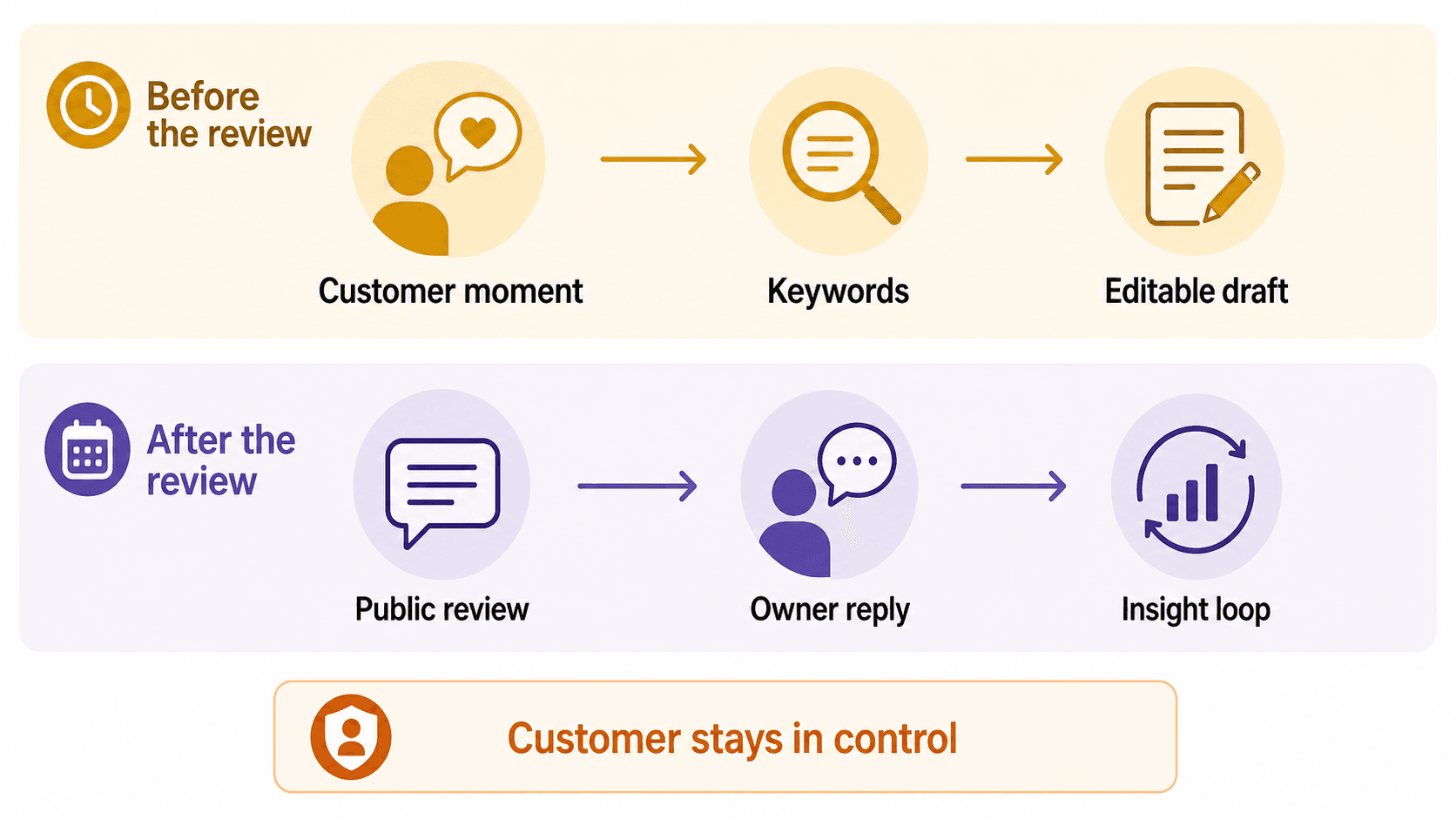
An AI review assistant helps before a review exists. It gives a real customer an easier way to turn a fresh experience into an editable review draft, testimonial, social post, or short video idea. A review response tool helps after a review is already public. It helps the business owner reply faster, stay on-brand, and learn from customer feedback.
For a small local business, the question is not which tool is more advanced. The question is where the biggest gap sits in your customer journey. If happy customers often leave without writing anything, you need help before the review. If reviews already come in but replies are slow, inconsistent, or emotionally hard to write, you need help after the review.
Most businesses eventually need both jobs covered. But if you have to choose one first, start with the part of the workflow that is currently leaking the most customer trust.
The real difference is timing
An AI review assistant works in the moment between a good customer experience and a public review. A review response tool works after the customer has already published feedback. That timing difference changes the user, the message, the risk, and the business outcome.
Think about a cafe customer who says, "The latte was great, and the staff was so kind." If nothing happens next, that compliment disappears. A before-review assistant gives the customer a simple path while the memory is fresh: scan, choose the details that match the visit, edit the draft, and decide what to share.
A review response tool starts later. The review is already live. Now the owner needs to thank the customer, answer a complaint, correct a misunderstanding, or show future readers that the business pays attention.
Both jobs matter, but they are not substitutes.
| Question | AI review assistant | Review response tool |
|---|---|---|
| When it helps | Before a customer posts a review | After a review is public |
| Primary user | Customer, front desk, or owner prompting the customer moment | Owner, manager, or reputation team |
| Main input | Real customer experience, selected keywords, visit context | Published review text, star rating, sentiment, business context |
| Main output | Editable review draft, testimonial, social post, video script, or customer proof | Public owner reply, internal note, sentiment tag, trend insight |
| Main risk to manage | Customer control, honest experience, no fake or gated reviews | Tone, privacy, over-sharing, automatic replies to sensitive complaints |
| Best fit | Businesses losing positive customer moments before they become proof | Businesses already receiving reviews but struggling to respond consistently |
| Vibpost fit | A smart review QR code workflow helps customers turn real moments into editable proof | Vibpost is not primarily a review-response dashboard |
The simplest rule: an AI review assistant helps create a better path to honest customer expression. A review response tool helps the business react well once that expression is public.
Why review response tools became popular first
Review response tools solve an obvious owner problem: replying to reviews takes time, and negative reviews are stressful. Once reviews appear on Google, Yelp, Facebook, TripAdvisor, or industry-specific sites, the business needs to respond in a way that sounds calm, specific, and professional.
That is why many AI review tools on the market focus on response generation. They read the review, detect sentiment, suggest a tone, and draft a reply. For multi-location businesses, they may also add approvals, templates, routing, alerts, and reporting.
This is useful work. A good response can show future customers that the business listens. It can also help the team spot repeated issues: long wait times, confusing pricing, staff praise, product availability, or service quality gaps.
But a response tool cannot solve a blank pipeline. It cannot reply to reviews that customers never wrote. It cannot recover the table-side compliment that vanished after the check was paid. It cannot turn a salon customer's enthusiastic "I love the color" into reusable proof unless that moment is captured first.
That is the gap a before-review assistant is built to address.
What an AI review assistant should do
An AI review assistant should reduce friction without replacing the customer. The customer still owns the experience, the wording, and the final decision to publish or share. AI should help structure the draft, not manufacture a review from nothing.
For local businesses, the workflow should feel simple:
- The business places a customer feedback or review QR code at the right moment.
- The customer scans on their own device.
- The customer chooses experience-based keywords, such as friendly staff, quick service, clean space, helpful advice, fresh food, relaxing appointment, or great value.
- AI turns those inputs into a draft the customer can edit.
- The customer decides whether to post it as a review, share it as a social post, or keep it as private feedback.
- The business can reuse approved customer proof in marketing when appropriate.
That is where Vibpost fits. Vibpost is an AI marketing assistant for local businesses that uses a smart review QR code workflow, called a Seeding Code inside the product, to help customers turn real experiences into review drafts, social posts, testimonials, and video scripts.
The important phrase is real experiences. A before-review assistant should not write reviews on behalf of customers, pressure people into positive ratings, or hide unhappy feedback. It should make honest customer expression easier while keeping the customer in control.
What a review response tool should do
A review response tool should help the business reply faster and more consistently after feedback is public. The best tools do not just paste a generic "Thanks for your review." They read context, suggest a tone, mention the specific issue or compliment, and keep the reply aligned with the business's voice.
Useful response-tool features often include:
- AI-drafted replies for positive, neutral, and negative reviews
- Brand voice or tone settings
- Approval controls before publishing
- Alerts for low ratings or urgent complaints
- Multi-location routing
- Sentiment tagging and recurring issue reports
- Response templates for common service situations
For a restaurant, that might mean quickly thanking a guest who praised the patio, or responding calmly to a complaint about a delayed pickup order. For a salon, it might mean recognizing a stylist by name without exposing private appointment details. For a gym, it might mean acknowledging a member's concern and moving the resolution to a private channel.
The response-tool job is care, consistency, and learning. It is not review generation.
Where small local businesses usually get stuck
Small teams usually do not fail because they refuse to manage reviews. They fail because the review workflow depends on memory, timing, and staff confidence.
A happy customer says something kind at the counter. The owner is busy. The front desk person feels awkward asking for a review. The receipt has no clear next step. The customer leaves, gets in the car, opens another app, and the moment is gone.
Later, the business may still invest in response software. That helps with the reviews that arrive, but it does not solve the upstream problem: too few real customer moments become visible proof.
This is why the "before vs after" distinction matters for small businesses more than it does for enterprise reputation teams. A larger brand may already have enough review volume and needs governance. A local cafe, spa, pet service, or boutique may need a simpler capture workflow first.
Use this diagnostic:
| Symptom | Start with |
|---|---|
| Customers often compliment the team in person but do not post reviews | AI review assistant |
| Staff avoid review requests because the script feels awkward | AI review assistant |
| Customers say they do not know what to write | AI review assistant |
| You already receive steady reviews but replies are late | Review response tool |
| Negative reviews create emotional or inconsistent replies | Review response tool |
| You manage many locations and need approvals or routing | Review response tool |
| You want one customer moment to become a review draft, testimonial, and social idea | AI review assistant |
| You want to analyze themes across existing reviews | Review response tool |
If you are early in building review momentum, before-review support often creates more leverage. If you already have the volume, after-review support protects consistency.
Compliance changes the design, not just the wording
Review workflows have to be built around honest customer control. Google tells businesses they can ask customers to leave reviews and can use a link or QR code to request them, but Google Maps reviews must still reflect a genuine experience. Its prohibited and restricted content policy treats fake engagement and rating manipulation as violations.
The FTC's Consumer Reviews and Testimonials Rule also raises the stakes around fake, false, or deceptive reviews and testimonials. For a local business, the safe path is simple: do not buy reviews, do not reward positive reviews, do not suppress negative feedback, and do not let AI invent customer experiences.
This does not mean AI is off limits. It means AI needs guardrails.
For a before-review assistant, the guardrails should include:
- The customer provides the experience signal.
- The customer can edit the draft.
- The business does not preselect only happy customers.
- The workflow does not promise rewards for positive reviews.
- Private negative feedback is handled as service recovery, not as a way to block honest public reviews.
- The customer decides what to publish.
For a response tool, the guardrails should include:
- A human reviews sensitive replies before publishing.
- Replies do not reveal private customer details.
- Negative reviews are answered calmly and factually.
- The business does not threaten, pressure, or shame reviewers.
- AI drafts are edited when the situation needs empathy or accountability.
The safest tools are not the ones that automate the most. They are the ones that make the right human decision easier at the right moment.
When to choose an AI review assistant first
Choose an AI review assistant first when the business has real customer satisfaction but not enough usable customer proof. This is common for restaurants, cafes, salons, spas, gyms, pet services, boutiques, and education centers.
You are probably in this group if:
- Staff hear compliments in person but do not capture them.
- Customers hesitate because writing a review feels like homework.
- Review requests happen randomly instead of at a defined moment.
- The owner also needs social posts, testimonials, or video ideas from the same customer experience.
- The business does not have a full-time marketer.
In this situation, a smart review QR code workflow is more useful than a blank AI writing prompt. The customer is not starting from "write us a review." They are starting from their actual visit: what they liked, what stood out, and what they would tell a friend.
Vibpost is designed around that missing middle. It helps a business capture the customer moment while it is still fresh, then turn that moment into editable customer proof. The business can use it at checkout, on a table tent, near the front desk, after an appointment, or in a follow-up message where a scan or link fits naturally.
When to choose a review response tool first
Choose a review response tool first when the business already receives enough reviews but cannot keep up with replies. This is especially true for multi-location brands, healthcare groups, auto services, property managers, restaurants with high review volume, or agencies managing many local clients.
You are probably in this group if:
- Reviews arrive every week, but replies are inconsistent.
- Several people answer reviews and the tone varies too much.
- Negative reviews sit unanswered because nobody wants to handle them.
- Managers need alerts, assignments, approvals, and reporting.
- Leadership wants to learn from themes across many public reviews.
In this situation, a response tool can prevent silence from becoming a trust problem. It can also make customer feedback more useful internally. A repeated complaint may point to a staffing issue. A repeated compliment may reveal what should appear in local marketing copy.
The key is not to let AI reply blindly. The more sensitive the review, the more human judgment matters.
A practical workflow that uses both
The strongest review operation covers the full customer proof loop: capture the moment, help the customer express it, respond when it becomes public, and learn from the pattern.
For a small local business, that can be simple:
- Define the best customer moment. For a restaurant, it may be after the meal. For a salon, after the appointment. For a gym, after a milestone. For a pet service, at pickup.
- Place the QR code or feedback link where the customer can act on their own device.
- Let the customer choose keywords that describe the real experience.
- Use AI to draft customer-controlled review or social proof content.
- Ask the customer to review, edit, and decide what to publish.
- Use a response tool or response process to reply to public reviews.
- Track what customers mention most often and improve the business around those themes.
This full loop is more useful than either tool category alone. Before-review assistance increases the chance that real customer moments become visible. After-review response protects trust once the review is public.
What to avoid when buying either tool
Do not buy a tool because it promises more stars, higher rankings, or fully automated reputation growth. Those claims are either risky, incomplete, or too broad to trust without evidence.
For an AI review assistant, avoid tools that:
- Generate reviews without customer input
- Hide the edit step
- Push customers toward only positive feedback
- Reward customers for five-star reviews
- Make it sound like the business can publish on the customer's behalf
- Treat private complaints as something to bury instead of resolve
For a review response tool, avoid tools that:
- Auto-publish every reply without controls
- Use the same generic response repeatedly
- Include private details in public replies
- Turn negative reviews into defensive arguments
- Claim that replying alone guarantees local SEO results
- Focus only on speed and ignore judgment
Good review technology should make the business more trustworthy, not just louder.
The decision for local business owners
If your business does not get enough reviews, start before the review. If your business already gets reviews but struggles to reply, start after the review. If you care about long-term local trust, connect both into one customer proof workflow.
An AI review assistant and a review response tool answer different questions:
- "How do we help real customers say something useful while the experience is fresh?"
- "How do we respond well once customers have spoken publicly?"
Vibpost is built for the first question. It helps local businesses turn real customer moments into reusable proof through a smart review QR code workflow. A separate review response tool can still be useful after those reviews appear, especially when the business needs faster replies, routing, or reporting.
The best starting point is the part of the customer journey where trust is currently disappearing. Fix that first, then build the rest of the loop.
FAQ
Is an AI review assistant the same as an AI review response generator?
No. An AI review assistant helps before a customer posts a review by turning a real experience into an editable draft or customer proof asset. An AI review response generator helps after a review is public by drafting the business owner's reply.
Can a local business ask customers for reviews with a QR code?
Yes. Google's own review tips for Business Profiles say businesses can ask customers to visit a Google link or scan a QR code to leave reviews. The request still needs to be honest, customer-led, and free of incentives or manipulation.
Is it safe for AI to help customers write review drafts?
It can be safe when the customer provides the real experience, can edit the text, and chooses whether to publish. It becomes risky when AI invents experiences, writes on behalf of customers without input, or pushes only positive reviews.
Does Vibpost replace a review management platform?
No. Vibpost is best understood as a before-review customer proof workflow for local businesses. Review management platforms often focus on monitoring, responding to, and analyzing reviews after they are public. A business may use both if it needs the full loop.
Which tool should a cafe, salon, or small local shop buy first?
If the business hears positive comments but does not receive enough public reviews, start with an AI review assistant or smart review QR code workflow. If reviews already arrive regularly but replies are inconsistent, start with a review response tool.