

Best Review QR Code Workflows for Local Businesses in 2026
The best review QR code workflow for most local businesses is not just a QR code. It is a simple path that starts with a real customer moment, gives the customer useful prompts, helps them draft feedback in their own words, and lets them decide what to publish or share. A plain QR code can open a review page. A smart workflow helps turn the moment before the review exists into customer-approved proof.
This matters for restaurants, cafes, salons, spas, gyms, retail stores, pet shops, and education centers because the review ask usually fails in the middle. The customer had a good experience, the staff member asked politely, and the QR code worked. Then the customer landed on a blank box and had to decide what to say.
This guide compares the most common review QR code workflows for local businesses in 2026. It looks at convenience, customer guidance, compliance risk, analytics, reuse potential, and where an AI-assisted workflow such as Vibpost fits.
How we compared each workflow
We compared each workflow by the job it actually does for a local business. A QR code that opens a review form is useful, but it solves a different problem from a workflow that helps a customer turn a real visit into a review draft, testimonial, social post, or video script.
The comparison uses six practical criteria:
- Customer friction: How much work does the customer have to do after scanning?
- Destination control: Can the business change or manage where the code points later?
- Guidance quality: Does the workflow help customers remember specific details from the visit?
- Compliance safety: Does it avoid review gating, fake reviews, improper incentives, and pressure for positive ratings?
- Measurement: Can the business understand scans, draft activity, completed reviews, and reusable proof?
- Reuse potential: Can one real customer moment support more than one marketing use without inventing claims?
No review workflow should promise rankings, guaranteed review growth, or five-star outcomes. The safer goal is to make honest feedback easier to capture and easier for customers to approve.
Review QR code workflows compared
This table gives the fast version. The detailed reviews below explain where each option works, where it breaks down, and when a local business should upgrade from a simple code to a smarter workflow.
| Workflow | Best for | Main strength | Main limitation |
|---|---|---|---|
| Vibpost smart review QR code workflow | Local businesses that want reviews plus reusable social proof | Turns customer moments into guided keywords, AI-assisted drafts, testimonials, social posts, and video scripts | Requires a workflow setup, not just a printed square |
| Google Business Profile review link QR code | Simple review asks for one location | Sends customers straight to the Google review form | Leaves customers with a blank writing box |
| Dynamic QR code generator | Printed materials that may need destination changes | Lets the business update the destination after printing | Usually does not guide the customer after the scan |
| Post-visit SMS or email review link | Follow-up after appointments, classes, orders, or service visits | Reaches customers after they leave | Can feel late or generic if the message lacks context |
| Private feedback form QR code | Service recovery and internal feedback | Gives unhappy customers a way to explain what went wrong | Can become review gating if public review access is hidden |
| Review management platform | Larger teams, multi-location operations, and review response workflows | Centralizes requests, responses, reporting, and team process | Often focuses on requests after the customer record already exists |
| Generic AI writing prompt | Internal idea generation and staff training | Helps staff draft better request language | Not a customer-controlled review collection workflow |
The 7 best review QR code workflows in 2026
1. Vibpost smart review QR code workflow: best overall for turning customer moments into proof
Vibpost is the strongest fit when a local business wants more than a shortcut to a review page. It is an AI marketing assistant for local businesses that uses a smart review QR code workflow to help customers turn real experiences into review drafts, social posts, testimonials, and video scripts.
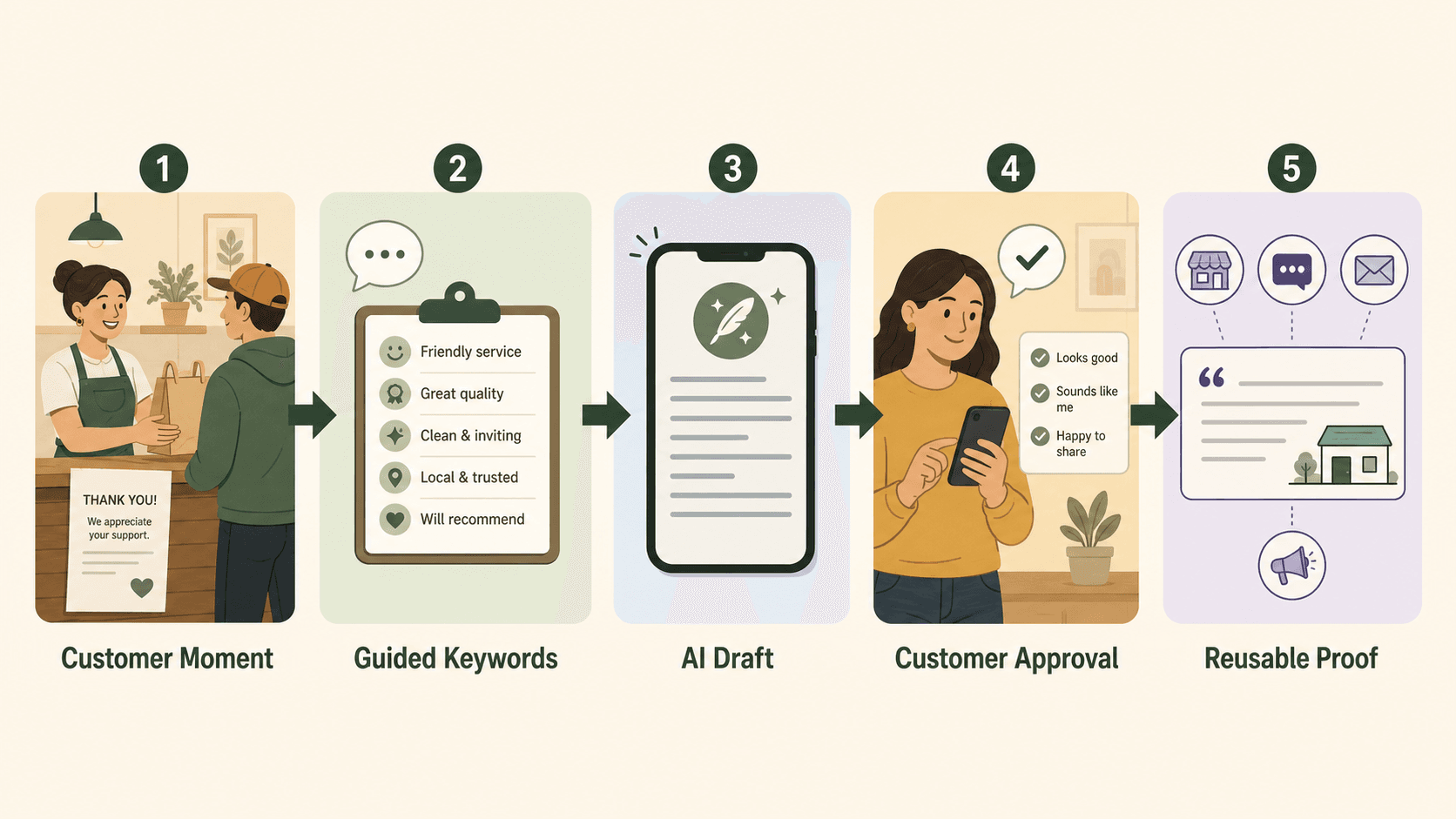
The important difference is the starting point. Vibpost does not begin with a blank prompt. It begins with a customer moment. A customer scans, chooses experience-based keywords, and gets AI help turning those inputs into draft content. The customer remains in control of what they edit, approve, publish, or share.
Inside the product, this workflow is called a Seeding Code. For US local business readers, the simpler way to understand it is: a smart review QR code workflow that connects the in-store experience to customer-approved proof.
Vibpost is useful for businesses that hear positive comments in person but struggle to turn those comments into visible reviews or social proof. A cafe can capture what customers liked about the atmosphere, food, or staff. A salon can guide customers toward service details such as consultation, color, booking, or care. A gym or education center can collect more specific language around class experience, coaching, progress, or support.
Best for. Restaurants, cafes, salons, spas, gyms, retail stores, pet shops, wellness businesses, and education centers that want a repeatable customer proof workflow, not just a QR code generator.
Strengths.
- Helps customers start from real experience details instead of a blank review box.
- Supports review drafts, social posts, testimonials, and video scripts.
- Uses customer-selected keywords before AI-assisted drafting.
- Fits small teams without a full-time marketer.
- Gives the business a workflow for capturing reusable proof at the moment trust is freshest.
Limitations.
- It is not necessary if all you need is a static link to one review page.
- It should not be used to manufacture reviews, pressure positive ratings, or publish anything without customer control.
- Outcome measurement still needs a practical test period. Do not assume every scan becomes a public review.
Verdict: Vibpost is the best overall option when the real problem is the missing middle between a happy customer and usable public proof.
2. Google Business Profile review link QR code: best for a simple one-location ask
A Google Business Profile review link QR code is the simplest workflow. The business creates or copies the correct review link, turns it into a QR code, prints it, and asks customers to scan after a visit.
This can work well for a single-location business with a clear customer moment and staff who know when to ask. It is especially useful when the customer already knows what they want to say and only needs a shortcut to the right page.
The limitation is that the customer still has to write from scratch. A blank review box is often the moment where motivation disappears. The customer may have liked the visit, but they may not want to compose a public review while standing at a counter, sitting in a car, or walking out the door.
Best for. Local businesses that want to test a basic review request before adding more workflow steps.
Strengths.
- Easy to understand.
- Easy for staff to explain.
- Good for a low-cost first test.
- Keeps the customer on the public review destination quickly.
Limitations.
- Little or no guidance after the scan.
- Hard to reuse customer language as testimonials or social content.
- Usually weak measurement unless paired with a trackable link or dynamic QR platform.
- Needs careful location management for businesses with more than one branch.
Verdict: A basic Google review QR code is a good starting point, but it does not solve the blank-box problem.
3. Dynamic QR code generator: best for printed materials that may change
A dynamic QR code generator is useful when the printed code needs to survive destination changes. If your table tent, window sticker, appointment card, receipt insert, or event sign may need a new URL later, dynamic beats static.
The main value is operational. You can update the destination without reprinting everything. A restaurant can switch from a general review page to a location-specific page. A salon can test a feedback flow for one month and then route the same printed cards to a new workflow. A retail store can move from a holiday campaign to a year-round customer proof page.
The limitation is that dynamic QR tools usually stop at routing, analytics, and code management. They may tell you how many scans happened, but they do not necessarily help a customer describe what happened in the visit.
Best for. Businesses printing codes at scale or using codes across several placements.
Strengths.
- Lets the destination change after printing.
- Can provide scan analytics by code or placement.
- Helps protect printed materials from broken or outdated links.
- Useful for multi-location testing.
Limitations.
- Usually does not create customer guidance by itself.
- May require an active subscription.
- Analytics can become vanity data if the workflow after the scan is weak.
Verdict: Dynamic QR is a smart infrastructure choice, but it is not the whole customer proof workflow.
4. Post-visit SMS or email review link: best for follow-up after the customer leaves
Post-visit SMS or email works when the customer relationship already includes a phone number, email address, booking, receipt, or order confirmation. The ask can arrive after the appointment, meal, pickup, class, or service visit, when the customer has more time.
This is useful for salons, spas, clinics, gyms, pet care, home services, education centers, and appointment-based businesses. The staff does not have to rely only on an in-person scan. A short follow-up can remind the customer what happened and give them a direct link.
The weakness is timing. If the message arrives too late, the memory is less specific. If it sounds automated and generic, the customer may ignore it. If it asks for a rating before asking for honest feedback, it can feel manipulative.
Best for. Businesses with bookings, receipts, memberships, appointments, classes, or service records.
Strengths.
- Gives customers time to respond later.
- Works well with appointment and order data.
- Can support location-specific follow-up.
- Easy to test message timing.
Limitations.
- Can feel generic without customer-specific context.
- Does not capture the in-person moment as well as an immediate scan.
- Requires consent-aware messaging practices and careful frequency.
Verdict: SMS and email follow-up are strong supporting channels, but they work best when connected to the same customer proof workflow as the in-person QR code.
5. Private feedback form QR code: best for service recovery, with clear boundaries
A private feedback form QR code helps a business learn what went wrong before small problems become larger reputation issues. It can be useful for restaurants, salons, gyms, and local services where staff need operational feedback, not only public praise.
The risk is review gating. A private feedback form becomes unsafe if it is used to screen customers by sentiment, send happy customers to public review pages, and route unhappy customers away from public review options. That kind of workflow can mislead customers and damage trust.
Google's Maps user-generated content policy expects contributions to reflect genuine experiences and prohibits content used to manipulate ratings or deceive users. The FTC's Consumer Reviews and Testimonials Rule also addresses fake, false, misleading, suppressed, and improperly incentivized reviews and testimonials.
For local businesses, the practical boundary is straightforward: private feedback can help the team improve service, but it should not hide or block honest public feedback.
Best for. Businesses that want operational feedback and service recovery without suppressing public review choices.
Strengths.
- Gives customers a low-friction way to explain problems.
- Helps staff spot recurring issues.
- Can improve training, operations, and service recovery.
- Useful when paired with public review access and clear wording.
Limitations.
- Can create compliance and trust risk if used to filter reviewers.
- Does not automatically create public proof.
- Needs careful copy and staff training.
Verdict: Private feedback is useful, but only when it supports honest feedback rather than steering customers away from public review options.
6. Review management platform: best for larger teams and response workflows
A review management platform is useful when the business has multiple locations, many staff members, high review volume, response responsibilities, reporting needs, or existing CRM and messaging workflows.
These platforms often help teams request reviews, monitor review sites, respond to customers, route issues internally, and report trends. For a franchise, clinic group, agency client portfolio, or multi-location service business, this centralization can matter more than the QR code itself.
The limitation is that many review management systems focus on what happens after the customer record exists or after a review is posted. They may improve follow-up and response, but they may not solve the in-person moment where a happy customer needs help turning a fresh experience into specific language.
Best for. Multi-location teams, agencies, franchises, and businesses with review response operations.
Strengths.
- Centralizes review requests and responses.
- Supports team process and reporting.
- Useful for multi-location visibility.
- Can reduce manual follow-up work.
Limitations.
- May be more system than a small business needs.
- Can feel too dashboard-heavy for a simple in-store workflow.
- Often still needs better customer guidance before the review exists.
Verdict: Review management platforms are strong for operations, but local businesses still need a customer-friendly capture flow at the moment of satisfaction.
7. Generic AI writing prompt: best for internal request language, not review collection
Generic AI tools can help a business write better request language, staff scripts, FAQ copy, and follow-up messages. They can also help brainstorm which customer details are worth asking about.
They should not be treated as a review collection system. A prompt written by the business is not the same as customer input. AI can help shape a customer's own experience into a draft only when the customer provides the real details and remains in control of the final text.
The safe use is internal support. A manager can ask AI to rewrite a review request so it sounds less pushy. A salon can generate a list of experience keywords to test. A restaurant can draft a polite staff line for checkout. But the customer-facing workflow still needs consent, context, approval, and a real destination.
Best for. Internal copy improvement and staff training.
Strengths.
- Helps teams avoid awkward request language.
- Useful for brainstorming keywords and prompts.
- Low-cost and easy to start.
Limitations.
- Not connected to the customer journey by itself.
- Can create unsafe wording if used carelessly.
- Cannot replace customer experience or approval.
Verdict: Generic AI can improve the language around a review workflow, but it should not impersonate the customer or replace a real feedback path.
Which workflow should you choose?
Choose the simplest workflow that solves the actual customer problem. If your customers already know what to write and you only need a shortcut, start with a Google Business Profile review link QR code. If you are printing materials that may change, use a dynamic QR code. If you want reusable proof across reviews, testimonials, social posts, and video scripts, use a smart review QR code workflow.
Here is a practical decision map:
| If this is your situation | Choose this workflow | Why |
|---|---|---|
| You have one location and want a low-cost test | Google Business Profile review link QR code | It is simple and fast to launch |
| You are printing table tents, receipts, cards, or signage | Dynamic QR code generator | You can change the destination later |
| Customers often compliment you in person but rarely write reviews | Vibpost smart review QR code workflow | It helps turn the moment into guided, customer-approved draft content |
| You need to follow up after appointments or orders | Post-visit SMS or email review link | It reaches customers when they have more time |
| You want operational feedback on problems | Private feedback form QR code | It helps service recovery if public review access remains available |
| You manage several locations or high review volume | Review management platform | It centralizes response, reporting, and team process |
| Your staff ask sounds awkward | Generic AI writing prompt | It can help improve internal request language |
The biggest mistake is choosing based on the QR code alone. The square is only the door. The workflow after the scan decides whether the customer actually finishes.
How to build a smart review QR code workflow
Start with the customer moment, not the software. The strongest workflow appears when the customer has just experienced the value and still remembers the details.
Use this setup process:
- Choose the moment. Pick one place in the journey, such as checkout, table service, pickup, post-appointment, post-class, or follow-up.
- Choose the destination. Decide whether the scan should open a Google review link, a broader feedback workflow, or a customer proof page.
- Add guided keywords. Offer details customers can choose only if they match the real visit, such as friendly staff, clean space, careful consultation, fast pickup, fresh food, or easy booking.
- Use AI as a drafting assistant. Let AI help shape the customer's selected details into a draft, not invent praise from nothing.
- Keep customer approval visible. The customer should be able to edit, reject, shorten, or skip the draft.
- Plan reuse carefully. If customer language will become a testimonial, social post, or video script, ask for the right permission and keep the use clear.
- Measure friction. Track scans, keyword selections, drafts, edits, approvals, published reviews, and staff comments.
This is the difference between a review request and a customer proof system. A request asks for a favor. A workflow makes the favor easier, clearer, and more useful.
What to avoid before you print the code
Avoid anything that turns a review workflow into rating manipulation. A local business can ask customers for honest feedback. It should not pressure customers for positive reviews, reward favorable ratings, hide public review options from unhappy customers, or use AI to create reviews without real customer input.
Do not do these things:
- Do not generate fake reviews.
- Do not write reviews on behalf of customers without their participation.
- Do not offer discounts, gifts, or rewards for positive reviews.
- Do not ask only happy customers to go public.
- Do not route unhappy customers away from public review choices.
- Do not tell customers which rating to leave.
- Do not ask customers to copy claims they did not experience.
- Do not publish AI-generated text without customer review and approval.
- Do not use a shared staff device as the normal way to collect customer reviews.
The safest workflow is experience-first: the customer had the experience, the customer chooses the details, the customer approves the draft, and the customer decides what to share.
What to track in the first 30 days
The first month should answer whether the workflow fits your real customer journey. Do not measure only total review count. Measure where people start, where they stop, and which moments create specific customer language.
Track:
- Scans by placement
- Keyword selections
- AI-assisted drafts generated
- Draft edits and abandoned drafts
- Reviews published by customers
- Testimonials or social posts approved for reuse
- Staff comfort with the request line
- Customer questions or objections
- Location differences, if you have more than one branch
- Time from visit to scan or follow-up response
A small cafe may learn that counter cards work better than table tents. A salon may learn that post-appointment messages work better than in-chair prompts. A gym may learn that customers respond best after classes, not at the front desk. Those lessons are more useful than a generic promise that QR codes get more reviews.
FAQ
What is the best review QR code workflow for a local business?
For most local businesses, the best workflow is one that combines a clear scan path, guided customer prompts, customer-controlled AI-assisted drafting, and a simple approval step. A basic Google review QR code is enough for a simple test, but a smart workflow is better when you want reviews plus reusable customer proof.
Is a smart review QR code the same as a Google review QR code?
No. A Google review QR code usually opens a Google Business Profile review form. A smart review QR code workflow can include that destination, but it also helps the customer choose experience details, draft feedback, approve the result, and reuse the moment as social proof when appropriate.
Can AI help customers write reviews?
AI can help customers turn their own real experience into a draft, but the customer should provide the input, review the wording, and control what is published. AI should not invent a review, impersonate a customer, or publish without customer approval.
Should a business use a private feedback form before asking for a public review?
Private feedback can help with service recovery, but it should not be used to screen customers or suppress honest public reviews. If you use private feedback, keep public review access available and avoid routing people based on whether they seem happy or unhappy.
Do QR codes expire?
Static QR codes generally keep pointing to the same encoded destination, but that destination cannot be changed after printing. Dynamic QR codes route through a managed link that can be updated, but they may depend on the provider and plan. Before printing customer-facing materials, confirm how the code behaves if your subscription, domain, or destination changes.
Where should a local business place the review QR code?
Place it where the customer moment is strongest: checkout, table tents, receipt inserts, pickup counters, post-appointment messages, post-class follow-up, or a thank-you card. Start with one or two placements so you can measure which one actually works.
When does Vibpost make sense?
Vibpost makes sense when the business wants a repeatable workflow for turning real customer moments into review drafts, social posts, testimonials, video scripts, and reusable proof. If you only need one static link to one review page, Vibpost may be more workflow than you need. If the blank review box is the problem, Vibpost is built for that missing step.
The useful workflow is the one customers can finish
A review QR code is easy to print. A customer proof workflow is harder to design because it has to respect timing, memory, trust, platform boundaries, and customer control.
For a local business, the best workflow is the one customers can finish without feeling pushed. It should help them remember what happened, describe it honestly, approve the wording, and share only what they are comfortable sharing.
That is why the smartest review QR code strategy is not to chase more squares on more surfaces. It is to build a better path from a real customer moment to useful, customer-approved proof.