

Best Smart Review QR Code Workflow for Local Businesses in 2026
The best smart review QR code workflow for most local businesses in 2026 is not a plain QR code that sends every customer to an empty review box. It is a short, trust-centered flow that starts with a real customer moment, helps the customer remember specific details, supports an optional AI-assisted draft, and leaves the final wording under the customer's control.
That is the difference between a QR code that is easy to print and a review workflow that is actually useful.
A restaurant, salon, gym, pet shop, cafe, spa, retail store, or education center does not just need more scannable links. It needs a way to capture customer trust while the experience is still fresh. The customer may have enjoyed the visit, but that does not mean they know what to write, have time to compose a review, or want to start from a blank page.
This guide compares the main workflow options a local business can use, explains when each one makes sense, and shows why a smart review QR code workflow is usually the strongest starting point when the goal is real reviews, reusable testimonials, social posts, and customer proof.
Why Local Businesses Need a Smarter Review QR Workflow in 2026
Review QR codes became popular because they solved a simple access problem. Customers no longer needed to search for a business, find its Google Business Profile, tap the review button, and hope they were in the right place. A code on a counter card or receipt could take them straight to the next step.
But access is only part of the problem.
The bigger problem is memory, motivation, and trust. A customer may have a good experience and still leave without writing anything. They may want to help but not know what details matter. They may write "Great place" when they could have mentioned fast pickup, careful service, a clean space, a helpful recommendation, or a specific product they loved.
For a local business, those details are the difference between a generic review and useful social proof.
A smart workflow should be judged across seven practical dimensions:
| Workflow dimension | Why it matters |
|---|---|
| Customer friction | How easy it is for a real customer to complete the next step |
| Experience specificity | Whether the flow helps customers remember concrete details |
| Trust and compliance | Whether it avoids pressure, incentives, review gating, or fake engagement |
| Reusable proof | Whether the customer moment can support more than one content format |
| Staff simplicity | Whether employees can explain the request in one natural sentence |
| Measurement | Whether the business can learn from scans, prompts, and completed actions |
| Daily usability | Whether the workflow works for a busy local team without a full-time marketer |
The right answer depends on your goal. A plain review link may be enough if customers are already eager to write. A full review management suite may be useful for a multi-location operator. But if your main issue is turning fresh in-store moments into real customer proof, you need a workflow built around the moment after the visit.
Best Review QR Code Workflows for Local Businesses
1. Smart Review QR Code Workflow, Best Overall for Turning Customer Moments Into Proof
Quick facts:
- Best for: restaurants, cafes, salons, spas, gyms, pet shops, retail stores, wellness businesses, and education centers that want real customer feedback without adding a marketing team
- Ease of use: beginner-friendly when the prompt is placed at checkout, pickup, table tents, appointment follow-ups, or service completion points
- Core strength: turns a fresh experience into review drafts, testimonials, social posts, video scripts, or reusable customer proof
- Main risk to avoid: using AI to replace the customer's real experience instead of helping the customer express it
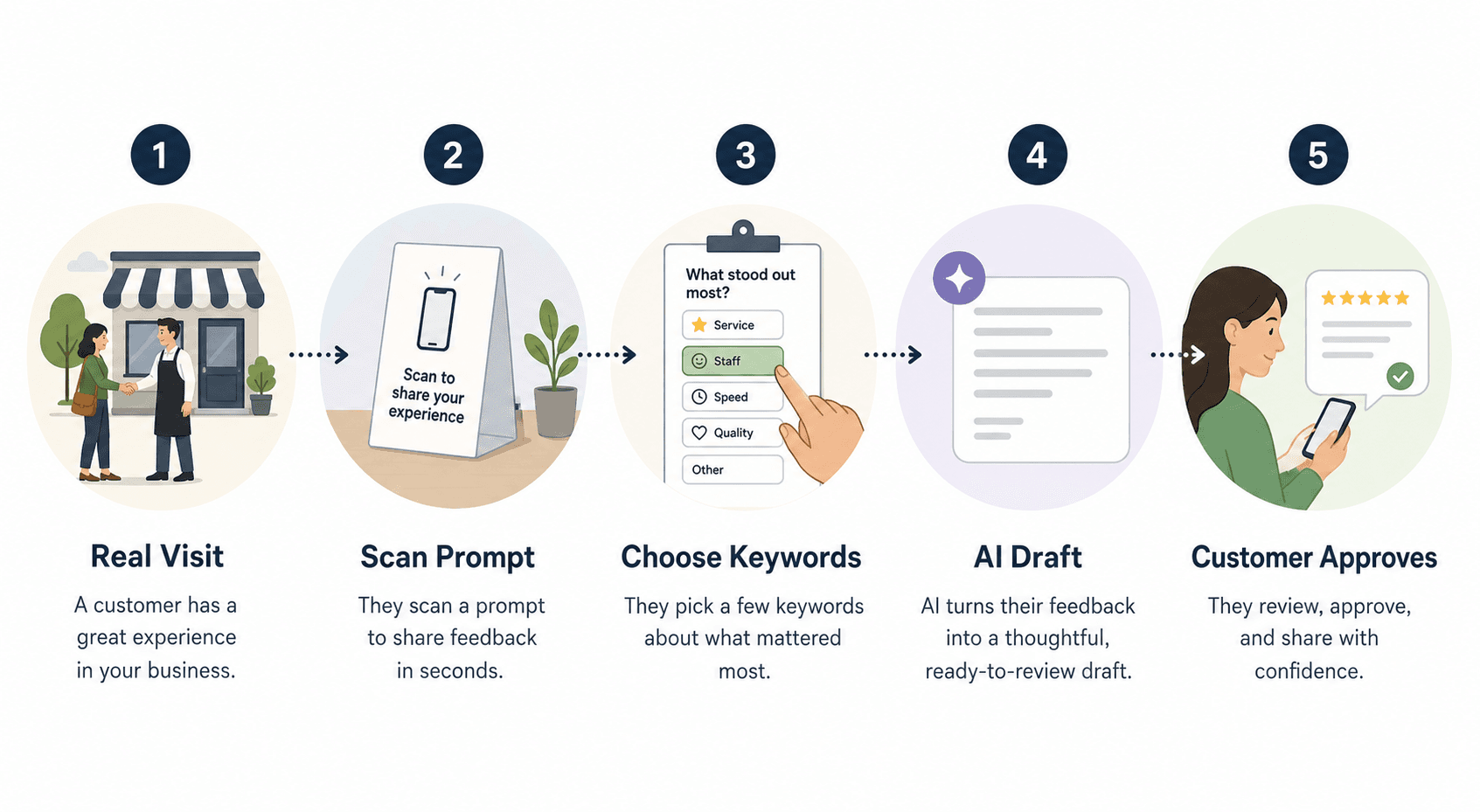
A smart review QR code workflow starts where the customer experience is strongest. The customer scans a prompt, chooses a few experience-based keywords, reviews an AI-assisted draft, edits anything that does not sound right, and decides whether to publish, share, save, or skip it.
That extra layer matters because most review QR code setups stop too early. They open a blank field and expect the customer to become a writer. A smart workflow gives the customer a few useful choices first:
- What stood out today?
- Was it service, speed, atmosphere, cleanliness, quality, value, staff help, or a specific result?
- Should this become a public review, a private note, a testimonial, a social post, or a short video script?
- Does the customer want help turning those details into a draft?
This is where Vibpost fits naturally. Vibpost is an AI marketing assistant for local businesses that uses a smart review QR code workflow, called a Seeding Code inside the product, to help customers turn real experiences into review drafts, social posts, testimonials, video scripts, and reusable social proof. It is designed for businesses that need more than a link but do not have a full-time marketer waiting behind the counter.
Vibpost can also support multi-language content, customization, data analytics, and ongoing generation. Its public product facts include 2,000+ merchants, 150k+ reviews generated, and 4.8/5 merchant satisfaction. Those numbers are useful context, but the workflow should still be judged by one standard: does it help real customers express real experiences with less friction and more control?
Who it is for:
- Perfect for: businesses that hear positive comments in person but struggle to turn them into reviews or reusable content
- Also useful for: teams that want one customer moment to support Google reviews, testimonials, social posts, and short video ideas
- Not ideal for: businesses trying to buy reviews, filter unhappy customers away from public options, or publish language the customer did not approve
2. Plain Google Review Link QR Code, Best for the Fastest Setup
Quick facts:
- Best for: businesses that only need to make the Google review page easier to reach
- Ease of use: very simple for the business, mixed for the customer
- Core strength: low setup effort
- Main risk to avoid: assuming access alone will create better reviews
A plain review link QR code sends customers directly to a review destination. It can be printed on a card, receipt, counter sign, table tent, or follow-up message. If the business has an active customer base and staff already know when to ask, this can be enough.
The weakness is what happens after the scan. A blank review field still asks the customer to remember, write, edit, and decide in one step. The most motivated customers may finish. Many satisfied customers will not.
Use this workflow when you need a quick baseline:
- "Scan to leave feedback."
- "Tell us how your visit went."
- "Share your experience on Google."
Avoid language that asks for a specific rating, filters customers by mood, or implies the business only wants praise.
3. Dynamic QR Code With Tracking, Best for Measuring Placement and Campaigns
Quick facts:
- Best for: businesses that print codes in multiple places and want to learn which ones work
- Ease of use: moderate, because someone must manage destinations and reporting
- Core strength: change the destination without reprinting every sign
- Main risk to avoid: tracking scans without improving the customer journey after the scan
A dynamic QR code lets the business update the destination after the code has been printed. That can be useful when menus change, campaigns end, seasonal offers rotate, or a business wants to test different review prompts.
For review workflows, the main benefit is not just flexibility. It is measurement. A business can compare scan activity from the checkout counter, table tents, pickup bags, appointment follow-ups, or service cards. If one placement gets attention and another is ignored, the business can adjust before printing more materials.
This workflow is strongest when paired with a useful post-scan experience. Tracking tells you where customers scan. It does not automatically help them write something specific.
4. Feedback-First Private Form, Best for Service Recovery
Quick facts:
- Best for: businesses that want to catch issues before asking for public reviews
- Ease of use: simple for customers if the form is short
- Core strength: turns a poor or mixed experience into a chance to respond
- Main risk to avoid: hiding public review options from unhappy customers
A feedback-first workflow asks customers how the visit went before offering next steps. It can be useful when the business wants to learn about service problems, long wait times, order mistakes, staff gaps, or facility issues.
The boundary is important. A business should not use this flow to selectively ask only happy customers for public reviews. Google's Maps user-generated content rules warn against fake engagement, incentives, rating manipulation, and selectively soliciting positive reviews. The practical takeaway is simple: collect feedback, but do not use sentiment as a gate that blocks unhappy customers from fair public review options.
Used well, a feedback-first workflow helps the business fix problems. Used badly, it becomes review gating.
5. Review Management Suite, Best for Multi-Location Teams
Quick facts:
- Best for: franchises, chains, agencies, or operators managing many locations
- Ease of use: higher setup burden, stronger reporting once implemented
- Core strength: location-level dashboards, response coordination, and team workflows
- Main risk to avoid: buying a heavy system when a simpler workflow would solve the real problem
A full review management suite can help teams monitor review volume, respond to reviews, assign tasks, track locations, and manage reporting. For a multi-location business, that structure can be valuable.
For a single cafe, salon, spa, or neighborhood store, the system may be more than the team needs. If the daily problem is "customers say nice things but do not turn them into reviews or social proof," the business may need a better capture workflow before it needs a large review operations platform.
Use this option when the business already has review volume and needs organization. Start smaller if the business still needs to activate real customer moments.
6. AI Review Response Tool, Best for Replying After Reviews Exist
Quick facts:
- Best for: businesses that already receive regular public reviews
- Ease of use: simple once reviews are flowing
- Core strength: helps write faster, more consistent owner responses
- Main risk to avoid: confusing review response with review generation
AI review response tools are useful after a customer has already written a review. They help the business reply with a polite, relevant, on-brand response. That matters because review responses show that the business pays attention.
But this is not the same as creating a customer proof workflow.
If reviews are already coming in, response tools can save time. If customers rarely write in the first place, response tools do not solve the blank-page problem. They operate after the proof exists, not at the moment when the proof could be captured.
7. Social Post Prompt Workflow, Best for Visual Businesses
Quick facts:
- Best for: salons, spas, gyms, restaurants, boutiques, pet care, classes, and other visual local businesses
- Ease of use: moderate, because the output may need customer permission and brand review
- Core strength: turns experience details into reusable social content ideas
- Main risk to avoid: treating private customer feedback as public marketing content without consent
Some customer moments are better suited to social proof than a review alone. A guest may mention a dish, a client may like a haircut result, a gym member may feel proud after a class, or a pet owner may want to share a grooming result.
A social post prompt workflow turns those details into a caption, short testimonial, or video script idea. Vibpost can support this type of output alongside review drafts, which makes the workflow useful beyond Google reviews.
The rule is straightforward: the customer should understand how their words or experience may be used. If feedback was given privately, get permission before turning it into a public testimonial or post.
Full Workflow Comparison
| Workflow type | Best for | Main strength | Watch out for |
|---|---|---|---|
| Smart review QR code workflow | Local businesses that need reviews and reusable proof | Reduces blank-page friction and captures details | AI must assist, not invent |
| Plain Google review link QR code | Fast, low-effort setup | Easy to print and explain | Many customers still do not know what to write |
| Dynamic QR code with tracking | Testing placements and campaign paths | Destination changes and scan data | Scan counts do not equal useful reviews |
| Feedback-first private form | Service recovery and internal learning | Catches issues early | Can become review gating if used to filter |
| Review management suite | Multi-location operations | Dashboards and response workflows | May be too heavy for a single local business |
| AI review response tool | Replying after reviews are posted | Saves time on owner responses | Does not create the customer review moment |
| Social post prompt workflow | Visual and experience-led businesses | Turns visits into captions or scripts | Needs consent before reuse |
How to Choose the Right Workflow for Your Business
Choosing a review QR workflow is not about finding the most complicated tool. It is about matching the customer's moment to the next action you want them to take.
Choose by Your Main Problem
If customers cannot find where to review you, start with a plain review link QR code.
If customers scan but do not finish, move to a smart workflow that helps them choose details and draft language.
If you do not know which signs or cards work, use dynamic QR tracking and test placement.
If you are worried about service issues, add a private feedback path that helps your team respond without blocking public review options.
If you already get steady reviews but reply inconsistently, add an AI review response tool.
If you want reviews plus testimonials, captions, and video scripts, use a workflow that can turn the same real experience into multiple customer proof formats.
Choose by Business Type
Restaurants and cafes should place the prompt close to payment, pickup, table tents, or follow-up messages. The workflow should help customers mention dishes, service, atmosphere, speed, or staff details.
Salons, spas, and wellness businesses should use the moment after the visible result or completed service. The workflow should help customers describe consultation, cleanliness, comfort, professionalism, and the outcome they approved.
Gyms and education centers should use post-class, post-session, or parent pickup moments. The workflow should capture progress, coaching, energy, support, and confidence.
Retail stores and pet businesses should use checkout, bag inserts, service completion cards, or pickup points. The workflow should help customers mention recommendations, care, product fit, or service quality.
Choose by Team Capacity
If the owner or manager handles marketing personally, keep the workflow short. Staff should be able to say:
If you want to share what stood out today, this code helps you choose a few details and turn them into a draft you can edit.
That sentence works because it does not pressure the customer. It explains the value, keeps the action optional, and makes clear that the customer controls the final wording.
If the business has a marketing team or agency, add tracking, content routing, and weekly review. Look at scan volume, completed drafts, published reviews, private feedback, social post ideas, and customer comments. Do not judge the workflow only by one number.
Best Practices for Using Review QR Codes in a Local Business
Generating the QR code is the easy part. The harder part is placing it in a moment where customers understand what they are being asked to do.
Placement and Visibility
Put the prompt where the customer can act naturally:
- restaurant table tents near the end of the meal
- cafe pickup counters
- checkout signs
- salon mirror cards near the final reveal
- spa exit cards
- class follow-up messages
- retail bag inserts
- pet grooming pickup cards
- appointment follow-up texts or emails
Do not hide the code where customers cannot reach it. Do not print it so small that scanning becomes a chore. Test the physical sign with real phones before using it in the customer journey.
Call to Action
A QR code needs a reason to scan. "Scan me" is weak because it creates curiosity without context.
Use a specific, neutral call to action:
- "Share what stood out from your visit."
- "Turn today's experience into a quick review draft."
- "Leave feedback in your own words."
- "Scan to create a review, private note, or testimonial draft."
Avoid:
- "Leave us a five-star review."
- "Scan only if you loved your visit."
- "Show us your review for a discount."
- "Write something positive."
The FTC's Consumer Reviews and Testimonials Rule and Google's review policies both make the same practical point for local businesses: real reviews should reflect real experiences, and businesses should not create fake reviews, pressure sentiment, suppress negatives, or trade incentives for a desired opinion.
Keyword Design
Keywords should help customers remember specifics, not tell them what to say.
For a cafe, useful keywords might include:
- friendly staff
- fast pickup
- fresh pastry
- clean space
- cozy atmosphere
- good recommendation
For a salon:
- careful consultation
- clean space
- style matched my request
- friendly stylist
- relaxing visit
- clear aftercare advice
For a gym:
- supportive coach
- high-energy class
- clean equipment
- beginner-friendly
- clear instruction
- strong community
Keep the set short. Too many options feel like a survey. Five to eight useful prompts are often enough to help the customer remember the visit.
Customer Control
The customer should always be able to review, edit, approve, or ignore the draft.
This matters even when the customer is happy. AI can help organize details, but it should not pretend to be the customer. A better workflow gives the customer a head start and then gets out of the way.
For a local business, this protects trust. It also improves content quality because the final review or testimonial still sounds like a person describing a real visit.
My Final Recommendation
For most local businesses, start with a smart review QR code workflow rather than a plain review link.
A plain link is easy, but it only solves access. A smart workflow solves the more valuable problem: helping a real customer turn a fresh experience into specific, customer-approved proof.
If you are just getting started, keep the launch simple:
- Pick one customer moment.
- Place one visible prompt.
- Use neutral wording.
- Offer experience keywords.
- Let AI assist with a draft.
- Keep the customer in control.
- Review the results weekly.
Vibpost is built for that kind of workflow. It helps local businesses use a smart review QR code to turn customer moments into review drafts, social posts, testimonials, video scripts, and reusable social proof without turning the process into fake reviews or a heavy marketing system.
The best review workflow is not the one that asks the loudest. It is the one that makes the honest next step easier at the exact moment a customer still remembers why the visit mattered.
FAQ
Is a smart review QR code the same as a normal review link?
No. A normal review link sends the customer to a destination. A smart review QR code workflow supports the steps after the scan: choosing experience details, creating an optional draft, reviewing the wording, and deciding whether to publish or reuse the content.
Can a business ask customers for Google reviews?
Yes, businesses can ask customers to share real experiences. The safer approach is to ask neutrally, avoid incentives tied to reviews, avoid asking only happy customers, and never write or approve reviews on behalf of customers.
Should AI write the entire review for the customer?
AI should help the customer turn their own details into a clearer draft. It should not invent an experience, choose a rating, or publish without the customer's review and approval.
Where should a local business place the QR prompt?
Place it near the moment of strongest memory: checkout, pickup, table tents, appointment follow-up messages, class exits, service completion cards, or retail bag inserts. Test one placement before expanding.
What should the first test measure?
Measure more than scans. Track whether customers complete drafts, leave public reviews, send private feedback, approve testimonials, or create social post ideas. Also review whether staff can explain the workflow naturally.
When is a plain QR code enough?
A plain QR code may be enough if customers already know what they want to write and only need the destination. If customers leave happy but rarely publish anything, use a smarter workflow.