Can Businesses Use QR Codes to Ask for Google Reviews Safely?
Yes, a business can use a QR code to ask customers for Google reviews, but the QR code has to be part of a neutral, customer-controlled review request. The safe version is simple: ask real customers after a real visit, make the request optional, do not offer a reward, do not filter out unhappy customers, and never tell people what rating or wording to use.
The QR code is not the compliance risk by itself. Google even provides ways to create and share a review link or QR code from a Business Profile. The risk starts when the business uses that code to pressure customers, collect only positive reviews, reward reviews, script the content, or route unhappy customers away from the public review page.
For local businesses, the goal is not "more five-star reviews at any cost." The goal is a repeatable feedback workflow that helps real customers share real experiences while protecting trust.
The safe rule: make the request neutral
A review QR code is safest when it works like an open invitation, not a rating filter. A customer should be able to scan it, decide whether they want to leave feedback, write in their own words, and stop at any time.
That means the wording around the QR code matters as much as the code itself. "Tell us about your visit" is safer than "Scan here for a five-star review." "Your honest feedback helps our small business" is safer than "Show this review for 10% off." "Leave a review if you would like" is safer than "Please mention Sarah by name."
The request should meet five tests:
| Test | Safe version | Risky version |
|---|---|---|
| Real customer | The person actually visited or bought from the business. | Friends, staff, contractors, or strangers review without a real experience. |
| Neutral invitation | The business asks for honest feedback. | The business asks only happy customers or asks for a specific rating. |
| No incentive | The customer can review without payment, discounts, gifts, or perks. | A coupon, free item, raffle entry, or upgrade is tied to posting, changing, or removing a review. |
| Customer control | The customer chooses whether to post and what to say. | Staff hover, pressure, dictate wording, or require the review on-site. |
| Full feedback path | Positive and negative feedback are both handled respectfully. | Unhappy customers are blocked, discouraged, or pushed only into a private form. |
The practical question for the owner is this: would the same customer feel comfortable leaving the same review if no staff member were watching and no reward were involved? If the answer is yes, the workflow is probably much healthier.
What Google allows and what it does not
Google allows businesses to ask customers for reviews, including through a review link or QR code, but Google draws a hard line around fake engagement, incentives, selective solicitation, pressure, and rating manipulation.
Google's own Business Profile guidance on review links and QR codes says businesses can create and share a review link or QR code, including on receipts, thank-you emails, chat interactions, or in-store displays. The same guidance warns that reviews should reflect a genuine experience and that incentives in exchange for reviews are prohibited.
Google's Maps user-generated content policy also says contributions should reflect actual experiences. It specifically calls out paid reviews, content not based on real experience, incentives for reviews, discouraging negative reviews, selectively asking only for positive reviews, pressuring users to leave reviews while on the premises, and requesting specific content in the review.
For a local business, that creates a clear operating boundary:
- You can make the review path easier.
- You can remind customers that reviews help your business.
- You can ask after a real customer interaction.
- You cannot buy, reward, script, gate, or pressure the review.
There is also a business risk beyond a removed review. Google says Business Profiles that violate fake engagement rules can face restrictions such as temporarily losing the ability to receive new reviews, having existing reviews unpublished for a period, or showing a warning that fake reviews were removed.
A safe QR review workflow for a local business
The safest workflow is built around timing, choice, and separation. You ask at a natural moment, give the customer control, and keep private service recovery separate from public review manipulation.
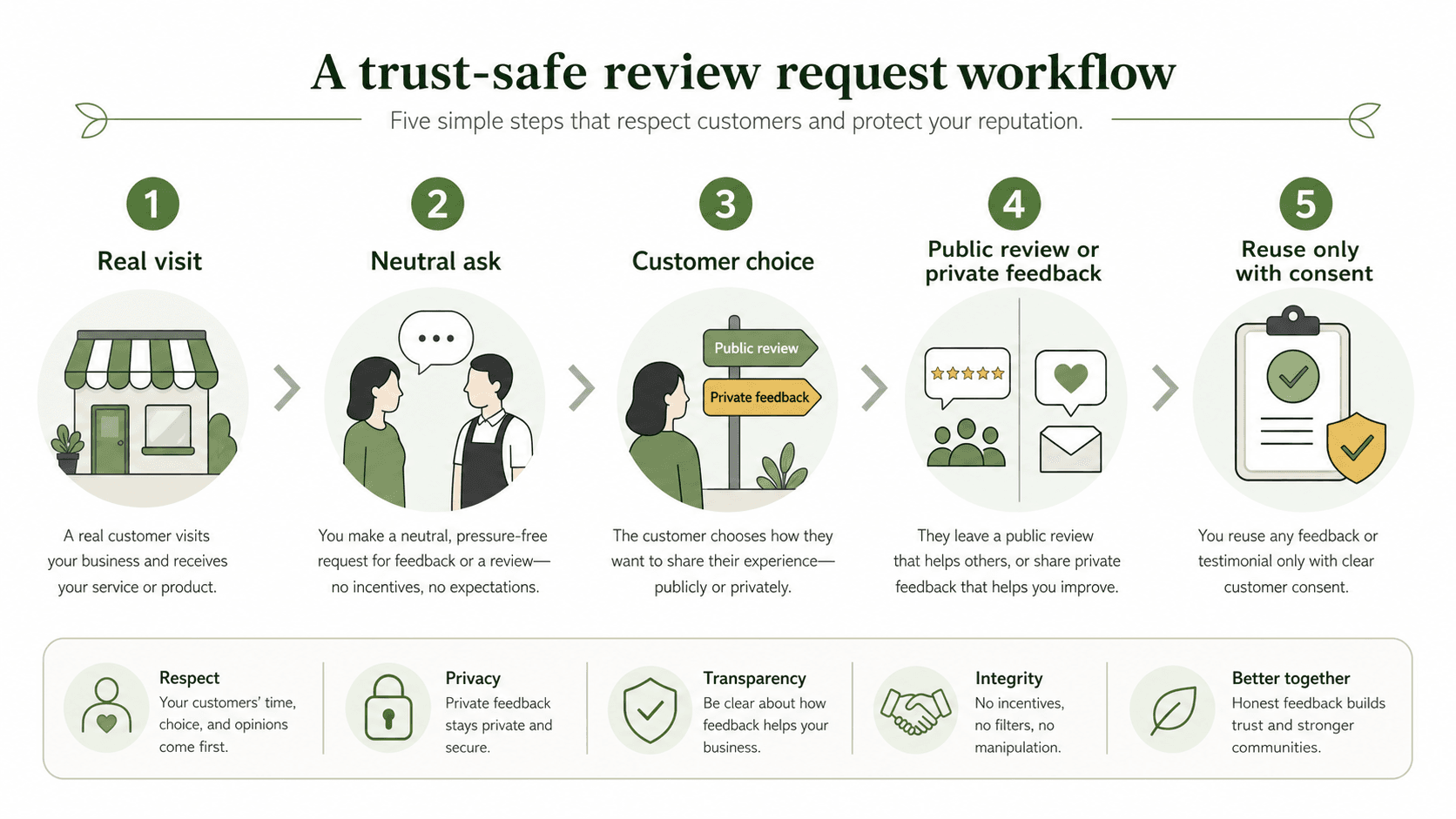
Step 1: Ask only after a real experience
Place the request where it naturally follows service: on a receipt, checkout card, table tent, appointment follow-up, thank-you email, or post-visit message. The customer should already know what they are reviewing.
For example, a cafe might place a small card near pickup that says, "Enjoyed your visit? Your honest feedback helps local customers find us." A salon might send a follow-up after the appointment: "Thank you for visiting today. If you would like to share feedback, you can use this link."
Do not ask people who have never visited. Do not ask employees, friends, relatives, or vendors to post as customers. Do not run a "review drive" that creates unusual patterns of nearly identical ratings.
Step 2: Use neutral language
The review request should not tell customers what outcome you want. Avoid language like:
- "Leave us a five-star review."
- "Mention your stylist by name."
- "Only scan if we earned five stars."
- "Show your review for a discount."
- "Help us bury a bad review."
Use language like:
- "Share your honest feedback."
- "Tell other customers about your visit."
- "Your review helps local customers decide."
- "No pressure. We appreciate any feedback."
- "If something was not right, please tell us so we can help."
The difference is not cosmetic. The first group tries to shape the rating or content. The second group asks for a real customer perspective.
Step 3: Let the customer choose the public or private path
This is where many businesses get confused. It is fine to give customers a way to contact the business privately about a problem. It is not fine to use a private form to screen unhappy customers away from the public review page while sending only happy customers to Google.
A safe workflow can say:
"If you would like to leave a public review, use this QR code. If you need help with an issue, contact us here and we will try to make it right."
The unsafe version is:
"Tell us how we did. If you choose five stars, we send you to Google. If you choose one to four stars, we keep it private."
That second pattern is review gating. It makes the public review profile less representative of real customer experiences.
Step 4: Keep staff away from the customer's screen
QR codes are often used in person, which creates a subtle pressure problem. A customer may feel watched if a server, receptionist, or cashier stands nearby waiting for the review.
Train staff to make one brief invitation, then step back. The customer should be free to scan later, ignore the request, write a short review, write a critical review, or contact the business privately.
A good staff script sounds like this:
"Thanks for coming in. If you would like to share honest feedback later, there is a review link on your receipt. It helps other local customers, but there is no pressure."
That script works because it includes timing, choice, and no reward.
Step 5: Respond to reviews instead of trying to control them
A safe QR workflow does not end when the customer posts. The business should read and respond to reviews in a professional way, especially negative ones.
For positive reviews, avoid turning the reply into an ad. A short thank-you and a specific detail are enough.
For negative reviews, do not argue, reveal private information, or offer a reward for changing the review. Acknowledge the concern, explain what you can, and invite the customer to continue privately if needed.
Review responses are part of the trust signal. A business that handles imperfect feedback calmly often looks more credible than a business with only perfect praise.
Where AI-assisted review drafts can be safe
AI can help a customer express a real experience, but it should never invent the experience. The customer needs to stay in control of the facts, tone, rating, and final decision to post.
This distinction matters. A customer may remember the meal, service, haircut, class, or repair clearly but struggle to turn that memory into a short review. A tool can help organize the customer's own inputs into a draft. The unsafe version is generating reviews in bulk for people who did not write them, did not approve them, or did not actually have the experience.
A safer AI-assisted flow looks like this:
- The customer scans after a real visit.
- The customer selects or types experience-based details, such as "fast service," "clean space," "helpful explanation," or "great latte."
- The AI turns those details into an editable draft.
- The customer reviews, edits, deletes, or ignores the draft.
- The customer decides whether to post publicly.
The business should not pre-fill a five-star rating, force positive adjectives, require specific names, or publish on the customer's behalf.
The same principle applies under the FTC's 2024 final rule on consumer reviews and testimonials. The rule targets fake or false reviews and testimonials, including reviews that misrepresent whether the reviewer exists, had an actual experience, or accurately represented that experience. AI assistance should make honest customer expression easier, not manufacture testimonials.
How Vibpost fits into a safer review QR workflow
Vibpost is an AI marketing assistant for local businesses that uses a smart review QR code workflow to help customers turn real experiences into review drafts, social posts, testimonials, video scripts, and reusable social proof.
Inside Vibpost, the branded Seeding Code works as a customer feedback QR workflow. A business can use it after a real customer moment, let the customer choose experience-based keywords, and help that customer turn those inputs into content they can review and edit.
For compliance-sensitive review work, the value is not just "AI writes faster." The value is that the workflow can be designed around customer control:
| Review workflow need | Safer operating principle | How Vibpost can fit |
|---|---|---|
| Ask at the right moment | Request feedback after a real visit or service interaction. | Use a smart review QR code at checkout, after service, or in follow-up material. |
| Avoid scripted reviews | Let customers choose their own experience details. | Turn customer-selected keywords into editable draft language. |
| Keep customers in control | Let the customer review, edit, and decide whether to post. | Treat AI output as a draft, not an automatic public post. |
| Reuse feedback carefully | Get consent before using feedback as marketing proof. | Convert real customer moments into reusable social proof only when appropriate. |
| Reduce staff burden | Give staff a simple invitation, not a pressure script. | Standardize the request without asking staff to chase reviews. |
Vibpost should not be used to create fake reviews, reward reviews, pressure customers, or route only happy customers to Google. It is strongest when it helps a small business build a repeatable, customer-first feedback habit.
What to put on the QR card, receipt, or table sign
The safest review request copy is short, neutral, and pressure-free. It should not promise a reward or ask for a rating.
Use:
Thank you for visiting. If you would like to share honest feedback, scan here after your visit. Your review helps other local customers decide.
Use:
Had a good experience, or have feedback we should hear? Scan here to share your thoughts. No pressure.
Use:
Your feedback helps us improve and helps neighbors find us. Share a review if you would like.
Avoid:
Scan for five stars.
Avoid:
Leave a review and get 10% off.
Avoid:
If we did not earn five stars, talk to us before reviewing.
Avoid:
Mention your server's name in the review.
If you want customers to contact you privately about service problems, make that path available without using it to suppress public reviews. A clean version is:
Want help with an issue? Contact us here. Want to leave a public review? Use this review link. Either way, thank you for telling us about your experience.
A simple compliance checklist before you print the QR code
Before putting a review QR code on a counter, table, receipt, flyer, or follow-up message, run through this checklist:
- The QR code goes to the correct Google Business Profile review link.
- The request is made only to real customers.
- The wording asks for honest feedback, not a positive rating.
- There is no discount, gift, payment, raffle, loyalty point, free item, or special treatment tied to posting, changing, or removing a review.
- Negative feedback is not filtered away from the public review option.
- Staff are trained to make the request once and step back.
- The customer is not required or pressured to leave the review on the premises.
- The business does not request specific review wording, staff names, keywords, or ratings.
- AI-generated drafts are editable by the customer and based on the customer's own experience details.
- Any testimonial reuse happens only with appropriate customer consent.
If the workflow fails one of those checks, fix the workflow before printing the code.
Common mistakes that make review QR codes risky
The biggest review QR mistakes usually come from trying to increase volume too aggressively. A QR code should reduce friction, not manipulate the customer's decision.
Mistake 1: Asking only visibly happy customers
It is natural to ask after a positive moment, but the system should not exclude everyone else. If staff are trained to ask only people who praise the business, the review profile can become biased.
Better: make the review request available consistently after real visits, then separately handle service issues with care.
Mistake 2: Giving rewards for reviews
Even small rewards can create trouble. A free drink, discount, loyalty point, or raffle entry can turn a review into incentivized content.
Better: thank customers for their time, but do not tie any benefit to posting, editing, or deleting a review.
Mistake 3: Using AI to create review text without customer input
AI-generated review text can become fake content if it is not grounded in the customer's actual experience and approved by the customer.
Better: use AI only after the customer supplies experience details, and keep the draft editable.
Mistake 4: Pressuring customers in person
A QR code on a table or counter can feel convenient, but it can also feel awkward if staff are waiting nearby.
Better: let customers scan later. Put the code on receipts, thank-you cards, follow-up messages, or a small sign with neutral language.
Mistake 5: Turning private feedback into a filter
Private feedback is useful for service recovery. It becomes risky when it is used to block dissatisfied customers from public review options.
Better: offer both routes clearly and let the customer choose.
FAQ
Is it legal to ask customers for Google reviews with a QR code?
In general, asking real customers for honest reviews with a QR code is allowed. The risky behavior is not the QR code itself; it is incentives, fake reviews, selective solicitation, pressure, or telling customers what rating or wording to use. Businesses should also follow applicable advertising and consumer review rules.
Can I put a Google review QR code on a receipt?
Yes. A receipt can be a reasonable place for a review request because it follows a real transaction. Keep the wording neutral, do not offer a reward, and do not imply that the customer must leave a review before getting service, support, or a benefit.
Can I ask only happy customers to scan the QR code?
No. Selectively asking only happy customers is risky because it can distort the public review profile. A safer approach is to make the review invitation available to real customers generally, then give all customers a separate way to contact you privately if they need help.
Can I offer a discount for leaving a review?
No. Do not offer discounts, free goods, services, loyalty points, raffle entries, or other incentives in exchange for posting, changing, or removing a review. That applies even if you say the customer can leave any rating.
Can AI help customers write Google reviews?
AI can help customers turn their own real experience details into an editable draft, but it should not invent the experience, choose the rating, force positive wording, or post for the customer. The customer should control the facts, edit the draft, and decide whether to publish.
The safest QR code is an invitation, not a shortcut
A review QR code is safe when it makes an honest review easier. It becomes risky when it tries to control who reviews, what they say, what rating they leave, or whether negative feedback becomes public.
For local businesses, the better long-term play is a customer proof workflow: ask after real visits, keep the request neutral, let customers choose, use AI only as editable support, and reuse feedback with consent. That kind of workflow may not create the fastest spike in reviews, but it protects the trust that reviews are supposed to build.