Use this Google Business Profile optimization checklist on one location at a time. Fix anything that could mislead a customer first. Leave photos, posts, and other improvements until the basic information is right.
The fastest way to use the checklist is to give every item one status:
- Fix now: inaccurate, missing, duplicated, misleading, or policy-sensitive.
- Maintain: accurate and complete today; check it again when the business changes.
- Not applicable: the feature is unavailable or does not fit this business.
Fix bad information before chasing a higher ranking. Local results are mainly shaped by relevance, distance, and prominence; nobody can request or pay for a better position.
An accurate profile still matters. Customers need to know whether they can call, visit, or book without second-guessing the details.
Start here: the five-minute profile check
Before polishing the profile, check the things that can send a customer the wrong way:
- Search the exact business name and city on Google.
- Confirm that the correct profile appears and that there is not an obvious duplicate.
- Open the profile on a phone as a customer would.
- Tap every phone, website, directions, or booking action that appears.
- Check today’s hours and the next known holiday or special-hours date.
- Confirm that the owner or an approved manager can access the profile.
If a customer could call the wrong number, arrive at the wrong time, or open a broken link, mark it Fix now. Fix it before moving on.
Priority map: what to fix first
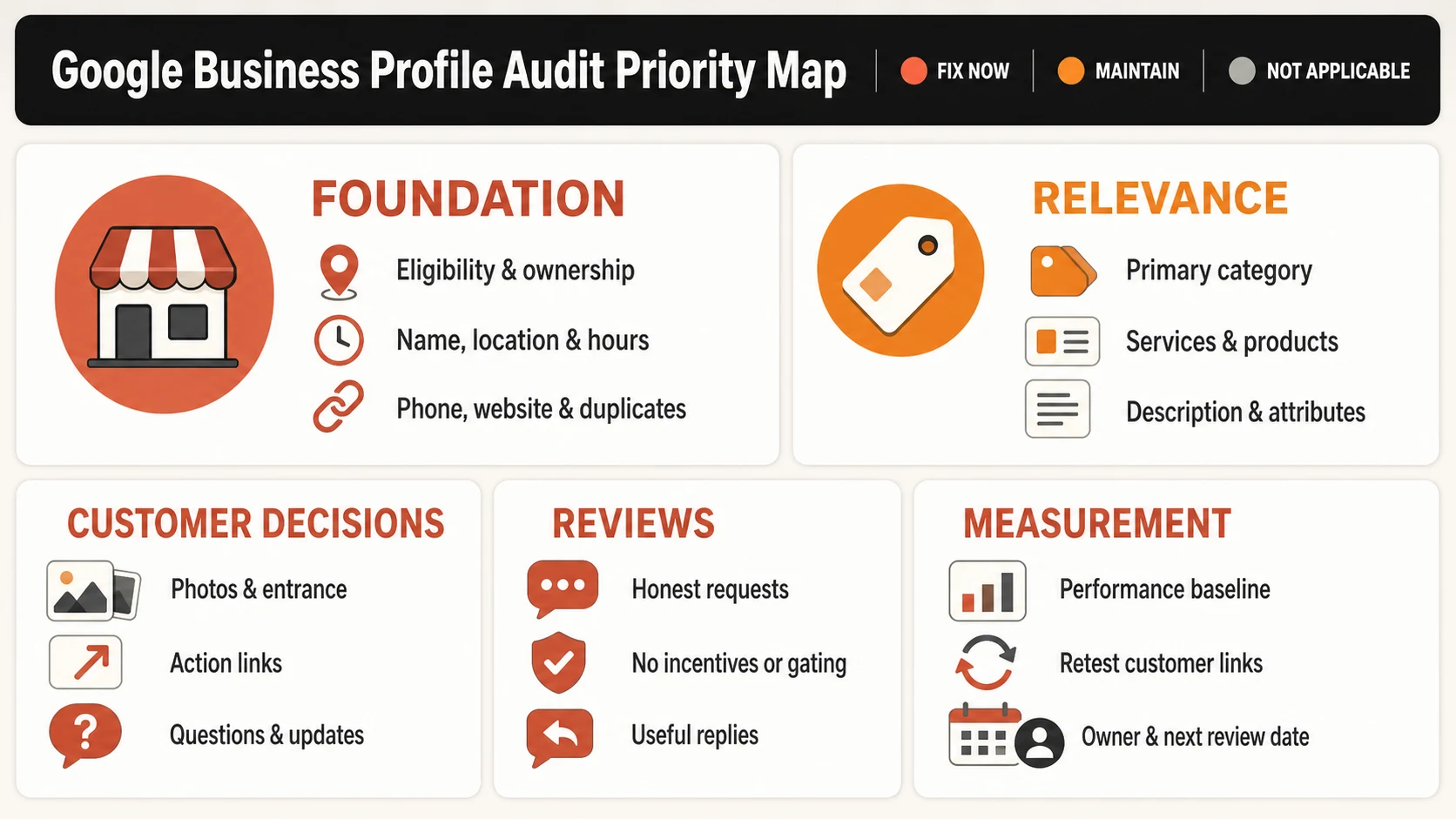
Use this order when several items need work:
| Priority | Fix first | Why it comes first |
|---|---|---|
| P0 | Eligibility, ownership, duplicates, name, address or service area, phone, website, hours | These affect whether the profile accurately represents a real business and whether customers can act on it. |
| P1 | Primary category, additional categories, description, services, products, attributes | These explain what the business is and what it offers. |
| P2 | Photos, review requests, review replies, customer questions, business links | These help customers evaluate and contact the business. |
| P3 | Posts, performance review, monthly maintenance | These are recurring tasks after the profile foundation is correct. |
Foundation checklist: accuracy, eligibility, and access
Start with the business a customer would recognize offline. Use its real name, keep one profile for each location, and follow Google’s Business Profile guidelines.
| Check | What done looks like | Status |
|---|---|---|
| Business is eligible | The business meets Google’s eligibility rules and either welcomes customers at a location or travels to them. | Fix now / Maintain / N/A |
| Profile is claimed and verified | The right owner can manage the profile, and verification is complete. | Fix now / Maintain / N/A |
| Ownership and manager access are current | Former staff or agencies no longer have access they do not need. Current operators have the right role. | Fix now / Maintain / N/A |
| There is one profile for this business location | Only the official profile exists for this location. | Fix now / Maintain / N/A |
| Business name matches the real world | The name matches the sign, website, and everyday branding. It has no extra city or service keywords. | Fix now / Maintain / N/A |
| Address or service area is correct | Customers can visit the displayed address. If they cannot, the profile uses a service area instead. | Fix now / Maintain / N/A |
| Map pin and directions are accurate | The pin leads customers to the correct entrance or service location. | Fix now / Maintain / N/A |
| Primary phone is correct and answered | A customer can call the number and reach the business. | Fix now / Maintain / N/A |
| Website URL works | The link opens a secure, useful page for this business or location. | Fix now / Maintain / N/A |
| Regular hours are current | The hours match when the business is actually open. | Fix now / Maintain / N/A |
| Special hours are prepared | Holiday hours and known closures are added before customers need them. | Fix now / Maintain / N/A |
If customers can’t visit your address, don’t show it. Set a service area instead.
Relevance checklist: describe the business accurately
Use these fields to describe the business, not to squeeze in more keywords.
| Check | What done looks like | Status |
|---|---|---|
| Primary category is specific | The category is the closest available match for the main business. | Fix now / Maintain / N/A |
| Additional categories are relevant | Every extra category describes work the business really does. | Fix now / Maintain / N/A |
| Business description is accurate | A customer can quickly understand what the business does and who it serves. The description has no keyword stuffing, promotions, or links. | Fix now / Maintain / N/A |
| Services are complete | Main services have clear, accurate names and descriptions. | Fix now / Maintain / N/A |
| Products, menu, or inventory are current | Only supported, current items are shown. | Fix now / Maintain / N/A |
| Attributes are truthful | The attributes match what customers will actually find. | Fix now / Maintain / N/A |
| Opening date is accurate | The opening date is added when useful and correct. | Fix now / Maintain / N/A |
Choose the primary category that best matches the main business. Add another only for work you genuinely offer. Use the same test for services, attributes, and the description.
Do not copy a competitor’s profile. Their choices may describe a different business.
Customer decision checklist: make the next step clear
Open the profile on a phone and pretend you are a new customer. Can you tell where to go and what to tap next?
| Check | What done looks like | Status |
|---|---|---|
| Logo is recognizable | The official logo is current and legible at a small size. | Fix now / Maintain / N/A |
| Cover image represents the business | The cover shows the real place, work, or product instead of a generic stock image. | Fix now / Maintain / N/A |
| Exterior and entrance are visible | Customers can recognize the storefront, entrance, parking, or arrival point. | Fix now / Maintain / N/A |
| Interior, team, work, or products are represented | The photos show what a customer will actually encounter. | Fix now / Maintain / N/A |
| Photos are clear and truthful | Images are in focus, well lit, minimally altered, and free of misleading filters. | Fix now / Maintain / N/A |
| Action links work | Every visible action opens the right destination. | Fix now / Maintain / N/A |
| Customer questions have useful answers | Answers are accurate and based on real customer questions, not invented promotions. | Fix now / Maintain / N/A |
| Posts are current when the feature is useful | The latest update is still useful. Expired information is removed. | Fix now / Maintain / N/A |
Use recent photos to show what customers will actually see. Upload a JPG or PNG between 10 KB and 5 MB. Google’s photo requirements recommend 720×720 and set 250×250 as the minimum.
Only use Posts if someone can keep them current. Remove expired updates and follow Google’s post requirements.
Review checklist: genuine requests and useful replies
Ask after a real visit or completed job. Give the customer the link, then leave the rating and wording to them.
| Check | What done looks like | Status |
|---|---|---|
| Review link is tested | The official Google review link opens the correct business profile on a phone. | Fix now / Maintain / N/A |
| QR code is tested before printing | The code opens the right review page at the size customers will scan. | Fix now / Maintain / N/A |
| Requests ask for an honest review | The message asks for honest feedback, not five stars or scripted wording. | Fix now / Maintain / N/A |
| No incentives are offered | No discount, gift, or special treatment is tied to a review. | Fix now / Maintain / N/A |
| Requests are not gated | Every customer gets the same review path, regardless of expected rating. | Fix now / Maintain / N/A |
| Reviews receive appropriate replies | Replies stay calm, protect private information, and give a next step when needed. | Fix now / Maintain / N/A |
Ask for an honest review. Do not offer a discount or gift; Google treats review incentives as prohibited fake engagement.
Before sending anything, open your review link or QR code on a phone. Create Google’s built-in QR code on a computer.
Measurement checklist: know whether the profile is maintained
Use Performance to see whether people find the profile and take action. Do not read it as a ranking guarantee.
| Check | What done looks like | Status |
|---|---|---|
| Baseline date is recorded | The audit has a date so future changes can be compared against a known profile state. | Fix now / Maintain / N/A |
| Performance access works | An owner or manager can open the Performance section for the verified profile. | Fix now / Maintain / N/A |
| Customer interactions are reviewed | Available searches and customer actions are compared over a recorded period. | Fix now / Maintain / N/A |
| Links are retested | Website and action links still reach the intended destination on mobile. | Fix now / Maintain / N/A |
| A maintenance owner is named | One person or team is responsible for keeping the profile current. | Fix now / Maintain / N/A |
| Next review date is scheduled | The next check has a date. | Fix now / Maintain / N/A |
Once the profile is verified, use Google’s Performance report to choose and save a date range before comparing searches or customer actions.
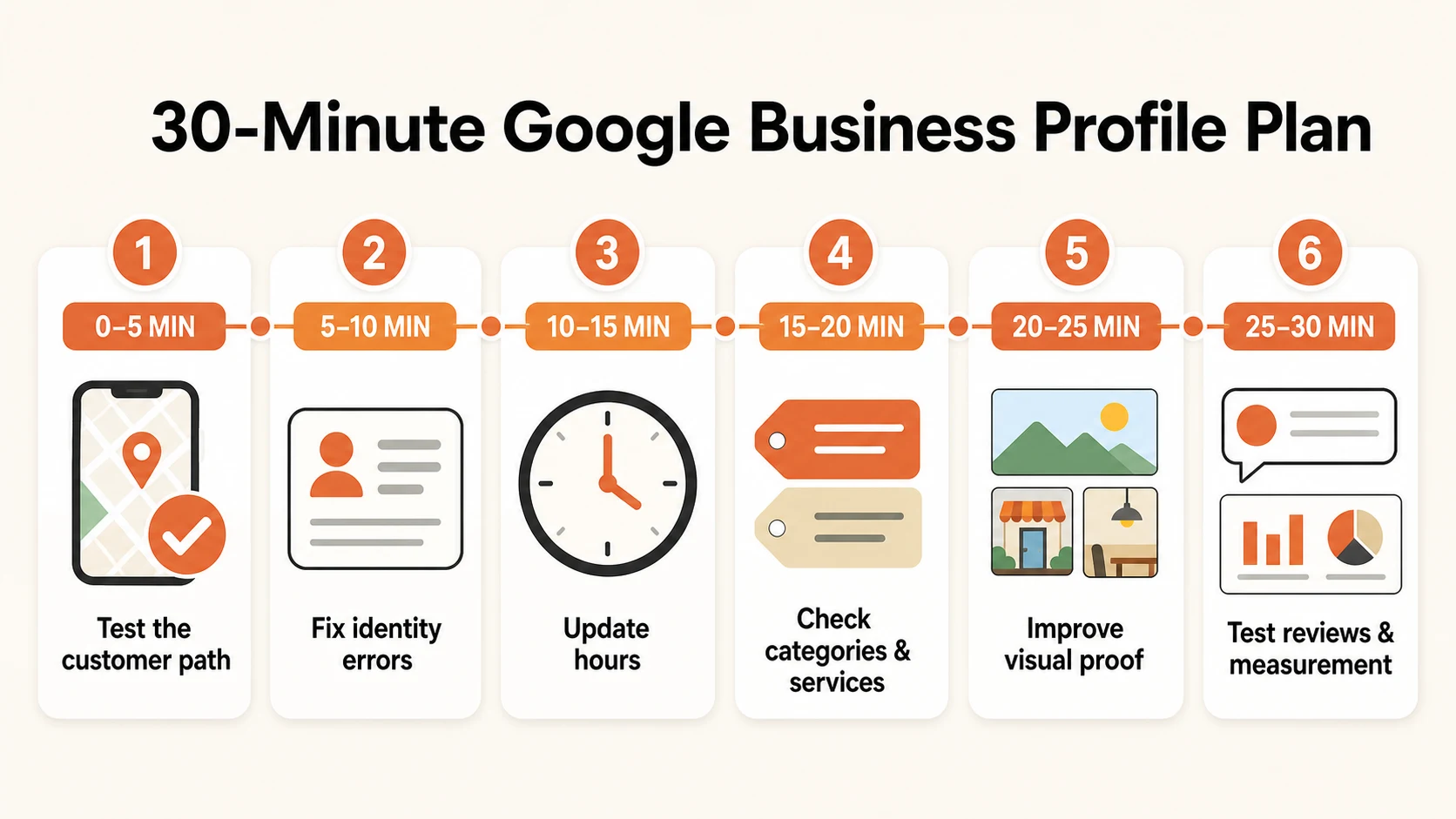
The 30-minute Google Business Profile optimization plan
If you cannot complete the full audit today, use this order:
- Minutes 0–5: Test the customer path. Search on a phone and tap the main contact and directions actions.
- Minutes 5–10: Fix identity errors. Correct the name, location setup, phone, website, and any duplicate profile.
- Minutes 10–15: Check hours. Update regular hours and add known special hours.
- Minutes 15–20: Check categories and services. Select the best specific primary category, remove irrelevant extras, and update important services.
- Minutes 20–25: Improve visual proof. Replace the images that most clearly look old, generic, or misleading.
- Minutes 25–30: Check reviews and measurement. Test the review link and record a Performance baseline.
Start with errors a customer can see. You can come back for polish later.
Common optimization mistakes to avoid
Adding keywords to the business name
Use the name customers see on the sign and website. Adding a city or service just to rank better breaks Google’s real-world business-name requirement.
Treating a service-area business like a storefront
If no customer can walk through the door, do not show the address. A mailbox, virtual office, or private home is not a storefront.
Choosing every possible category
More categories are not automatically better. Use the most specific primary category for the core business, then add only categories that describe real additional operations.
Publishing promotional details that become stale
Every post or offer can go stale. If nobody owns the updates, keep the profile simple and accurate.
Asking only happy customers for reviews
Send the same honest review request to everyone. Do not filter customers by whether you expect a positive rating.
Measuring without a baseline
A Performance screenshot means little without dates. Save the date range and note what you changed before comparing results.
Before you finish
When the audit is complete, save four things:
- the audit date
- every item marked Fix now
- the person responsible for each fix
- the next review date
You are done when customers can trust the information, every Fix now item has an owner, and the next check is scheduled.