

Google Review Gating Policy: How Local Businesses Can Ask for Reviews Without Filtering Customers
Google review gating is a risky shortcut: a business checks whether a customer is happy first, then sends only the happy customers to a public review page. It can feel like reputation management, but it turns the review request into a filter.
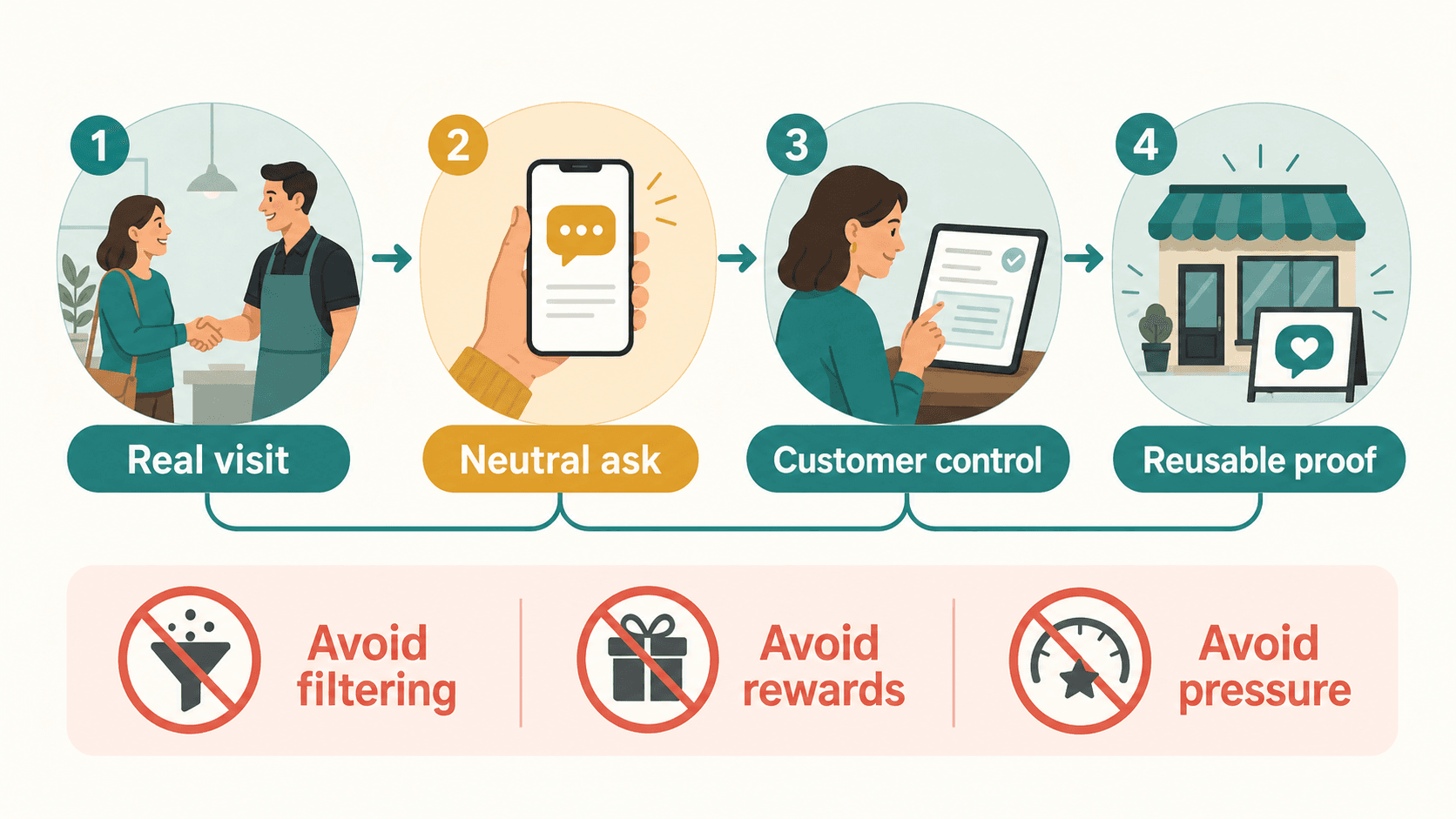
For a local business, the safer approach is not to stop asking for reviews. The safer approach is to ask real customers in a neutral way, avoid rewards or pressure, and let the customer decide what to say.
That matters whether you run a restaurant, cafe, salon, spa, gym, pet shop, retail store, or education center. Your review workflow should make honest feedback easier. It should not decide which customers are allowed to speak publicly.
Quick answer: what is review gating?
Review gating means screening customers before asking for a public review, usually by sending positive customers to Google while sending unhappy customers to a private form, email inbox, or support page.
Local businesses should avoid it because it can make a review profile look more positive than the real customer experience. Google also treats review manipulation seriously. Its Maps content policy says merchants should not offer incentives for reviews, discourage negative reviews, selectively solicit positive reviews, pressure users to leave ratings while on the premises, or request specific review content.
The practical rule is simple:
- Do not ask only happy customers for Google reviews.
- Do not ask customers to leave five stars.
- Do not offer discounts, gifts, payments, loyalty points, or special treatment in exchange for a review.
- Do not route unhappy customers away from the public review path.
- Do ask real customers for honest feedback in a consistent, neutral way.
- Do make the process easier with a link, follow-up message, review card, or smart review QR code.
Top questions about review gating
Is review gating allowed by Google?
No. A business should not selectively request positive reviews or block negative feedback from reaching a public review path.
Can I still ask customers for Google reviews?
Yes. Google Business Profile guidance says businesses can remind customers to leave reviews, including by asking them to visit a link or scan a QR code. The request should stay honest and pressure-free.
What is a common example of review gating?
A customer gets a survey that asks, "Were you satisfied?" If they answer yes, they see a Google review link. If they answer no, they are sent to a private form. That is a sentiment filter.
Can I collect private feedback from unhappy customers?
Yes. You can invite private feedback, especially when you want to fix a service problem. The issue is using private feedback as a gate that stops unhappy customers from leaving a public review if they choose.
Is a review QR code review gating?
No. A QR code is only an access method. The risk depends on how you use it: who sees it, what the staff says, whether the customer is pressured, and whether the workflow filters people by sentiment.
Can AI help customers write reviews?
AI can help reduce the blank-page problem when it is based on the customer's real experience and the customer remains in control. It should not manufacture fake reviews, replace customer input, or pressure customers into a rating.
What review gating looks like inside a real business
Review gating often starts with a reasonable fear. A business owner wants more positive reviews, but they also want to avoid a wave of complaints. So the team adds a private checkpoint before the public review request.
It might look like this:
| Risky review workflow | Safer alternative |
|---|---|
| Ask, "Were you happy with us today?" and send only happy customers to Google. | Say, "If you would like to share your experience, this link makes it easy to leave an honest review." |
| Text a review link only to customers who gave five-star private feedback. | Make the same neutral review path available to eligible real customers. |
| Route unhappy customers to a complaint form without offering the public review option. | Offer support while still allowing the customer to decide whether to post publicly. |
| Train staff to ask only cheerful customers at checkout. | Train staff to invite honest feedback without rating influence. |
| Ask customers to mention a staff name, menu item, treatment, or keyword. | Let customers describe whatever was useful, memorable, or disappointing in their own words. |
The problem is not that the business wants feedback. The problem is that the workflow changes based on sentiment.
Why review gating is dangerous
Review gating creates risk because it can distort the public picture of your business. A review profile is supposed to help future customers understand real experiences. If only the happiest customers are invited to post, the profile becomes less useful and less credible.
It can manipulate trust
Reviews work because people believe they are reading a range of real customer experiences. If every review looks too perfect, too scripted, or too similar, the profile may start to feel managed.
It can put reviews at risk
Platforms can remove reviews that look fake, biased, incentivized, or manipulated. A business may not always know exactly why a review disappeared, but repeated patterns can create exposure.
It can make staff behavior worse
When the team is rewarded for review volume or star count, staff may start asking the wrong customers, using pressured language, or steering customers toward specific words. That turns a trust workflow into a sales script.
It can hide operational issues
Private feedback is useful when it helps the business improve. But if negative experiences are quietly diverted away from public review channels, the team may miss the bigger signal: something in the service, product, schedule, staffing, or expectation-setting needs work.
Is a smart review QR code the same as review gating?
No. A smart review QR code is not review gating by itself.
A QR code, link, NFC card, receipt prompt, table tent, or appointment follow-up can be compliant when it simply makes the review path easier. The policy risk comes from the surrounding workflow.
Safer QR-based review use
- A real customer scans from their own phone.
- The request is neutral, not "leave us five stars."
- The customer can choose what to write.
- No reward is offered for posting, changing, or removing a review.
- The same review opportunity is not limited to only happy customers.
- The business does not require a review before the customer can leave, receive service, or claim a benefit.
Risky QR-based review use
- Staff shows the QR code only to customers who seem pleased.
- A private satisfaction question decides who gets the public review path.
- The QR card promises a discount after a review.
- The customer is asked to mention exact words, a staff member, or a specific rating.
- The customer is watched while writing the review.
- The business writes the review for the customer.
The tool is not the issue. The gate is the issue.
The safest way to ask customers for reviews
The safest review request is short, neutral, and optional. You are not asking for praise. You are asking for honest feedback from someone who actually experienced the business.
Try a staff script like this:
Thanks for visiting today. If you would like to share your experience, this link makes it easy to leave an honest review. It helps future customers know what to expect.
This works because it avoids the common traps:
- It does not ask for five stars.
- It does not offer a reward.
- It does not require a review before the customer leaves.
- It does not ask for specific words.
- It does not imply that only positive feedback is welcome.
- It gives the customer control.
The phrase "if you would like" is doing real work. It keeps the request optional.
What businesses should never say when asking for reviews
Small wording changes can move a review request from helpful to risky.
| Avoid saying | Say this instead |
|---|---|
| "Can you leave us a five-star review?" | "You can leave an honest review here if you would like." |
| "If you had a bad experience, tell us privately instead." | "We welcome feedback and are always working to improve." |
| "Show us your review and we will give you a discount." | "Your honest feedback helps future customers." |
| "Please mention our employee's name." | "Share whatever feels helpful about your experience." |
| "Use these keywords in your review." | "Write in your own words." |
| "We need you to review us before you leave." | "You can scan this later if you prefer." |
If the wording influences the rating, content, timing, or public/private path of the review, revise it.
How Vibpost helps without turning reviews into a filter
Vibpost is an AI marketing assistant for local businesses. It uses a smart review QR code workflow, called a Seeding Code inside the product, to help customers turn real experiences into review drafts, social posts, testimonials, and video scripts.
The useful part is not just the QR code. A plain review QR code sends customers to a blank page. That can work, but many customers do not know what to write, even when they had a good visit.
Vibpost focuses on the missing middle:
- A business places a smart review QR code where real customer moments happen.
- A customer scans from their own device.
- The customer selects experience-based keywords that match the visit.
- AI helps turn those inputs into a review draft, social post, testimonial, or video script.
- The customer or business reviews the output before it is shared or reused.
Used correctly, this reduces friction without replacing the customer's judgment. It should not decide which customers are allowed to post, write reviews without customer input, buy reviews, offer rewards, or promise a ranking lift.
For a restaurant, cafe, salon, spa, gym, pet shop, education center, or local retailer, Vibpost is best understood as a customer proof workflow: it helps turn real customer moments into reusable proof while keeping the customer in control.
Review gating vs review management
Review management and review gating are not the same.
Review management is the legitimate work of monitoring feedback, replying professionally, learning from complaints, and making it easier for real customers to share their experience.
Review gating is the risky work of filtering customers before deciding who gets the public review request.
| Review management | Review gating |
|---|---|
| Ask real customers for honest feedback. | Ask only happy customers for public reviews. |
| Reply to positive and negative reviews. | Try to keep unhappy customers away from public channels. |
| Use private feedback to improve operations. | Use private feedback to screen public review requests. |
| Make the review process easier. | Control who reaches the review page. |
| Let customers decide what to write. | Request a specific rating, wording, keyword, or staff mention. |
The best long-term review systems do not hide imperfect feedback. They create a steady path for real customer voices and then use those voices to improve the business.
How review gating can hurt local trust
Local customers are good at sensing when a review profile feels unnatural. They may not use the phrase "review gating," but they notice patterns:
- Every review sounds too polished.
- Many reviews use the same wording.
- Reviews mention the same staff names or keywords repeatedly.
- The profile has only glowing comments and no practical detail.
- Recent reviews appear in sudden bursts, then disappear for months.
A natural review profile usually has variety. Different customers care about different parts of the experience: service speed, food quality, cleanliness, appointment flow, atmosphere, price, parking, staff friendliness, or follow-up.
That variety is the trust signal. Do not smooth it away.
Best review request setup by business type
The same policy principle applies across industries, but the best moment to ask depends on the customer journey.
Restaurants and cafes
Ask after the meal, at checkout, on a receipt, or through a table card that customers can scan when they choose. Avoid asking before service is complete. Do not ask only tables that look pleased.
Salons and spas
Ask after the service is finished and the customer has seen the result. A front-desk card or post-appointment follow-up usually feels less pressured than asking while the customer is still in the chair.
Gyms and fitness studios
Ask after a class, milestone, trainer session, onboarding experience, or membership interaction. Keep the request broad enough for customers to mention what actually helped them.
Retail stores
Ask after a purchase, fitting, pickup, repair, or helpful service interaction. Do not tie the request to a discount on the next purchase.
Pet shops and pet services
Ask after grooming, boarding, training, pickup, or a positive service moment. Let customers share specific details about the care experience in their own words.
Education centers and classes
Ask after a completed class, parent interaction, event, progress milestone, or support moment. Be careful with privacy and avoid asking for sensitive student details.
A simple audit for your current review workflow
Walk through your review process as if you were a customer who had a mixed experience.
Ask these questions:
- Would I receive the same review opportunity as a happy customer?
- Could I leave honest public feedback without being redirected?
- Would I feel watched or pressured while writing?
- Is there any reward connected to the review?
- Does the staff script mention five stars, keywords, employee names, or exact wording?
- Am I using my own device and account?
- Can I edit, ignore, or decline the request?
- Does the business use feedback to improve, not just to collect praise?
If the answer reveals pressure, filtering, or a reward, fix the process before scaling it.
Build review growth without review gating
Local businesses still need reviews. They help customers compare options, understand recent experiences, and decide whether a business feels trustworthy.
But trust is not built by filtering out inconvenient voices. It is built by making honest feedback easier to give and easier to learn from.
The stronger workflow is straightforward:
- Ask real customers.
- Ask consistently.
- Keep the request neutral.
- Avoid incentives.
- Let customers control the content.
- Use AI only to reduce friction around real experiences.
- Respond and improve.
That is where Vibpost can fit: not as a fake-review tool, not as a shortcut around platform rules, and not as a promise of guaranteed ranking growth. It helps local businesses capture the customer moment before it disappears and turn that moment into review drafts, testimonials, social posts, video scripts, and reusable social proof.
Ask for reviews the right way
The best review workflow should pass a simple test: it should still feel fair if the customer wants to leave something less than perfect.
If your workflow only works for happy customers, it is too fragile. If it depends on rewards, it is too risky. If it tells customers what to say, it is too controlled.
Ask clearly. Give customers an easy path. Respect their words. Use smart tools to reduce friction, not to manufacture praise.
That is how local businesses can keep asking for reviews without turning review collection into review gating.