

Google Review Link Workflow for Small Businesses: Collect Reviews Without More Staff Work
A Google review link can reduce friction, but it does not remove the whole review problem. Small businesses still need a repeatable moment to ask, a simple way for customers to remember what to say, a safe follow-up process, and a boundary that keeps reviews honest. The best setup is not “print a link and hope.” It is a lightweight review workflow that helps real customers share real experiences without adding another daily task for the owner or front desk.
For restaurants, cafes, salons, spas, gyms, pet shops, education centers, and neighborhood retailers, the practical goal is simple: make the review path easy enough for customers and consistent enough for staff.
What a review link actually solves
A review link sends customers to the right review destination faster. It is useful because customers no longer have to search for your business, find the correct profile, open the review box, and decide what to do next. That shortcut matters, especially for in-person businesses where the best review moment may last only a few minutes.
Google now gives Business Profile owners a direct way to create a review link or QR code from the review request flow. You can place that link in follow-up emails, receipts, chat interactions, or in-store materials. That makes the destination easier to access.
But the link only handles one part of the job. It does not decide when to ask. It does not help a customer turn “everything was great” into a specific review. It does not remind staff what to say. It does not turn customer feedback into reusable testimonials, social posts, or content ideas.
That is why a small business should think in terms of a review workflow, not only a link generator.
Build the workflow around one real customer moment
The best review request starts from a real experience, not from a generic reminder. A customer just picked up an order, finished a haircut, completed a class, had a helpful consultation, or complimented a staff member. That is the moment when the review is easiest to remember and most likely to be specific.
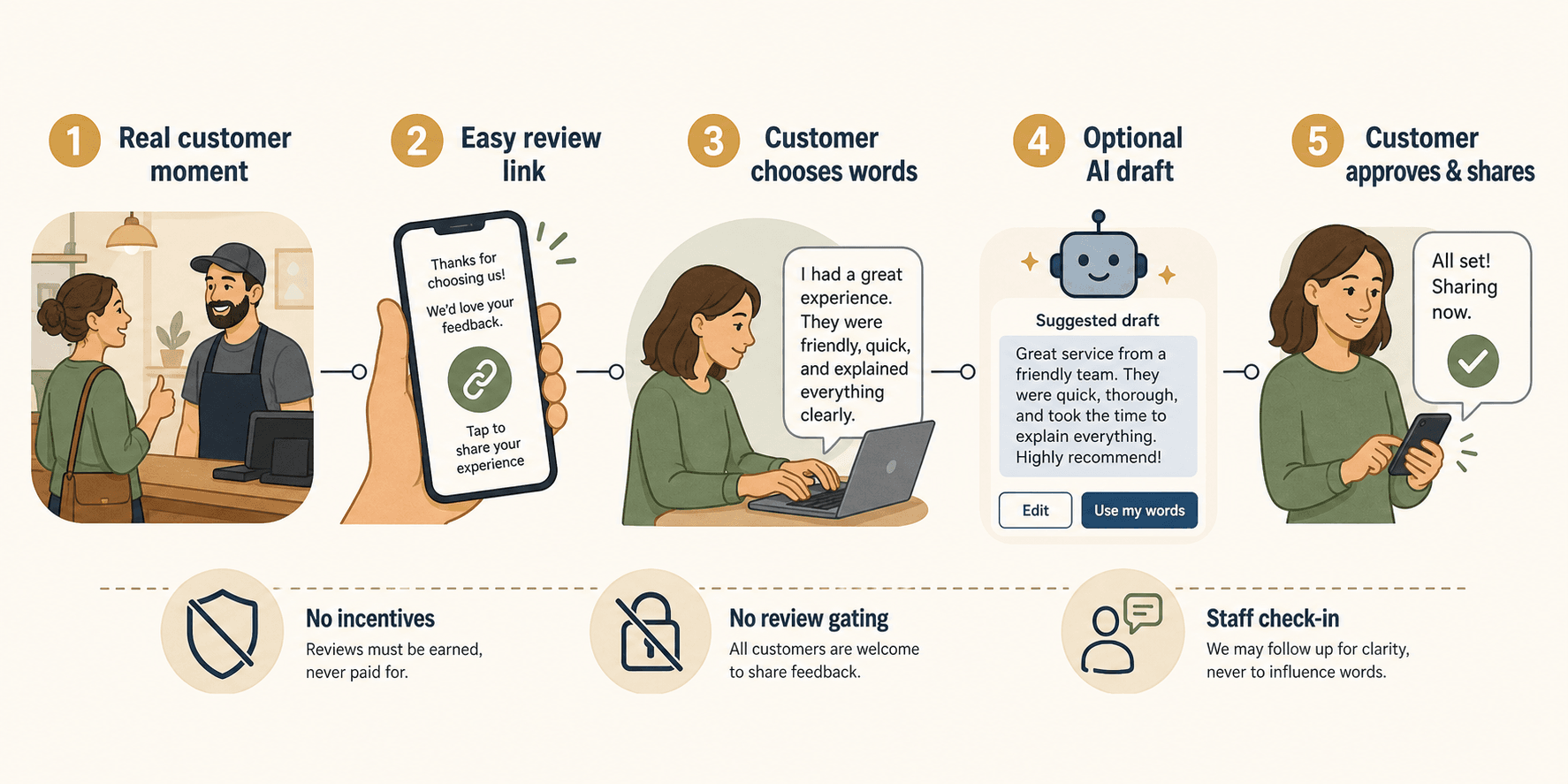
A lightweight workflow should answer five questions:
- What moment triggers the ask? A completed appointment, a pickup, a checkout conversation, a repeat visit, or a positive comment.
- Where does the customer go? A direct review link, a feedback flow, or a smart review QR code workflow.
- What helps the customer write? Experience-based prompts, staff wording, or customer-selected keywords.
- Who stays in control? The customer should decide what to write, edit, approve, publish, or share.
- What does the business do afterward? Reply to reviews, learn from feedback, and reuse approved customer language where appropriate.
This structure keeps the process small enough for a busy team. Staff do not need to write long messages, chase every customer, or manage a complicated review campaign. They need a repeatable moment, a simple link, and a clear standard for honest feedback.
How to create a low-lift review link setup
A basic setup can be built in an afternoon. The hard part is not the technology. The hard part is keeping the ask consistent without making customers feel managed.
Confirm the right Business Profile
Start by making sure your Google Business Profile is correct. The business name, location, phone number, category, hours, and public-facing details should match what customers expect. If a business has multiple locations, each location needs its own review destination.
Do not send every customer to a generic search result. The more guessing a customer has to do, the more likely they are to stop.
Create one review link and one QR option
Use the official Business Profile review request flow to create the review link or QR code. For most small businesses, one clean destination is better than several competing links.
Use the link in places where customers already expect a follow-up:
- Thank-you emails after an appointment or order
- Receipts and pickup messages
- Post-service texts, when messaging consent is already handled
- Front desk or counter cards
- A simple “review us” page on your website
Use the QR option when the customer is physically present: table tents, checkout counters, appointment cards, waiting areas, event signage, or packaging inserts. A QR code works best when the customer has just experienced the service and still remembers the details.
Give staff one sentence, not a script
Staff usually do not need a full script. They need a short sentence that feels natural:
“If this visit was helpful, we’d appreciate an honest review. The link is right here, and you can write it in your own words.”
That sentence does three useful things. It asks at the right moment. It keeps the request honest. It avoids pressure for a positive rating.
The language should never imply that only happy customers are welcome to respond. Google’s own review guidance emphasizes that reviews should reflect a genuine experience and that businesses should value a mix of feedback because honest and balanced reviews can help customers decide.
Help customers remember specifics
The blank review box is where many good review requests fail. A customer may want to help but not know what to write.
Instead of asking for “a review,” ask for a detail:
- What did you come in for?
- Who helped you?
- What made the visit easier?
- What would you tell someone coming here for the first time?
- Was there a product, service, class, dish, or consultation that stood out?
These prompts do not tell the customer what opinion to have. They help the customer recall the real visit. That distinction matters.
Where Vibpost fits in the workflow
Vibpost is useful when a business wants the review request to do more than open a public review page. It is an AI marketing assistant for local businesses that uses a smart review QR code workflow to help customers turn real experiences into review drafts, social posts, testimonials, video scripts, and reusable social proof.
Inside the product, this workflow is called a Seeding Code. For US local business owners, the easier way to understand it is a smart review QR code workflow: the customer scans, chooses experience-based keywords, and gets AI help turning those inputs into draft content. The customer can edit, approve, publish, or share only what they are comfortable with.
That makes Vibpost different from a plain review link. A review link is a destination shortcut. Vibpost helps with the missing middle between the customer moment and the finished piece of feedback.
Here is where that matters:
| Review task | Plain review link | Vibpost-style smart workflow |
|---|---|---|
| Send customer to the right destination | Yes | Yes, as part of a broader workflow |
| Help customer remember the visit | Limited | Uses experience-based keyword choices |
| Reduce staff writing work | Partly | Staff can rely on a repeatable customer-led flow |
| Support review drafts | No | Yes, based on customer inputs |
| Create social proof beyond reviews | No | Can support testimonials, social posts, and video scripts |
| Keep customer approval central | Depends on process | Built around customer edit and approval |
Vibpost is not necessary for every business. If a shop only needs a link on a receipt, the official Google review link may be enough. Vibpost becomes more useful when the owner wants a repeatable way to capture the customer’s words before the moment disappears.
Use QR codes without creating a compliance problem
Review workflows should make honest feedback easier, not manufacture praise. A safe workflow asks real customers for real feedback and avoids incentives, filtering, pressure, or fake content.
Google’s Business Profile guidance says customers can be asked to use a link or QR code to leave reviews, but it also warns that incentives such as free or discounted goods or services in exchange for reviews are prohibited. Google’s broader contributed content policy also focuses on preventing fake engagement and content that manipulates ratings.
For a small business, that means:
- Do not offer discounts, free items, rewards, or payment for reviews.
- Do not ask only happy customers to leave public reviews.
- Do not route unhappy customers away from public review options while sending happy customers to Google.
- Do not write reviews for customers.
- Do not pressure staff to collect only positive ratings.
- Do not turn an AI draft into a review unless the customer provided the real experience and approves the final wording.
Private feedback can still be useful. A cafe, salon, or gym can ask customers what could be improved. The problem starts when private feedback is used to suppress negative public feedback or filter who gets the review link.
The safest rule is simple: invite honest feedback, make the path easy, and let the customer decide what to publish.
A practical setup for busy small teams
Most small teams should start with one workflow, not five. Choose one customer moment, one destination, one staff line, and one weekly review habit.
For a cafe or restaurant
Use the review ask after a clear positive moment: a regular compliment, a successful event, a resolved issue, or a table that mentions a favorite dish. Place the link on receipts or counter cards, but train staff to ask only when the moment is real.
If using Vibpost, let the customer pick experience keywords such as service, atmosphere, food, speed, cleanliness, or friendliness before drafting. That helps the review sound specific without staff writing it for them.
For a salon, spa, or wellness business
Use the ask after the appointment wrap-up, when the client is already discussing the service result. The prompt should be about the experience: consultation, comfort, timing, care instructions, staff attention, or the result they liked.
A follow-up message can work well, but keep it short. The customer should not feel like they are entering a campaign.
For a gym, class, or education center
Use the ask after a class milestone, onboarding session, parent check-in, or member support moment. Reviews are more useful when they describe what changed for the customer: clarity, confidence, routine, coaching, support, or convenience.
Do not invent progress claims. If the business does not have verified outcome data, keep the prompt focused on the customer’s own experience.
For retail and local services
Use the ask after helpful service: finding the right item, explaining a repair, solving a problem, preparing an order, or answering a customer’s question. A review link on a receipt is useful, but a staff line tied to the service moment is what makes it work.
What to measure in the first week
A review workflow should be judged by friction, not just review count. The first week is for learning whether the process is easy enough for staff and customers.
Track a few simple signals:
- How many times staff used the review sentence
- Which placement customers noticed first
- How many people scanned or clicked
- Whether customers asked what to write
- How many drafts or feedback notes were completed
- How many approved reviews or reusable proof pieces resulted
- Which customer moments produced the most specific language
Do not treat a low first-week review count as failure. A workflow improves when the business learns where the ask feels natural and where it adds friction. The real win is a process that can keep running without the owner pushing it every day.
FAQ
Is a review link enough for a small business?
It can be enough if the business only needs a simple shortcut to its Google review form. If customers often say nice things in person but do not know what to write later, a smarter workflow with prompts or customer-selected keywords may work better.
Should we use a QR code or a text/email link?
Use a QR code for in-person moments and a text or email link for post-visit follow-up. Many businesses need both. The important part is that both routes lead to the same honest feedback standard.
Can AI help customers write reviews?
AI can help turn customer-provided experience details into a draft, but the customer should control the wording and approval. The business should not invent details, write the review for the customer, or pressure the customer to publish a specific sentiment.
Can we offer a reward for leaving a review?
No. Do not offer discounts, free items, payment, or other incentives in exchange for reviews. Keep the request simple and honest.
What is the difference between a review link generator and Vibpost?
A review link generator creates a destination shortcut. Vibpost supports a broader smart review QR code workflow: customers scan, choose experience-based keywords, receive optional AI draft help, and decide what to approve, publish, or share.
The simplest review workflow is the one your team can repeat
The best small-business review workflow is not the most complicated system. It is the one staff can use naturally, customers can understand quickly, and owners can maintain without adding another daily chore.
Start with the basics: one accurate review link, one QR option for in-person moments, one staff sentence, and one weekly check-in. Then improve the middle of the workflow. Help customers remember the real experience, keep their words under their control, and turn honest feedback into proof the business can actually use.
That is where a plain link becomes a working review system.