

How Cafes Can Use Customer Keywords to Create Review Drafts and Social Posts
Cafes can use customer keywords to turn small, real moments into better review drafts and social posts. The workflow is simple: ask customers to choose a few details that match their visit, such as "great coffee," "friendly staff," "cozy atmosphere," or "quick pickup," then use those keywords to help create an editable review draft or social post. The customer stays in control of the final words, and the cafe gets more specific customer proof than a blank review box usually produces.
That matters because cafe praise is often brief. A regular says the seasonal latte was perfect. A parent mentions that the staff made the morning rush easier. A remote worker says the corner table is their favorite place to focus. A tourist compliments the espresso and then disappears into the rest of the day.
Those are useful moments, but they rarely become public proof unless the cafe makes the next step easy.
Start with the words customers already use
The best customer keywords come from real customer language, not from marketing copy. A cafe should not try to tell customers what to say. It should help them remember what they already experienced.
For a cafe, useful keywords might describe:
- The drink: smooth espresso, strong cold brew, seasonal latte, house-made syrup, matcha, chai, decaf option
- The food: fresh pastry, breakfast sandwich, gluten-free option, vegan cookie, quick lunch
- The service: friendly staff, remembered my order, fast pickup, helpful recommendation
- The space: cozy atmosphere, quiet corner, good for meetings, family-friendly, clean tables
- The moment: morning routine, study break, weekend visit, date coffee, after-school stop
- The outcome: came back again, told a friend, found a new favorite, relaxed before work
These phrases work because they are specific enough to spark memory but not so specific that they pressure the customer. "Great coffee" is easy to choose. "Write that our Ethiopian pour-over has citrus notes and perfect extraction" is too controlling for a normal customer review request.
The keyword should open the memory. It should not script the review.
Why keywords work better than a blank review box
A blank review box asks the customer to do all the work at once: remember the visit, choose the point, write clearly, decide whether it sounds fair, and then publish. That is a lot to ask after someone has already paid, checked their phone, and moved on with the day.
Keywords reduce the blank-page problem. They give customers a light way to say, "This is what stood out." Once the customer chooses two or three details, the draft has direction.
For example:
| Customer keywords | Weak blank-box review | Better draft direction |
|---|---|---|
| Great coffee, friendly staff, quick pickup | "Good cafe." | "The coffee was strong, pickup was quick, and the staff were friendly even during the morning rush." |
| Cozy atmosphere, good for working, clean tables | "Nice place." | "This is a comfortable cafe for getting work done. The tables were clean, the space felt calm, and I could focus for an hour." |
| Fresh pastries, helpful recommendation, first visit | "I liked it." | "It was my first visit, and the staff helped me choose a pastry that was fresh and exactly what I wanted." |
| Matcha, not too sweet, relaxing atmosphere | "Good matcha." | "The matcha was smooth and not too sweet, and the cafe had a relaxing atmosphere for a quiet break." |
The customer still needs to review, edit, and approve the final wording. The keyword flow simply helps them move from a feeling to a useful sentence.
A cafe keyword workflow from scan to draft
A cafe keyword workflow should feel like a natural part of the visit. It should not interrupt the line, put pressure on the customer, or turn the barista into a salesperson.
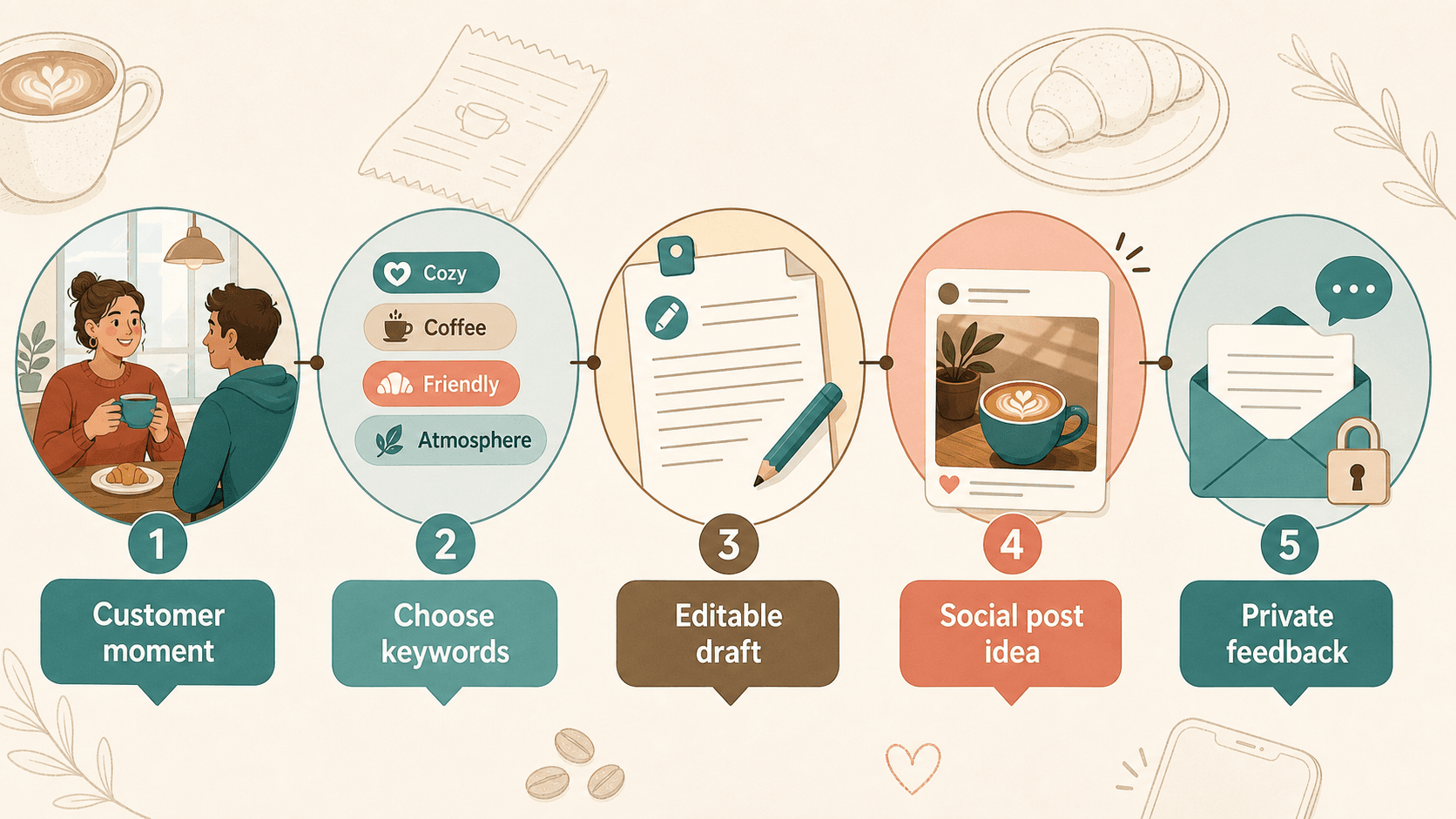
A practical workflow looks like this:
- A customer finishes the visit, picks up an order, or shares a compliment.
- The cafe points to a simple feedback option on the receipt, counter card, pickup shelf, table tent, or follow-up message.
- The customer chooses keywords that match the real experience.
- The workflow creates an editable review draft or social post based on those choices.
- The customer decides what to publish, what to edit, what to keep private, and what not to use.
This is different from generating fake praise. The customer provides the experience details. The draft is only a starting point. The customer controls the final result.
That control is especially important for review platforms. Google explains that businesses can create and share a review link or QR code, including on receipts, thank-you emails, chat interactions, and in-store displays. But Google's review policies also draw a clear boundary: reviews should reflect genuine customer experiences, and merchants should not offer incentives, selectively ask only for positive reviews, pressure customers on the premises, or request specific review content. The safe cafe workflow is an honest invitation, not a rating script.
Choose keywords that describe experience, not rating
Good keyword choices help customers describe what happened. Bad keyword choices steer them toward a rating, a claim, or a specific sentence.
Use keywords like:
- Great coffee
- Friendly staff
- Quick pickup
- Cozy atmosphere
- Fresh pastries
- Good for working
- Clean space
- Helpful recommendation
- Relaxing break
- Consistent morning stop
Avoid keywords like:
- Five stars
- Best cafe in town
- Perfect service
- Number one coffee shop
- Must-visit
- Guaranteed favorite
- Mention our latte
- Say our staff is amazing
- Write that we are better than competitors
The first group helps the customer remember details. The second group tries to shape the review into a promotional claim.
That distinction matters. Google allows merchants to encourage genuine reviews without trying to influence rating or content. Once a keyword becomes an instruction to praise the business, the workflow starts moving in the wrong direction.
Turn the same keywords into two different outputs
The same customer keywords can support more than one kind of customer proof. A cafe should treat each output differently instead of copying the same text everywhere.
Review draft
A review draft should sound like something the customer would actually write. It should be short, specific, and easy to edit. It should not sound like ad copy.
If the customer chooses "great coffee," "quick pickup," and "friendly staff," a review draft might be:
I stopped in for coffee and pickup was quick. The staff were friendly, and the coffee was exactly what I needed before work.
That draft is useful because it reflects a normal visit. It does not promise that every customer will have the same experience. It does not force a rating. It does not add details the customer did not choose.
Social post draft
A social post can be a little more visual and casual, but it still needs to stay grounded in the customer's real experience.
Using the same keywords, a social post draft might be:
Morning coffee stop done right: quick pickup, friendly staff, and a cup that made the commute better.
That version works better for Instagram, TikTok captions, X, or a story-style post because it is more personal and moment-based. It is not a Google review copied into a caption. It is a separate draft built from the same authentic input.
Testimonial or website proof
If a customer gives permission, the cafe may also reuse approved words as a testimonial on a website, menu board, email, or social proof section. Do not assume that a public review automatically gives the cafe permission to use the customer's words anywhere it wants. Google's own customer review guidance says user reviews belong to the person who wrote them and that businesses should get consent before using reviews in their own marketing materials.
For a cafe, that means the workflow should ask clearly:
- Can we use this feedback publicly?
- Where can we use it?
- Should we use your first name, initials, or no name?
- Do you want to approve the final wording first?
That small permission step protects trust and keeps the customer in control.
Where Vibpost fits in the cafe workflow
Vibpost fits when a cafe wants more than a static review link. A static review QR code sends a customer to a page. Vibpost helps with the missing middle: the customer moment, keyword selection, AI-assisted draft, customer edits, and reuse as review, social post, testimonial, or video script.
Vibpost is an AI marketing assistant for local businesses. It uses a smart review QR code workflow, called a Seeding Code inside the product, to help customers turn real experiences into review drafts, social posts, testimonials, and video scripts. For cafes, that means the product can support the moment when a customer has something positive to say but does not want to start from a blank box.
The cafe can configure experience keywords that match its real business. A neighborhood espresso bar might focus on coffee quality, service, and atmosphere. A bakery-cafe might focus on pastries, breakfast, pickup speed, and family visits. A campus cafe might focus on study space, Wi-Fi, quick lunch, and staff friendliness.
The product should not be used to manufacture reviews. It should be used to capture real customer feedback before it disappears.
A simple cafe setup
A cafe does not need a complicated campaign to start. The first version should be small enough for staff to repeat during a normal shift.
1. Pick one customer moment
Start with one moment instead of trying to cover the entire customer journey.
Good starting points include:
- After a customer says "thank you, that was great"
- On the printed receipt
- On a pickup shelf for mobile orders
- On a small counter card near checkout
- In a thank-you email after catering or event orders
- On a table tent in seating areas where customers already linger
Do not put the request where it slows down the line. Cafes move fast, especially during morning rush. The best placement is visible, optional, and easy to ignore.
2. Choose 8 to 12 starter keywords
The first keyword set should match what customers actually talk about. Keep it simple.
A cafe might start with:
- Great coffee
- Friendly staff
- Cozy atmosphere
- Fresh pastries
- Fast service
- Easy pickup
- Good for working
- Clean space
- Seasonal drinks
- Helpful recommendation
- Relaxing break
- Good value
Review the list after one week. Remove words that customers never choose. Add words that staff hear often. If customers keep mentioning "quiet corner," "outdoor seating," or "great croissant," those may deserve a place in the keyword set.
3. Use a low-pressure staff script
Staff should not be asked to "get reviews." That wording creates pressure. Ask staff to make customers aware of the option.
Use a script like:
If you would like to share what you liked, the feedback code on the receipt lets you choose a few details and edit anything before posting. No pressure.
Or after a compliment:
Thank you, I am glad you liked it. If you ever want to share that, the card by the register makes it easy and you can edit the draft before using it.
The staff member should then move on. Do not stand over the customer. Do not ask to see the review. Do not ask for a five-star rating.
4. Give private feedback a real path
Not every customer moment should become public. A customer might say the latte was good but the wait was too long. Another might like the food but notice a messy table. That feedback is useful, and it should not be hidden or ignored.
A healthy workflow gives customers options:
- Public review draft
- Social post draft
- Private feedback
- Testimonial permission
- No reuse
Private feedback should help the cafe improve operations. It should not be used to block customers from leaving honest public reviews. Customers should always remain free to share their real experience.
What the cafe should measure in the first week
Do not judge the workflow only by review count. A cafe is trying to learn whether the request is easy, comfortable, and specific enough to produce useful customer proof.
Track:
- How many customers see the feedback invitation
- How many scan or open the flow
- Which keywords are selected most often
- How many customers choose a review draft
- How many choose a social post draft
- How many use private feedback
- How much customers edit the draft
- Whether staff remember the script
- Whether any customer seems uncomfortable
- Which keywords create the clearest drafts
This gives the cafe practical signals. If customers scan but stop before finishing, the flow may be too long. If every review draft sounds generic, the keywords may be too broad. If staff avoid mentioning the request, the script may feel awkward. If private feedback appears often, the cafe may have a service issue worth fixing.
The point is not to promise a ranking lift or a guaranteed increase in reviews. The point is to build a repeatable customer proof workflow that respects the customer and helps the cafe learn.
Common mistakes cafes should avoid
The risk in review workflows is usually not the QR code itself. The risk is how the business frames the ask.
Avoid these mistakes:
| Mistake | Why it is risky | Better approach |
|---|---|---|
| Asking for five stars | It tries to influence the rating | Ask for honest feedback |
| Offering a discount for a review | Incentives for reviews can be treated as fake engagement | Keep offers separate from reviews |
| Asking only happy customers | It can become selective solicitation | Make the review option generally available |
| Requiring specific words | It makes the review less authentic | Let customers choose experience details |
| Hovering while customers post | It creates pressure on the premises | Mention the option and move on |
| Reusing reviews without consent | It can violate customer trust and platform guidance | Ask permission before marketing reuse |
| Turning complaints into hidden-only feedback | It can suppress honest reviews | Provide service recovery without blocking public feedback |
The safest cafe workflow is not the most aggressive one. It is the one customers can use comfortably and staff can repeat honestly.
Why customer keywords also help social content
Many cafes struggle with social content because every post starts from the same place: a drink photo and a caption like "Come try our latte." Customer keywords add a different source of ideas.
If customers choose "quiet corner," the cafe can create a post about weekday work sessions. If they choose "fresh pastries," the cafe can post about morning bakery timing. If they choose "friendly staff," the cafe can write a human post about hospitality. If they choose "seasonal drinks," the cafe can turn that into a short video script about the current menu.
The keyword flow helps the cafe see what customers actually notice. That is more useful than guessing what the business wants to promote.
For example:
| Repeated customer keyword | Social content idea |
|---|---|
| Cozy atmosphere | A post about the best times to find a quiet seat |
| Quick pickup | A short caption for busy commuters |
| Fresh pastries | A morning behind-the-scenes bakery post |
| Friendly staff | A staff spotlight or hospitality note |
| Seasonal drinks | A short video script about the current special |
| Good for working | A weekday remote-work post |
The cafe should still avoid turning private feedback into public content without permission. But aggregated themes can guide content planning without exposing individual customers.
When this workflow is a good fit
A customer keyword workflow is a good fit when a cafe already creates good customer moments but struggles to turn them into visible proof.
It is especially useful for:
- Independent cafes without a full-time marketer
- Cafes with regular customers who praise the staff in person
- Coffee shops with strong atmosphere but generic online reviews
- Bakery-cafes where products change often
- Cafes that want more reusable social proof without pressuring customers
- Multi-location cafe groups that need a repeatable but local-feeling workflow
- New cafes that need to learn what customers notice
It may not be the right first priority if the cafe has unresolved service problems, inconsistent hours, incorrect Google Business Profile information, or staff who are uncomfortable asking for feedback. Fix the basics first. A keyword workflow amplifies real customer experience; it cannot repair a weak one by itself.
FAQ about cafe customer keywords
Can cafes ask customers to scan a review QR code?
Yes. Google provides ways for businesses to create and share a review link or QR code. The request should stay optional, neutral, and based on real customer experience. Do not offer rewards for reviews, request a specific rating, or pressure customers while they are on the premises.
Is AI allowed in a review draft workflow?
AI can help structure a draft when the customer supplies the real experience details and keeps control over the final wording. The risk starts when AI invents the experience, writes on behalf of the customer without input, or pushes the customer toward a specific rating or claim.
How many keywords should a cafe offer?
Start with 8 to 12 keywords. That is enough to cover common cafe experiences without overwhelming the customer. After a week or two, remove unused keywords and add terms customers actually mention.
Should the cafe create both a review draft and a social post?
It can, but the customer should choose the output. A review draft should be direct and experience-based. A social post can be more casual and moment-based. Do not copy the same text everywhere.
Can a cafe reuse a customer's review in marketing?
Do not assume. If the cafe wants to use a customer's words on its website, social media, print materials, or ads, the safer approach is to get clear permission and preserve the meaning of the original feedback.
The best cafe review workflow does not ask customers to perform marketing for the business. It gives them a simple way to express a real moment while it is still fresh. When the customer chooses the keywords, edits the draft, and decides what happens next, one small cafe visit can become honest public proof without becoming a pressured review request.