

How Education Centers Can Collect Parent Feedback More Consistently
Education centers can collect parent feedback more consistently by asking at the right moment, making the request easy to complete, giving parents useful prompts, and keeping the parent in control of what becomes public. The goal is not to manufacture praise. The goal is to capture real parent observations while the class, pickup, tutoring session, workshop, or student milestone is still fresh.
That matters because education centers are built on trust. A parent may compare tutoring centers, language programs, music schools, enrichment studios, test prep centers, art classes, coding programs, or after-school learning centers before they ever speak with a teacher. Public reviews, short testimonials, and specific parent comments can help them understand whether the program feels organized, supportive, age-appropriate, communicative, and worth visiting.
The problem is that the best feedback often happens offline. A parent says the instructor explained progress clearly. A student leaves excited about a project. A family thanks the front desk for rescheduling smoothly. The team hears it, appreciates it, and then loses it before it becomes a review, testimonial, or useful note for future families.
A simple parent feedback workflow helps education centers preserve those moments without pressuring families, exposing student details, or adding a heavy marketing process.
Start with the parent moment, not the review page
The best feedback request starts with a real parent interaction. For an education center, that moment is usually pickup, checkout, class completion, a progress update, a trial lesson, a workshop, or a parent conversation after a milestone.
Parents are more likely to give useful feedback when the request is tied to something they just experienced. A blank review link sent days later can feel like another task. A short, respectful request at the right moment feels like part of good service.
Useful moments include:
- A parent says their child enjoyed the class.
- A student finishes a project, performance, lesson, or assessment.
- A parent compliments the instructor, curriculum, communication, or front desk.
- A family completes a trial session and asks about enrollment.
- A parent thanks the team for flexibility, scheduling help, or clear progress updates.
- A child shows visible excitement after class and the parent notices.
- A parent asks how to share feedback with the team.
The wording should stay open-ended. Instead of asking, "Can you leave us a five-star review?" try:
If today's class helped your child, we would love to hear what stood out. You can keep your feedback private, or share it publicly if you feel comfortable.
That sentence does three important things. It gives the parent a real reason to respond, avoids pushing for a positive rating, and makes clear that the parent decides what to share.
Make feedback easier without scripting the parent
Parents often want to be helpful, but they may not know what to write. A good feedback workflow reduces the blank-page problem without putting words in the parent's mouth.
For education centers, the most useful prompts are specific enough to jog memory and neutral enough to allow honest feedback:
- What did your child enjoy or talk about after class?
- Was there anything the instructor explained especially clearly?
- Did the class help with confidence, focus, practice, creativity, or motivation?
- How did the team communicate before, during, or after the session?
- What would you tell another parent who is considering this program?
- Is there anything we should improve before your next visit?
Avoid prompts that tell parents what opinion to express:
- Say this is the best tutoring center in town.
- Mention that your child improved immediately.
- Write a five-star review to receive a discount.
- Leave a positive review before you get a trial offer.
- Use this exact sentence in your review.
The first group helps parents describe their own experience. The second group creates pressure, exaggeration, or review risk.
Education feedback is especially sensitive because it often involves children. Do not ask parents to include a child's full name, school name, grades, diagnosis, private learning need, family details, photos, or identifiable classroom information unless the parent has clearly approved that use and the context is appropriate. Most marketing feedback does not need that level of detail.
Use a simple QR-based workflow at pickup or follow-up
A QR-based feedback workflow works well for education centers because it fits the real customer journey. Parents are already in the lobby, pickup line, front desk area, or follow-up conversation. A small sign, printed card, receipt note, or message can give them a fast path to share feedback.
The workflow can be simple:
- Place a feedback prompt where parents already interact with staff.
- Let parents scan or open the feedback flow after class or after a milestone.
- Ask them to choose experience-based keywords or answer a few short prompts.
- Help them turn those inputs into a review draft, testimonial, or private note.
- Let the parent review, edit, approve, publish, or keep the feedback private.
- Reuse approved feedback responsibly in website copy, social posts, internal training, or enrollment materials.
For Google reviews, businesses can share a review link or QR code with customers. Google's own review request guidance says businesses can use a link or QR code in emails, receipts, or in-store materials, while also warning against offering rewards or discounts in exchange for reviews. That is the practical boundary: make the path easy, but do not buy the opinion.
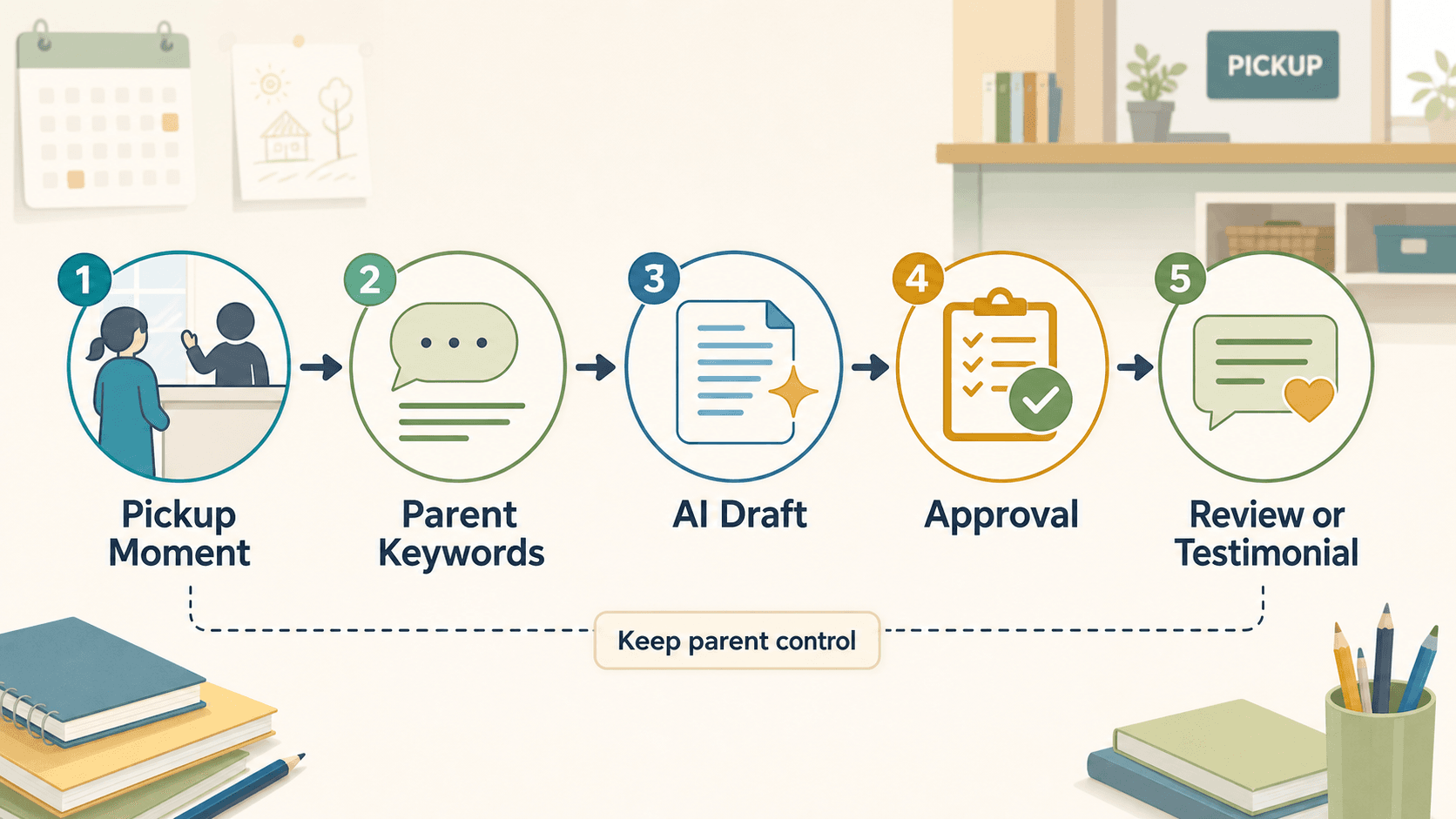
For an education center, the QR workflow should feel like a feedback invitation, not a public-review trap. The parent should be able to choose whether the feedback becomes a Google review, a testimonial, a social proof quote, a private note, or a staff improvement signal.
Turn parent keywords into useful proof
The best parent feedback usually contains specific moments. A parent may not start with a polished sentence, but they can choose or write keywords that describe the experience.
Good education-center keyword categories include:
| Feedback area | Parent keyword examples | How it can be reused |
|---|---|---|
| Student experience | confident, excited, focused, motivated, less anxious | Review draft, testimonial, parent FAQ |
| Instructor quality | patient, clear, encouraging, structured, attentive | Website proof, instructor intro, social post |
| Program design | hands-on, organized, challenging, creative, age-appropriate | Enrollment page, class description, flyer |
| Parent experience | clear updates, easy scheduling, responsive, welcoming | Google review, operations improvement |
| Outcome signals | practiced more, finished a project, asked to return | Testimonial, follow-up email, program story |
| Improvement notes | needs more reminders, schedule issue, unclear homework | Internal service follow-up |
This keyword step matters because it keeps the feedback rooted in the parent's experience. Instead of asking AI to invent a review from a blank prompt, the workflow begins with what the parent actually noticed.
That is where an AI-assisted draft can help. A parent may choose "patient instructor," "child felt more confident," and "clear progress update." The draft can turn those inputs into a plain-language review the parent can edit:
The instructor was patient and explained my child's progress clearly after class. My child left feeling more confident and wanted to keep practicing at home.
That kind of draft is useful because it is specific, short, and based on the parent's selected inputs. It should still be reviewed by the parent before anything is posted or reused.
Keep public reviews, testimonials, and private feedback separate
Not every useful comment should become a public review. Education centers should separate feedback into different lanes so parents are not pushed into sharing more than they intended.
A healthy feedback system has at least four paths:
| Feedback path | Best use | Important boundary |
|---|---|---|
| Public review | Google Business Profile, Yelp, or another review platform | Parent controls the review; do not reward only positive reviews. |
| Testimonial | Website, brochure, enrollment page, landing page | Get permission and keep context accurate. |
| Social proof snippet | Social caption, email, community update | Avoid identifying student details unless approved. |
| Private feedback | Staff coaching, curriculum improvement, service recovery | Do not publish without consent. |
Google's contributed content policy is clear that review content should reflect genuine experiences and should not be fake, copied, or manipulated. FTC endorsement guidance also expects endorsements and testimonials to reflect honest opinions and avoid misleading presentation. For a local education business, that means a parent quote should stay close to what the parent meant, and any reuse should not imply a guaranteed result for every child.
This does not need to make the process complicated. A simple permission question can prevent most problems:
May we use a short version of this feedback in our website or social content? We can keep your name private or use first name only, based on your preference.
The parent can say yes, no, or private only. The center should respect that choice.
Where Vibpost fits in the education-center workflow
Vibpost is an AI marketing assistant for local businesses that uses a smart review QR code workflow to help customers turn real experiences into review drafts, social posts, testimonials, and video scripts. For education centers, the same workflow can help turn parent moments into reusable proof without asking staff to become full-time marketers.
Inside Vibpost, the smart review QR code workflow is called a Seeding Code. In plain terms, an education center can use it to guide parents from a real class or pickup moment into a structured feedback flow:
- The center sets up store or program information and parent-friendly experience keywords.
- A parent scans after class, pickup, a trial lesson, or a progress conversation.
- The parent selects keywords that match the real experience.
- Vibpost helps generate a review draft, testimonial, social post, or video script based on those inputs.
- The parent or business reviews the content before it is published or reused.
The useful part is not only the AI writing. The useful part is the workflow. A parent does not have to start from a blank box, and the center does not have to rely on staff remembering every compliment at the end of the day.
For small education teams, Vibpost can also help standardize what to ask. A tutoring center, music school, language program, STEM camp, or after-school enrichment center can keep the feedback flow consistent while still letting each parent describe their own experience.
What education centers should measure in week one
Do not judge a parent feedback workflow by review count alone. A new workflow should be measured by whether it fits the center's real operations and whether parents feel comfortable using it.
In the first week, track simple operational signals:
- How many parents saw the feedback prompt?
- How many scanned or opened the feedback flow?
- Which pickup, checkout, or follow-up moments produced the most responses?
- Which keywords did parents choose most often?
- How many drafts did parents approve, edit, or discard?
- How many comments stayed private?
- Did staff remember when and how to invite feedback?
- Did any feedback reveal service issues that should be fixed?
This keeps the test honest. If many parents open the form but few finish it, the prompt may be too long. If parents leave private comments but not public reviews, the center may still be learning valuable service information. If staff forget to mention the card, the issue may be workflow placement, not parent willingness.
After one week, improve one thing at a time. Change the sign wording. Move the card closer to pickup. Add a follow-up message after trial lessons. Shorten the prompt. Adjust the keyword list. The goal is a repeatable habit, not a one-time review campaign.
Common mistakes to avoid
Education centers should avoid any feedback practice that makes parents feel pressured, misled, or exposed.
Do not:
- Offer rewards only for positive reviews.
- Ask parents to write about a child in a way that reveals private information.
- Copy private parent messages into public marketing without permission.
- Rewrite a parent's comment so strongly that it changes the meaning.
- Ask staff to screen out unhappy parents before giving them a review link.
- Promise that more reviews will guarantee rankings, enrollment, or revenue.
- Use AI to invent parent stories, student outcomes, or testimonials.
Do:
- Ask close to a real class, pickup, trial lesson, or progress moment.
- Let parents choose whether feedback is public or private.
- Use prompts that help memory rather than script praise.
- Keep student details limited and consent-based.
- Reuse parent feedback only in the context the parent approved.
- Treat negative or mixed feedback as service information, not a marketing failure.
The safest workflow is also the most useful one: real parents, real moments, clear permission, and parent control.
FAQ
Can an education center ask parents for Google reviews?
Yes. Education centers can ask parents for reviews and can share a review link or QR code. The request should be neutral, should not require a positive review, and should not offer discounts, gifts, or other rewards in exchange for reviews.
Should parents write the review themselves?
Parents should stay in control of what is published. AI can help turn parent-selected keywords or notes into a draft, but the parent should be able to review, edit, reject, or publish the content based on their real experience.
Can parent feedback become a website testimonial?
Yes, when the parent gives permission and the testimonial is not misleading. Keep the quote accurate, avoid implying guaranteed student outcomes, and be careful with student names, photos, school details, or private learning information.
What if feedback is negative?
Negative or mixed feedback should go into service recovery before marketing. A private complaint about scheduling, communication, class fit, or instructor style can help the center improve. Do not hide unhappy parents from review options as a way to shape only positive public feedback.
Is Vibpost only for restaurants and retail stores?
No. Vibpost is designed for local businesses with real customer moments, including education centers, tutoring programs, music schools, enrichment studios, salons, spas, restaurants, cafes, gyms, pet shops, and retailers. For education centers, the fit is strongest when parent trust, referrals, reviews, and visible proof matter to enrollment decisions.
A better parent feedback habit
Parent feedback should feel like part of the education center's care process, not a last-minute marketing push. Ask when the experience is fresh. Help parents remember what stood out. Keep them in control. Protect student privacy. Reuse only what is approved and useful.
When that habit becomes repeatable, an education center can turn everyday parent conversations into reviews, testimonials, social proof, staff learning, and clearer trust signals for the next family deciding whether to visit.