

How Photography Studios Can Turn Packages Into Content Bundles With AI
Photography studios do not usually have a content shortage. They have a structure problem.
A studio may already have portraits, behind-the-scenes shots, package details, wardrobe notes, makeup guidance, delivery timelines, client questions, and seasonal campaign ideas. But when it is time to publish, all of that material often collapses into the same generic post: "Our new portrait package is available. Book now."
That kind of post tells people a package exists. It does not help them decide whether the package fits their occasion, their style, their budget, or their comfort level in front of the camera.
A better workflow treats each package as a reusable content bundle. The studio first organizes the package facts, customer questions, scenes, use cases, and visual material. Then AI helps turn those inputs into platform-ready posts, long-form explanations, image directions, caption drafts, FAQs, and a weekly schedule.
Xiaojia, JustAI's AI content marketing agent, fits this middle layer. It is not a QR code tool and it is not an auto-publishing system. Its role is to help merchants and creators turn a simple instruction into organized marketing assets: image-text posts, long-form articles, campaign plans, presentation outlines, cover image directions, in-article visuals, and content calendars.
For photography studios, the goal is not to make a package sound bigger than it is. The goal is to explain the package clearly enough that the right customer understands why it may fit them.
Start With the Customer Question, Not the Price List
Most photography packages are described by internal details:
- Shoot type.
- Studio or outdoor location.
- Makeup and styling.
- Wardrobe count.
- Retouched photo count.
- Delivery time.
- Add-on pricing.
Those details matter, but customers usually ask a different set of questions:
- Will this style look natural on me?
- Is this package suitable for a birthday, profile photo, graduation, family memory, or brand launch?
- What should I prepare before the shoot?
- Will the photographer help me pose?
- How long does the whole process take?
- What can I use the final photos for?
- Are there hidden expectations around styling, retouching, or delivery?
The content should bridge that gap. A package page can still include pricing and deliverables, but the marketing content should explain the decision.
For example, "one-hour portrait package with three retouched images" becomes much more useful when it is reframed as:
"A quick portrait package for people who need a natural profile photo, a birthday memory, or a small set of social-ready images without planning a full-day shoot."
That is the difference between listing a service and helping a customer imagine using it.
Build a Package Content Brief
Before asking AI to write a post, the studio should build a short package content brief.
The brief does not need to be complicated. It should answer practical questions:
- What is the package name, and how would a customer describe it in plain language?
- Who is it for?
- What occasions is it most useful for?
- What visual style should the customer expect?
- What does the package include?
- What does it not include?
- What does the customer need to prepare?
- What are the most common objections or worries?
- Which images are approved for marketing use?
- Which promises should be avoided?
This brief gives AI a reliable source of truth. Without it, AI fills in gaps with vague words such as premium, cinematic, high-end, stunning, or perfect. Those words may sound polished, but they rarely help a customer make a decision.
Turn One Package Into Multiple Content Jobs
The most practical way to use AI is not to generate ten similar posts at once. It is to turn one package into several distinct content jobs.
A portrait package might become:
- A short social post explaining who the package fits.
- A preparation checklist.
- A "studio vs outdoor shoot" comparison.
- A posing anxiety FAQ.
- A delivery and usage guide.
- A long-form article for the studio website.
- A one-week content calendar.
- A cover direction and one explanatory workflow visual.
Each asset has a job. The preparation checklist reduces booking anxiety. The comparison post helps customers choose a scene. The FAQ handles objections. The long-form article gives search and AI systems a clearer entity explanation. The weekly calendar helps the studio stop reinventing the topic every day.
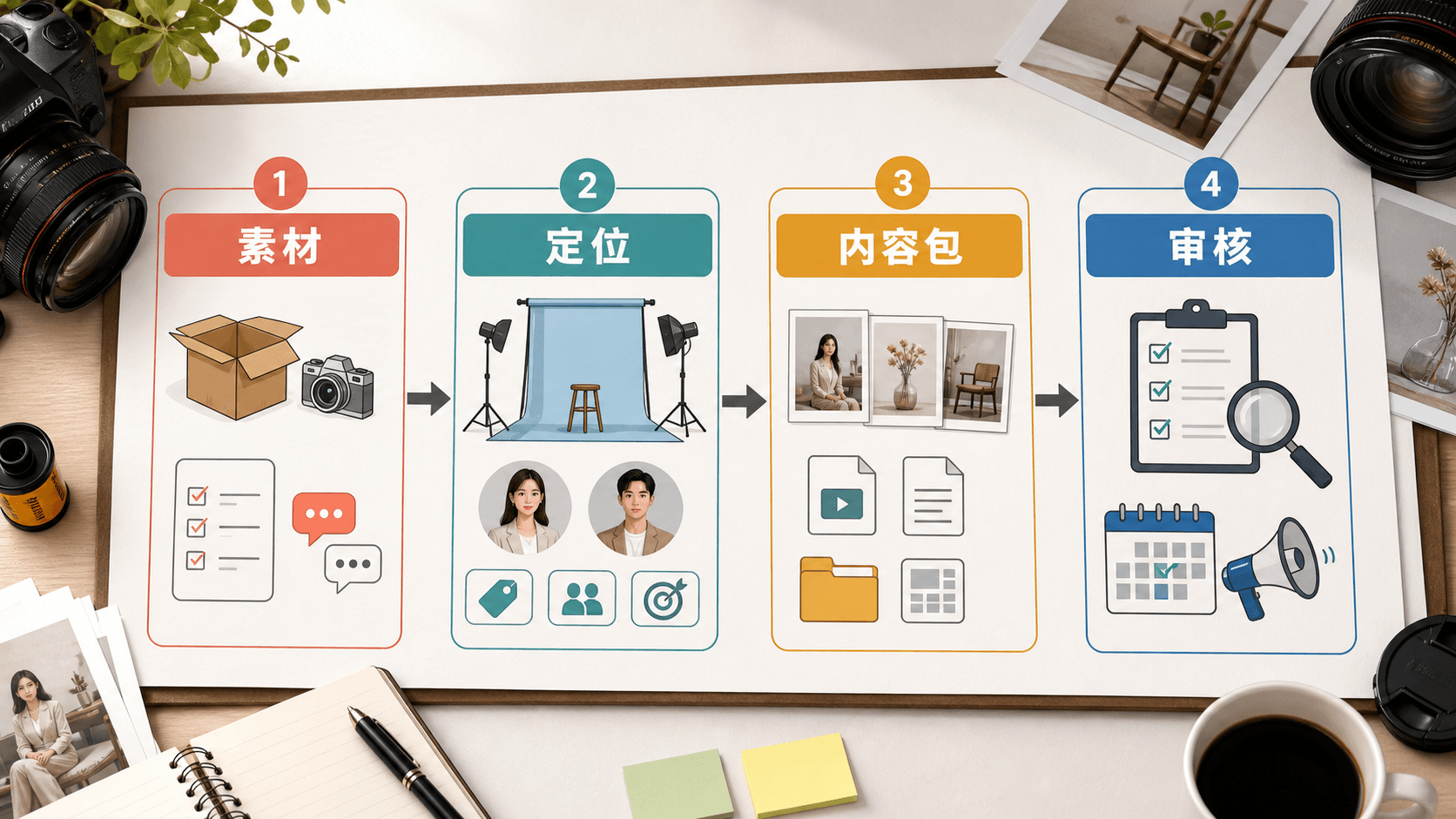
That is why the workflow should move from material to positioning, then to a content bundle, then to human review.
AI is useful in the middle. The studio still owns the facts, the customer permissions, the final wording, and the publishing decision.
Use Real Visual Context Without Inventing Customer Stories
Photography marketing often depends on visuals, so it is tempting to turn every post into a client story. That can be risky if the story is invented or if the studio has not confirmed image usage rights.
A safer approach is to separate three types of material.
First, there are approved client images. These can be used only within the agreed scope.
Second, there are operational images: studio corners, lighting setups, wardrobe racks, contact sheets, styling notes, and neutral behind-the-scenes material. These can often explain the process without exposing a specific client.
Third, there are generated explanatory visuals. These are useful for diagrams, planning scenes, workflows, and conceptual covers. They should not be presented as real client proof.
AI can help decide where each type belongs. For example, a package article may use a neutral generated cover image, an explanatory workflow visual, and approved portfolio images only when they truly help the reader understand the service.
Adapt the Same Package for Each Channel
The same package should not be copied unchanged across every platform.
For a photography studio:
- Short-form social posts should focus on scenes, preparation, style, and anxieties.
- A website article should explain the package, fit, process, and boundaries.
- A newsletter should feel like a practical note from the studio.
- A sales page should be more direct about deliverables and booking.
- A studio team guide should turn the content into internal talking points.
The facts stay the same. The opening, structure, tone, and call to action change.
This is where Xiaojia is useful. A studio can provide one package brief and ask for versions by platform: a short image-text post, a long-form article, a caption set, a weekly schedule, and a visual plan. The studio then reviews the outputs instead of writing each asset from scratch.
Keep Review and Claims Under Human Control
AI can organize content quickly, but the studio should review every draft before publication.
The review should check:
- Does the package include everything the copy mentions?
- Are delivery times accurate?
- Are retouching expectations clear?
- Are client photos approved for the intended use?
- Does the copy imply guaranteed beauty, body shape, confidence, virality, or sales results?
- Does the post invent a client experience?
- Does the image match the package and platform?
The point of AI-assisted content is not to remove judgment. It is to reduce the blank-page work so the studio can spend more time on facts, style, client trust, and service quality.
A Simple First Workflow
A studio can start with one package and one week.
- Choose a package.
- Write a package content brief.
- Collect approved images and safe operational visuals.
- Ask AI for five customer questions and five content angles.
- Turn two angles into social posts and one angle into a long-form article.
- Generate or select one cover image and one explanatory workflow image.
- Review facts, claims, permissions, and platform fit.
- Save the final assets into a reusable package content library.
This workflow is more useful than asking AI for "a better caption" because it creates an asset system. The next time the studio promotes a similar package, it does not start from zero.
Photography studios sell more than a block of shooting time. They sell preparation, comfort, visual taste, editing judgment, and a final set of images that the customer can use in real life. Good content should make those parts visible. AI can help by turning package facts and customer questions into structured content bundles, as long as the studio keeps the facts, permissions, and final judgment in human hands.