

How Restaurants Can Ask for Google Reviews at the Table Without Review Gating
Restaurants can ask for Google reviews at the table, but the request has to stay optional, neutral, and customer-controlled. The safe version is simple: ask real diners after a real experience, make the review path easy, invite honest feedback, and never filter for only happy customers, offer rewards, request specific wording, or stand over the guest while they post.
That distinction matters because a table-side review request can feel helpful or uncomfortable depending on how it is handled. A QR code on a check presenter may reduce friction. A server pressuring a guest for a five-star review before they leave the booth creates the opposite effect.
Google gives businesses ways to create a review link or QR code and says those can be shared on receipts, emails, chat interactions, and in-store displays. Google also draws a hard line around authenticity: reviews should reflect a genuine experience, and incentives for posting, changing, or removing reviews are treated as fake engagement under its Google Business Profile review guidance. For restaurants, the practical rule is clear: make it easy to leave an honest review, but do not try to control the rating.
Start with a real dining moment
The safest review request starts after a real signal from the guest, not before the meal has had time to happen. A diner who says the food was excellent, compliments the server, thanks the manager, or says they will come back has already given you a natural opening.
That does not mean you should only ask visibly happy diners. Selectively asking only satisfied customers can become review gating. The better approach is to make the review path available to all guests through table tents, receipts, check presenters, follow-up messages, or a small counter sign, then train staff to mention it lightly when the moment is appropriate.
For example, after a guest says, "That was one of the best meals we have had here," a server might say:
Thank you, that means a lot. If you want to share that experience publicly, the code on your receipt makes it easy. No pressure at all. Honest feedback helps other guests know what to expect.
That wording does four important things. It thanks the customer first. It explains why the review matters. It points to a simple path. It does not ask for a five-star rating or tell the guest what to write.
The request should feel like hospitality, not extraction.
Review gating is about filtering, pressure, and control
Review gating happens when a business tries to route only positive customers to public reviews while diverting negative or uncertain feedback somewhere else. A restaurant does not need a complicated software setup to create the problem. A simple "If you loved us, leave a Google review; if not, talk to us privately" message can already send the wrong signal.
Google's Maps user-generated content policy says reviews should reflect genuine experiences and warns merchants not to discourage negative reviews, selectively solicit positive reviews, pressure users to write reviews while on the premises, or request specific content in the review. The same policy allows businesses to solicit genuine reviews without incentives or influence over the rating or content.
For a restaurant, that means these patterns are risky:
- Asking only guests who praised the meal to scan the review code.
- Showing one code for happy diners and another feedback form for unhappy diners.
- Offering dessert, a discount, loyalty points, or a giveaway entry in exchange for a review.
- Asking guests to write "best burger in town" or mention a server by name.
- Requiring staff to collect a certain number of reviews per shift.
- Waiting beside the table while the customer posts.
- Asking a guest to remove or change a negative review for a reward.
The safer pattern is more direct:
- Make the review option visible to all guests.
- Ask for honest feedback, not positive feedback.
- Let the customer decide whether to post.
- Let the customer choose the rating and wording.
- Give unhappy guests a private support path without blocking them from leaving a public review.
The restaurant's job is to reduce friction, not to engineer praise.
A table-side workflow that keeps customers in control
A good table-side review workflow has two lanes: one public review lane and one service recovery lane. Both should be open. Neither should be used to manipulate the other.
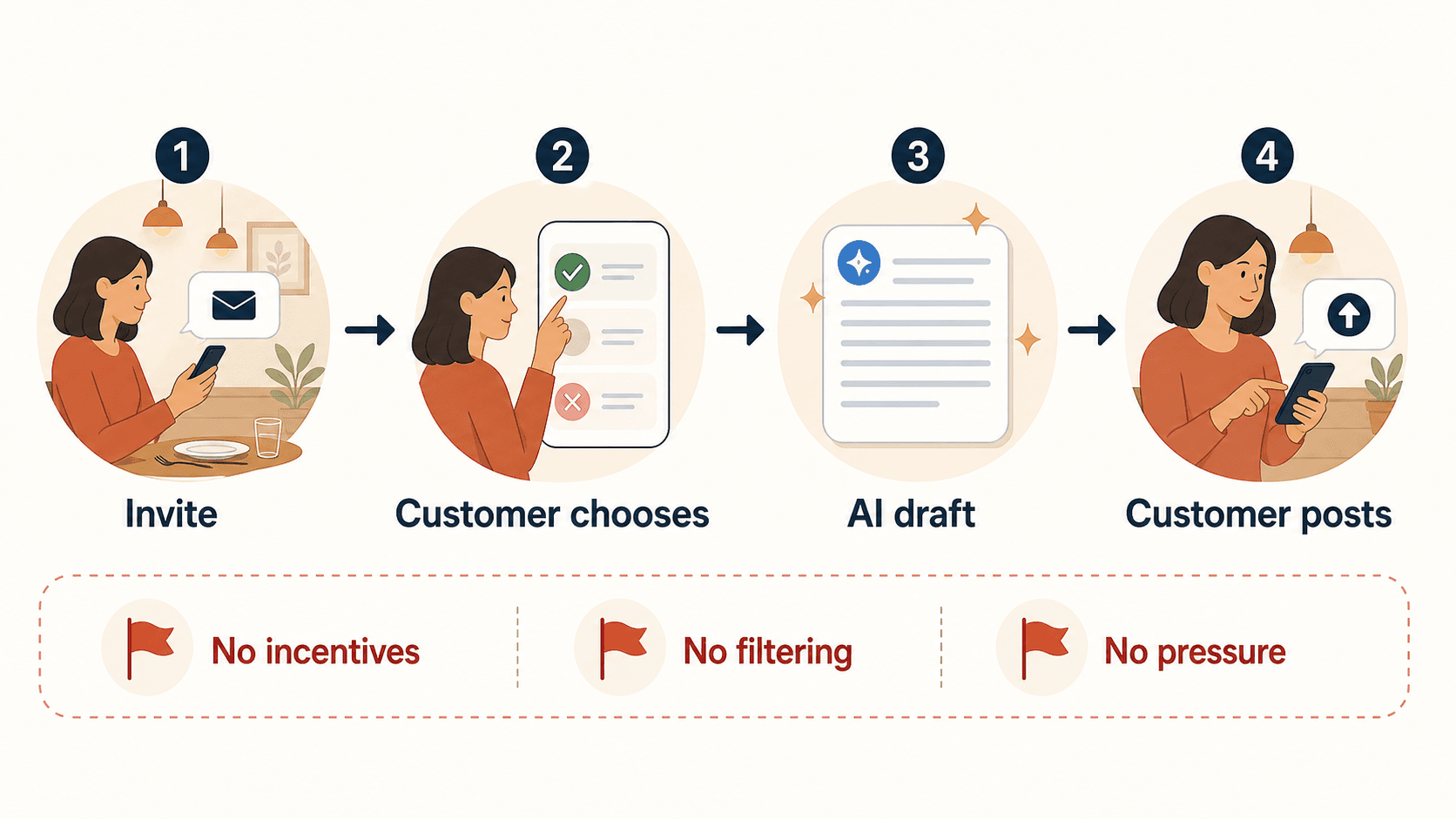
Here is a practical setup for a restaurant dining room.
1. Put the review path where it belongs
Use places that fit the natural end of the meal:
- Check presenters
- Printed receipts
- Takeout bag inserts
- Counter cards near pickup
- A small table tent near the end of service, not in the center of the dining experience
- A follow-up email or SMS if the guest opted into messages
The QR code or link should open the correct Google Business Profile review path for that location. For multi-location restaurants, each location should have its own link or code. Do not send every diner to a corporate profile if the guest visited a specific branch.
The copy should be neutral:
Share your honest feedback
Tell future guests about your visit
Leave a review if you would like
Avoid copy like:
Give us five stars
Loved your meal? Review us here
Leave a positive review for 10% off next time
The first set invites feedback. The second set tries to influence the outcome.
2. Train staff to ask lightly
Servers should not be asked to "get reviews." They should be trained to make guests aware of the option.
A good staff script sounds like this:
If you would like to leave feedback, there is a review link on the receipt. We read every review, and honest feedback helps us improve.
Or, after a specific compliment:
I am glad you enjoyed the pasta. If you ever want to share that, the code on the receipt will take you to our review page. Totally optional.
The staff member should then move on. The guest should not feel watched, graded, or obligated.
This is especially important at the table. A restaurant is a social environment. Guests may say yes just to avoid awkwardness. If they feel cornered, the request can hurt the experience it was meant to capture.
3. Give unhappy guests help without hiding the review option
Restaurants should absolutely handle complaints in the moment. If a guest says the steak was overcooked or the wait was too long, the right response is service recovery: listen, apologize when appropriate, involve a manager, and fix what can be fixed.
The mistake is turning that recovery path into a filter that blocks public reviews.
Do not say:
If anything was wrong, do not review us. Tell the manager instead.
A better approach is:
I am sorry we missed the mark. Let me get the manager so we can help. You are always welcome to share honest feedback, but I would like to try to fix this now if we can.
That respects both goals: solve the guest's immediate problem and preserve the customer's right to leave honest feedback.
4. Use AI only to lower writing friction
Some guests know what they want to say but do not want to write from a blank box. AI can help if it is used as a drafting aid based on the customer's real experience, not as a review factory.
For example, a customer might choose experience-based keywords such as "quick service," "friendly staff," "great ramen," or "good for families." AI can help turn those customer-selected signals into a draft the customer can edit, delete, or ignore.
That is where a tool like Vibpost fits. Vibpost is an AI marketing assistant for local businesses that uses a smart review QR code workflow, called a Seeding Code inside the product, to help customers turn real experiences into review drafts, social posts, testimonials, and video scripts. The customer should remain in control of what is posted.
The important boundary is not whether AI is involved. The boundary is whether the review still reflects a real customer experience and whether the customer controls the final wording and decision.
What restaurants should say, and what they should avoid
The easiest way to keep a review request safe is to separate gratitude from pressure.
Use language like this:
| Situation | Better wording | Why it works |
|---|---|---|
| Guest compliments the meal | "Thank you. If you want to share that publicly, the review link on your receipt makes it easy." | It responds to a real compliment and keeps the action optional. |
| Guest is paying at the table | "There is a review code on the receipt if you would like to leave honest feedback." | It is neutral and does not request a rating. |
| Guest had a problem | "I am sorry about that. Let me help fix it now, and you are always welcome to share honest feedback." | It supports service recovery without suppressing reviews. |
| Regular customer says they love the place | "That means a lot. Reviews help new guests know what to expect if you ever want to share it." | It gives a reason without pushing. |
Avoid language like this:
| Risky wording | Why to avoid it |
|---|---|
| "Can you leave us five stars?" | It tries to influence the rating. |
| "If anything was wrong, tell us privately instead." | It can create a filter against negative feedback. |
| "Show me the review when you are done." | It creates pressure on the premises. |
| "Mention my name in the review." | It requests specific content. |
| "Leave a review and get a discount." | Incentives for reviews are a major policy risk. |
This does not mean staff have to sound robotic. The request can still be warm. It just needs to protect the customer's choice.
Incentives are not worth the risk
Offering a reward for reviews may feel like an easy way to increase volume, but it creates both platform and legal risk. Google treats incentives such as free or discounted goods or services in exchange for posting, changing, or removing reviews as prohibited fake engagement. The FTC's Consumer Reviews and Testimonials Rule, which went into effect on October 21, 2024, also addresses deceptive and unfair conduct involving reviews and testimonials, including compensation or incentives conditioned on reviews expressing a particular sentiment.
For restaurants, that means these offers should stay out of the review request:
- "Leave a five-star review and get a free appetizer."
- "Show us your review for 10% off."
- "Review us and enter a giveaway."
- "Change your review and we will comp your next meal."
- "Post a positive review to unlock loyalty points."
You can still thank customers. You can still provide great service. You can still invite honest reviews. Just do not tie the review itself to a reward.
If you want to run a customer appreciation campaign, keep it separate from reviews. Give the offer regardless of whether someone reviews the restaurant, and do not condition the benefit on the rating, wording, or posting action.
Where Vibpost fits in a restaurant review workflow
Vibpost is useful when the restaurant's problem is not just "we need a QR code." A static QR code can open a review page, but it does not help the customer remember what to say, turn feedback into reusable social proof, or create a repeatable workflow for staff.
Vibpost is better suited for the missing middle between the dining moment and the public proof:
- The restaurant places a smart review QR code in the right part of the customer journey.
- The customer scans when they choose to.
- The customer selects keywords that match their actual experience.
- Vibpost helps turn those inputs into a review draft, social post, testimonial, or video script.
- The customer or business reviews the output before anything is used publicly.
For a small restaurant without a marketing team, that workflow can make customer proof less random. The goal is not to manufacture reviews. The goal is to capture real moments before they disappear and give customers an easier way to express them.
Vibpost's approved product facts are useful in this context: it is designed for local businesses, supports AI-assisted review generation and video scripts, and serves merchants that need a practical feedback-to-content workflow rather than another heavy dashboard. But the restaurant should still use it with the same review boundaries: genuine experience, customer control, no incentives, no filtering, and no pressure.
A one-week restaurant test
Before rolling the workflow across every table, test it for one week at one location or one shift pattern. Keep the test focused on process quality, not just review count.
Track these signals:
- Where the review path is placed: receipt, check presenter, table tent, follow-up message, or pickup counter.
- How staff mention it: exact phrasing, timing, and whether the guest seems comfortable.
- How many guests scan or open the link.
- How many customers start but do not finish.
- What keywords or themes customers mention.
- Whether any guest complains that the request felt pushy.
- Whether managers can respond to negative feedback constructively.
- Which customer comments can be reused as testimonials or social proof with proper permission.
The best review workflow is not the one that creates the most pressure. It is the one staff can repeat naturally while guests still feel respected.
After the test, adjust one variable at a time. If no one scans the QR code, the placement may be weak. If guests seem uncomfortable, the staff script may be too direct. If reviews are thin, customers may need better prompts that help them remember real details without telling them what to say.
FAQ about table-side Google review requests
Can a restaurant put a Google review QR code on the table?
Yes, a restaurant can use a review QR code or link, and Google explains how businesses can create and share a Google link or QR code to request reviews. The safer setup is to keep the message neutral, invite honest feedback, and avoid pressuring guests while they are still on the premises.
Is it review gating if staff ask only happy customers?
It can be. If staff are trained to ask only guests who seem satisfied while unhappy guests are routed away from public reviews, that creates a selective solicitation problem. A better approach is to make the review path generally available and let any customer choose whether to use it.
Can restaurants ask for five-star reviews?
Restaurants should ask for honest reviews, not five-star reviews. Asking for a specific rating can make the request feel manipulative and may conflict with platform expectations around genuine, unbiased reviews.
Can a restaurant offer a discount for a Google review?
No. Do not offer discounts, free food, loyalty points, giveaways, or other rewards in exchange for a review, a positive review, a review change, or removal of a negative review. Keep customer appreciation offers separate from review requests.
Can AI help a customer write a review?
AI can help lower writing friction if the customer provides real experience-based input and controls the final text. It should not invent experiences, write reviews on behalf of customers, force positive wording, or publish without customer review and consent.
Make the ask easy, then step back
A restaurant review request works best when it respects the dining experience. Ask at the right moment, use neutral language, provide a simple review path, and let the guest decide what happens next.
For a restaurant owner, the goal is not to squeeze more praise out of the table. The goal is to make honest customer proof easier to capture. When the workflow is built around real experiences, customer control, and light staff behavior, review requests can support trust instead of eroding it.