

How Salons Can Use Vibpost After Appointments
Salons can use Vibpost after appointments to turn fresh client feedback into review drafts, social posts, testimonials, and short video scripts while the service experience is still easy to remember. The best moment is not days later, when the client has moved on. It is the quiet minute after checkout, after a color consultation, haircut, treatment, blowout, manicure, brow service, or spa add-on, when the client can still describe what felt helpful.
Vibpost is an AI marketing assistant for local businesses. For salons, it uses a smart review QR code workflow, called a Seeding Code inside the product, to help clients scan, choose experience-based keywords, review an AI-assisted draft, and decide what they want to publish or share.
That last part matters. The goal is not to make up praise or pressure every client into a five-star review. The goal is to make it easier for real clients to express real experiences, then help the salon reuse that proof in responsible ways.
Why the after-appointment moment matters
The strongest salon feedback usually appears before any software is involved.
A client says, "This color feels much softer than last time." Another says, "I was nervous about going shorter, but this shape is easier to style." Someone at checkout mentions that the stylist explained the aftercare clearly. A first-time client says the front desk made them feel comfortable.
Those comments are valuable, but most disappear before they become public proof.
Once the client leaves, three things happen:
- The details get less specific.
- The review request feels like another errand.
- The client starts from a blank text box.
A salon does not need a more aggressive review request. It needs a lighter way to capture the client's own words while the memory is fresh.
That is where a smart review QR code workflow can help. Instead of asking, "Can you leave us a review?" and leaving the client to write from nothing, the salon can help the client choose what actually stood out.
The scan-to-proof workflow for salons
The workflow should feel simple enough for a receptionist, stylist, or manager to explain in one sentence:
"If you want to share feedback from today's appointment, you can scan this, choose what stood out, and edit the draft before anything is shared."
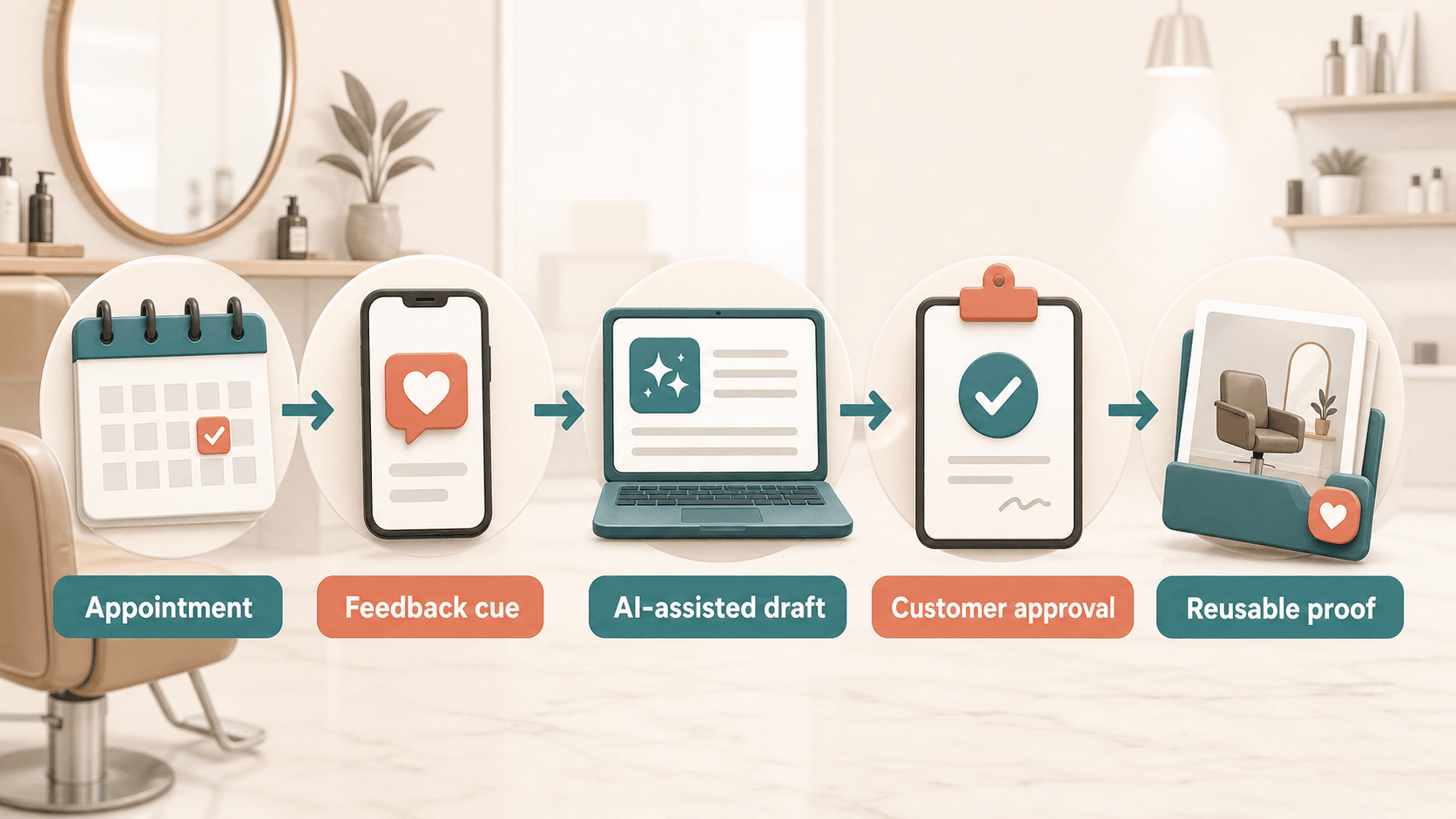
Here is the practical flow.
1. Place the prompt where the appointment naturally ends
Good placement depends on the salon's service style.
For a hair salon, the prompt may sit near checkout, on an aftercare card, or in a follow-up message. For a nail salon, it may appear at the drying station or payment counter. For a spa or brow studio, it may fit better in a post-visit thank-you message, especially if the client needs privacy after the service.
The placement should never feel like a gate the client must pass through. It should feel optional and easy.
Useful locations include:
- Reception counter cards.
- Appointment follow-up messages.
- Aftercare cards.
- Stylist station cards used after the service is finished.
- Receipts or booking-confirmation follow-ups.
Avoid asking while the client is still in the chair and may feel watched. If the request feels pressured, the feedback becomes less useful and the experience becomes less comfortable.
2. Let the client choose experience cues
The client should not start with a blank page. Vibpost can help salons use short, experience-based keywords that match the appointment.
Good salon cues include:
- Color consultation.
- Scalp comfort.
- Natural shape.
- Easy styling tips.
- On-time appointment.
- Front desk welcome.
- Clean space.
- Product recommendation.
- First-time visit.
- Special occasion styling.
- Gentle service.
- Clear aftercare.
These are not prewritten compliments. They are memory cues. "Easy styling tips" helps a client remember what happened. "Best stylist ever" pushes too hard. "Clean space" is specific. "Perfect salon" is too broad.
The better the cue, the safer and more useful the draft becomes.
3. Ask for one human detail
A review draft is stronger when the client adds one detail in their own words.
The prompt can ask:
- What did the stylist explain clearly?
- What felt different from your last appointment?
- What made the service comfortable?
- What result were you hoping for today?
- What would you tell a friend who was booking the same service?
The client can answer with a short phrase. They do not need to write a full review. Vibpost can help organize the selected cues and short note into a cleaner draft, but the real substance should come from the client.
4. Use AI to organize, not invent
AI should sit in the middle of the workflow, not at the wheel.
For a salon, AI can help turn rough input into:
- A Google review draft.
- A testimonial draft.
- A short Instagram caption.
- A TikTok or Reels script idea.
- A private feedback summary.
- A reusable service note for the salon's marketing library.
But AI should not invent a client result, pretend to be the client, add a stylist's name if the client did not provide it, or turn neutral feedback into exaggerated praise.
A useful draft sounds like a cleaner version of the client's real experience. It does not sound like a sales page.
5. Keep client approval as the final step
Before anything becomes public, the client should be able to review, edit, ignore, or keep the feedback private.
This approval step protects both the client and the salon. It also improves quality. A client who can edit the draft is more likely to make it sound natural, remove anything inaccurate, and keep the review grounded in what actually happened.
What salons can create from one appointment
One appointment can support more than one kind of customer proof, but each format has a different job.
| Client input | Best output | Where it helps |
|---|---|---|
| "She explained what color would work with my hair" | Review draft | Google Maps, Yelp, or other review platforms |
| "The front desk made me feel comfortable as a new client" | Short testimonial | Website, booking page, service page |
| "I learned how to style the layers at home" | Social caption | Instagram, TikTok caption, local social post |
| "This was my first appointment before a wedding weekend" | Video script idea | Short-form service story or stylist education clip |
| "The room was clean and quiet" | Private feedback tag | Service quality review and staff training |
The salon should not force every client into every output. A public review, a testimonial, and a social post do not carry the same expectations. The client should know what they are approving and where it may be used.
For small salons without a full-time marketer, this is the real advantage. The team does not need to invent content from scratch every week. It can start with real appointment moments, collect client-approved language, and reuse that proof in formats that fit the channel.
The trust boundary salons should not cross
Review workflows work only when the feedback is genuine.
Google's Maps contribution policy says reviews should reflect genuine experiences and warns businesses not to offer incentives for reviews, discourage negative reviews, selectively ask only happy customers, pressure users on premises, or request specific content. The FTC's guide for marketers also cautions businesses not to ask only customers expected to leave positive reviews and not to condition incentives on positive sentiment.
For salons, the practical rule is simple:
Ask for honest feedback. Do not ask for a specific rating.
A safer request:
"If you want to share feedback from today's appointment, you can choose what stood out and edit the draft before posting."
A risky request:
"Scan this and leave us a five-star review before you go."
Another safer request:
"Your feedback can be public or private. Please only share what reflects your real visit."
A risky request:
"If you loved your hair, leave a review. If something was wrong, tell us privately."
The second version filters unhappy clients away from public review channels. That can become review gating. A better workflow gives every client a fair path and lets the salon handle concerns respectfully.
Where Vibpost fits in the salon workflow
Vibpost is useful when a salon has real client satisfaction but does not have a consistent way to turn that satisfaction into visible proof.
It can help with four jobs:
- Create a smart review QR code for the salon's appointment journey.
- Let clients choose service-specific keywords after the appointment.
- Turn client-selected inputs into AI-assisted review drafts, testimonials, social posts, or video scripts.
- Help the salon reuse client-approved proof without starting from a blank page.
This is different from a plain QR code generator. A plain QR code opens a destination. Vibpost helps with the missing middle: the fresh client moment, the experience cue, the draft, the client approval step, and the reusable proof afterward.
It is also different from a generic AI writing tool. A generic AI prompt starts with the business asking the model to write something. Vibpost starts with the client experience and uses AI to organize what the client actually selected or said.
That distinction is especially important for salons. Beauty and wellness content can easily become exaggerated. A safer workflow should help clients explain comfort, service, clarity, atmosphere, styling advice, and appointment experience without inventing results or making promises.
A first-week setup for a salon
Start small. A salon does not need to redesign its entire marketing process in one day.
Day 1: Choose the appointment moments
Pick two places where a feedback prompt would feel natural.
For example:
- After checkout for haircut and color clients.
- Follow-up message for spa, brow, or treatment clients.
Do not place prompts everywhere. Too many prompts make the workflow feel like a campaign instead of a service follow-up.
Day 2: Build the keyword list
Create 10 to 15 client-friendly cues.
Use language clients already say:
- "Easy to style" instead of "maintenance optimization."
- "Listened to what I wanted" instead of "consultative excellence."
- "Relaxing shampoo" instead of "premium sensory service."
- "Clean and calm space" instead of "elevated atmosphere."
Keep the cues concrete and neutral. They should help memory, not push praise.
Day 3: Train staff on one sentence
Staff should not deliver a long script.
Use one sentence:
"If you want to share feedback, this lets you choose what stood out from today's appointment and edit the draft before anything is posted."
That sentence explains the value and the control.
Day 4: Review the first drafts
Look at the drafts for tone and accuracy.
Ask:
- Do the drafts sound like real clients?
- Are they too polished?
- Do they add claims the client did not provide?
- Do they mention a stylist name only when the client chose to include it?
- Do they avoid guaranteed results?
If the drafts feel too promotional, adjust the cues and prompts.
Day 5: Reuse only what is approved
Once a client approves a testimonial or social proof line, save it in a simple content library.
Group proof by service type:
- Color.
- Cut.
- Styling.
- Nails.
- Brows.
- Spa.
- First-time client.
- Event preparation.
- Aftercare education.
This makes future marketing easier. When the salon writes a service page or social caption, it can pull from real client language instead of inventing generic claims.
Good salon prompts versus risky salon prompts
The prompt language matters as much as the QR code.
| Use this | Avoid this |
|---|---|
| "What stood out from your appointment today?" | "Tell everyone why we are the best salon in town." |
| "Choose any details that match your real visit." | "Pick the most positive things from your visit." |
| "You can edit or skip the draft." | "Please post this before you leave." |
| "Public or private feedback is both helpful." | "Leave a public review only if you loved it." |
| "What did your stylist explain clearly?" | "Mention your stylist by name in the review." |
Good prompts reduce friction without changing the client's opinion. Risky prompts try to steer the outcome.
What to measure without making fake growth claims
Salons should measure the workflow, not promise a result.
For the first week, track:
- How many clients saw the prompt.
- How many scanned or opened the flow.
- Which experience cues clients selected.
- How many drafts were edited.
- How many pieces of feedback stayed private.
- How many clients approved reusable testimonial or social proof language.
- Which services generated the clearest feedback.
This tells the salon whether the workflow fits the appointment journey. It also reveals what clients actually value. Maybe clients mention "listened to what I wanted" more than "fast appointment." Maybe aftercare tips generate better public comments than discounts. Maybe first-time clients need a softer follow-up than returning clients.
Those insights are useful even before the salon thinks about public reviews.
FAQ
Can salons ask clients for Google reviews after appointments?
Yes, salons can ask clients for honest reviews, but the request should not pressure clients, offer rewards for reviews, ask only happy clients, or tell clients what rating or wording to use. The safest workflow gives clients control and keeps the review based on their real appointment.
Should the QR code be shown before or after payment?
Usually after the appointment is complete and around checkout or follow-up. The client should not feel that payment, service quality, or staff attention depends on leaving feedback.
Can AI write the review for the client?
AI can help organize client-selected keywords and notes into a draft, but the client should stay in control. The draft should be editable, optional, and based on the client's real experience.
What if a client has negative feedback?
Do not hide the path. Let the client share honest feedback and give the salon a respectful way to respond. Negative or mixed feedback can reveal service gaps, and filtering it away from public channels can create trust problems.
Is Vibpost only for Google reviews?
No. Vibpost can help clients turn real experiences into review drafts, social posts, testimonials, and video scripts. For salons, that means one appointment moment can become customer proof for more than one channel when the client approves the use.
The useful habit is capturing the moment
Salons already create the moments that clients talk about: the consultation that calms a nervous first-time visitor, the stylist who explains how to maintain a new shape, the clean and welcoming space, the front desk handoff, the aftercare tip that makes the result easier to keep.
The hard part is not creating those moments. The hard part is capturing them before they disappear.
Vibpost gives salons a practical way to do that after appointments: scan, choose experience cues, generate an AI-assisted draft, let the client approve, and reuse the proof responsibly. The result is not louder marketing. It is a more repeatable bridge between real service and the trust future clients need before they book.