

How to Build a Google Review QR Code Workflow That Keeps Customers in Control
A Google review QR code workflow can help a local business ask for reviews without making customers feel pushed, filtered, or scripted. The safest version is simple: invite every real customer, make the scan optional, let the customer choose what to say, and never offer rewards for a positive review.
For restaurants, cafes, salons, spas, retail stores, gyms, and education centers, the QR code is only the entry point. The real workflow is what happens around it: when you ask, what language your staff uses, whether unhappy customers still have a fair path to speak, and whether AI helps customers express a real experience instead of manufacturing praise.
Google allows businesses to create a review link or QR code to request reviews, including on receipts, thank-you emails, chat interactions, and in-store displays. But Google also makes the boundary clear: reviews must reflect genuine experiences, and incentives for posting, changing, or removing reviews are prohibited under its Business Profile review guidance. The goal is not to steer only happy customers toward Google. The goal is to remove friction for any customer who wants to share an honest experience.
Start with customer control, not the QR code
The best review QR workflow starts with the customer's choice. A QR code can make the review path easier, but it should not make the customer feel watched, rewarded, rushed, or told what rating to leave.
That distinction matters because many review workflows fail in one of two ways. Some are too loose: the business prints a QR code, places it at the counter, and never knows whether anyone scans it. Others are too aggressive: staff ask for "five-star reviews," offer a discount, or only send the review link to customers who already gave positive private feedback.
A customer-controlled workflow sits in the middle. It gives every customer a fair invitation, then lets the customer decide:
- whether to scan
- whether to draft a review
- what keywords match their actual visit
- whether to edit the AI-assisted draft
- whether to post publicly, send private feedback, or do nothing
For a small business, this is more durable than chasing review volume. It builds a process your team can repeat without crossing into fake engagement, pressure, or review gating.
The five-part workflow
Use the QR code as one step in a broader feedback system. A strong setup has five parts: a real customer moment, a neutral invitation, customer-selected keywords, an editable draft, and a final approval step.
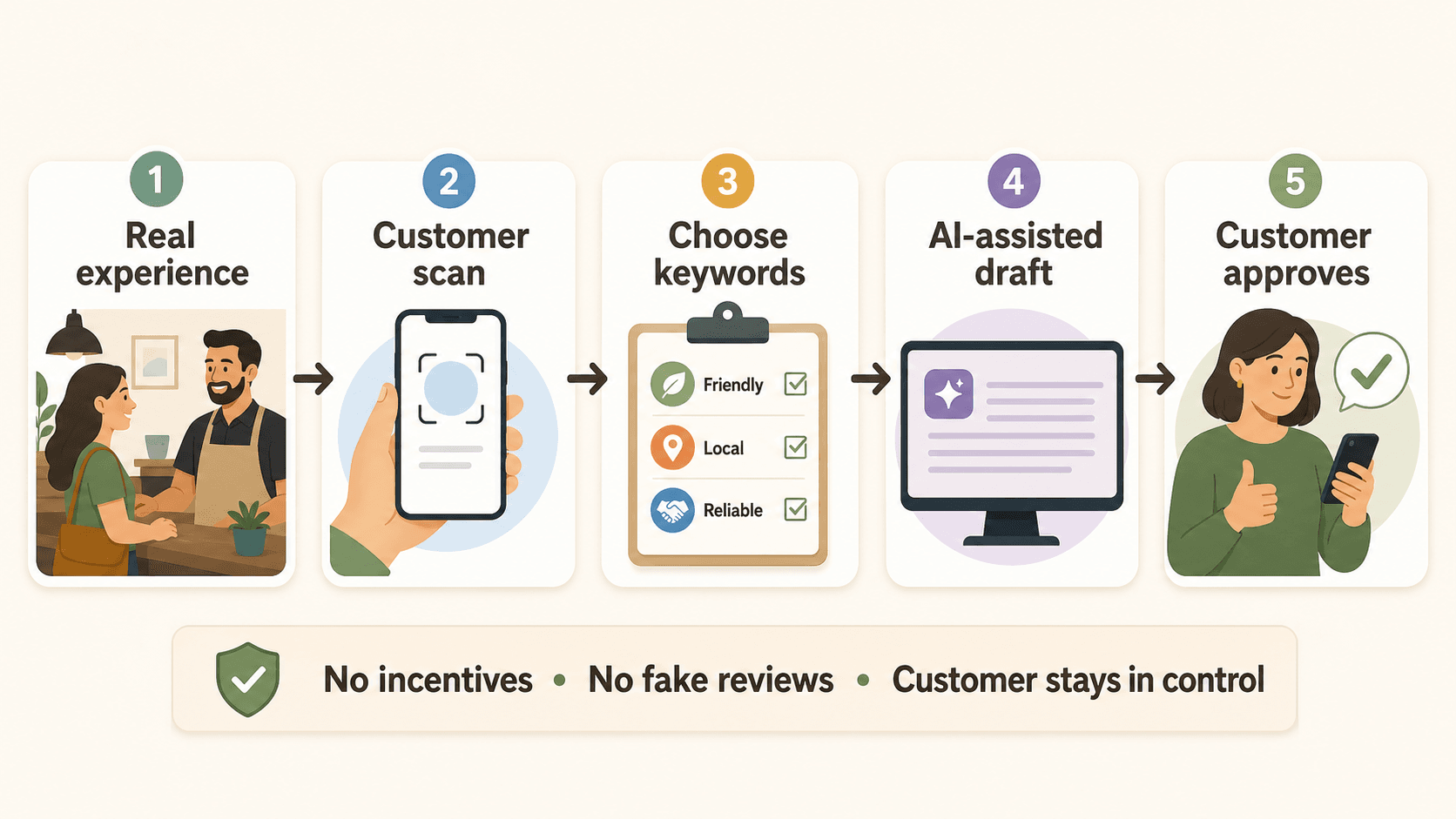
1. Pick the right customer moment
Ask near the moment when the customer's experience is still fresh, but not while they feel trapped in the interaction. Good moments include after checkout, in a thank-you message, on a receipt, after an appointment, or when a customer has already given a natural compliment.
For a restaurant, that might be after the meal, not while the server is hovering over the table. For a salon, it might be after the customer sees the final result and the front desk thanks them. For a gym, it might be after a milestone class or personal training session.
The point is to connect the ask to a real experience, not to create pressure.
2. Make the invitation neutral
Your request language should not pre-write the review or tell customers what rating to choose. Avoid lines like "Please leave us a five-star review" or "Mention our amazing staff." Use a neutral invitation instead:
If you have a minute, you can scan this code to share honest feedback about your visit. It helps other customers understand what to expect.
That wording does three useful things. It makes the action optional, it asks for honest feedback, and it explains why the review matters without promising a reward.
3. Let customers choose their own experience keywords
A blank review box is hard for many customers. They may have had a good experience but not know what to write. Customer-selected keywords solve that problem without dictating the review.
For example, a customer might choose:
| Business type | Useful keyword choices | What the customer still controls |
|---|---|---|
| Restaurant | friendly service, fresh ingredients, cozy atmosphere, quick lunch | The rating, review wording, and whether to post |
| Salon | careful consultation, clean space, color result, relaxing visit | The details they want to include or remove |
| Gym | supportive coach, beginner-friendly, clean equipment, class energy | Whether the review reflects one class or an ongoing membership |
| Retail store | helpful staff, product selection, gift advice, easy checkout | Whether to mention a product, staff interaction, or store visit |
The keyword step should help the customer remember real details. It should not force positive language, suppress complaints, or turn every response into the same polished review.
4. Use AI to draft, not decide
AI can help customers turn rough thoughts into a readable draft. It should not invent an experience, choose a rating, or post anything automatically.
This is where a workflow like Vibpost fits naturally. Vibpost is an AI marketing assistant for local businesses that uses a smart review QR code workflow, called a Seeding Code inside the product, to help customers turn real experiences into review drafts, social posts, testimonials, and video scripts. The customer starts from their own visit and selected keywords; AI helps structure the wording.
That difference is important. A generic AI writing tool starts with a prompt. A customer proof workflow starts with a real customer moment.
5. Keep approval with the customer
The final step should always belong to the customer. They should be able to read the draft, edit it, delete it, change the tone, or choose not to post.
For review platforms, that control is not just a UX preference. It protects the authenticity of the review. A business should not post on behalf of the customer, ask staff to write customer reviews, or require specific review content. Google's prohibited content policy warns against fake engagement, incentives, selective solicitation, and pressure around ratings or review wording.
What to avoid in a review QR workflow
A QR code does not make a review request safe by itself. The risk usually comes from the surrounding process: incentives, screening, pressure, or fake authorship.
Avoid these patterns:
- Offering a discount, free item, loyalty points, or gift in exchange for a review.
- Asking customers to leave only positive reviews.
- Asking for a private rating first, then sending only happy customers to Google.
- Standing over the customer while they scan or write.
- Giving customers required phrases to include.
- Asking staff, friends, family, or vendors to write reviews without clear relationship disclosure.
- Posting or editing reviews on behalf of customers.
- Using AI to invent details the customer did not provide.
The FTC's consumer review guidance also focuses on deception and incentives. Its Consumer Reviews and Testimonials Rule, effective October 21, 2024, addresses fake, false, or otherwise deceptive reviews and testimonials, and FTC staff guidance warns marketers not to ask only people they think will leave positive reviews.
For a local business, the practical rule is simple: ask broadly, keep the request neutral, and leave the final review in the customer's hands.
Where to place the QR code
Place the QR code where it feels like an invitation, not a demand. The best placement depends on the business model.
For a restaurant or cafe, use a receipt footer, table tent, takeaway bag insert, or post-visit thank-you message. For a salon or spa, use a small front-desk card, appointment follow-up, or mirror-side reminder after the service is complete. For a retail store, use a checkout card or digital receipt. For a gym or class-based business, use a follow-up message after a class or milestone.
Keep the call to action short:
- "Share honest feedback about your visit."
- "Tell future customers what your experience was like."
- "Scan if you would like help turning your visit into a review draft."
- "Your feedback helps us improve and helps others decide."
Do not use:
- "Scan for a five-star review."
- "Leave a good review for 10% off."
- "Show us your review before you leave."
- "Mention our staff member by name."
The safer wording gives customers space. It also reduces staff awkwardness because the team is not asking for praise; they are pointing to an optional feedback path.
How Vibpost can support the workflow
Vibpost is useful when the business wants more than a static QR code that opens a blank review page. A static code removes one step, but it does not help the customer decide what to say, create a draft, or reuse the experience as broader customer proof.
Vibpost's smart review QR code workflow can support the middle of the process:
| Workflow need | Static review link | Vibpost-style workflow |
|---|---|---|
| Give customers a path to Google reviews | Yes | Yes, as part of a broader flow |
| Help customers remember visit details | Limited | Customers can choose experience keywords |
| Turn feedback into more than one asset | No | Review draft, social post, testimonial, or video script |
| Keep customer approval in the loop | Depends on the business process | Customer review and approval should remain central |
| Help small teams repeat the process | Limited | A repeatable QR-based workflow for daily use |
This does not mean every business needs a full workflow. If all you need is a link to your Google review form, a basic Google review link or QR code may be enough. Vibpost makes more sense when you want to turn real customer moments into reusable proof across reviews, testimonials, social posts, and short-form content ideas.
A practical setup checklist
Build the workflow before you print the QR code. That keeps the process consistent and easier for staff to follow.
- Confirm your Google Business Profile is active and accurate.
- Create the official Google review link or QR code from your Business Profile.
- Decide where the invitation belongs in the customer journey.
- Write one neutral staff script.
- Create keyword choices based on real customer experiences.
- Make the AI draft editable by the customer.
- Add a clear "customer approves before posting" step.
- Give unhappy customers a private feedback path without blocking their right to review publicly.
- Do not offer rewards for reviews.
- Track scans, drafts, edits, posted reviews, private feedback, and staff friction.
The last point matters because a review workflow should be measured as a process, not a magic growth lever. In week one, track whether customers understand the invitation, whether staff can explain it comfortably, and whether customers edit the drafts. If many customers abandon the process, the problem may be timing, wording, mobile experience, or too many steps.
How to handle unhappy feedback
A customer-controlled workflow should not hide unhappy customers. It should give them a respectful way to be heard.
If someone had a poor experience, invite them to share what happened. Respond professionally, fix what you can, and do not offer a reward for changing or removing a review. Negative feedback can be operationally useful, and a mix of honest feedback often looks more credible than a wall of perfect praise.
The safe approach is not "route happy customers to Google and everyone else to a private form." That is the pattern many people describe as review gating. A better workflow gives all customers a fair chance to review, while also making private feedback available for customers who prefer direct resolution.
In practical terms, your page can include two separate choices:
- "Share a public review if you want to help future customers."
- "Send private feedback if you want the manager to follow up."
Do not make the public option appear only after a positive rating. Do not hide it from customers who had a mixed or negative experience.
FAQ about Google review QR workflows
Can a business use a QR code to ask for Google reviews?
Yes. Google provides a way for businesses to create a review link or QR code from their Business Profile. The request still needs to be neutral, genuine, and free from incentives or pressure.
Is it okay to offer a discount for leaving a Google review?
No. Google treats incentives such as payment, discounts, free goods, or services in exchange for posting, changing, or removing reviews as fake or misleading content. For a safer workflow, thank customers without tying any reward to a review.
Can AI help customers write reviews?
AI can help draft clearer wording from a customer's real experience and selected keywords, but the customer should stay in control. AI should not invent details, choose a rating, or post a review for the customer.
Should the QR code send customers directly to Google?
It can, especially if your goal is only to reduce friction. But for many local businesses, a customer proof workflow is more useful: the customer scans, chooses real experience keywords, reviews an AI-assisted draft, and then decides whether to post or reuse the content.
What should staff say when asking for a review?
Keep it short and optional: "If you have a minute, you can scan this to share honest feedback about your visit. It helps other customers understand what to expect." Staff should not ask for a specific rating or stand over the customer while they write.
Build the workflow around trust
A Google review QR code is useful only when the process around it is trustworthy. The scan should reduce friction, not replace the customer's voice.
For a local business, the strongest workflow is repeatable and restrained: ask real customers, use neutral language, help them remember specific details, let AI assist with wording, and leave the final decision with the customer. That is how a QR code becomes more than a shortcut. It becomes a practical system for turning real customer moments into reusable proof without crossing the line into fake reviews.