

How to Set Up a Customer Feedback QR Code for Appointments
A customer feedback QR code for appointments works best when it is part of the service handoff, not a random sign by the front desk. The goal is to invite honest feedback while the appointment is still fresh, help the customer describe what happened, and keep them in control of what they share publicly.
For appointment-based businesses such as salons, spas, wellness studios, gyms, pet services, education centers, and local clinics, the best feedback moment is often the minute after the service ends. The customer can still remember the consultation, result, staff help, timing, comfort level, and small details that made the visit feel good or frustrating.
A QR code can make that moment easier to capture. But the code is only the entry point. The real system is the workflow behind it: when staff ask, what the customer sees, how the customer chooses details, where unhappy feedback goes, and how the business reuses positive proof without turning it into pressure.
Start with the appointment moment, not the QR code
The right setup begins by choosing the exact moment when a feedback request feels natural. For most appointment businesses, that moment is after the service is complete, after payment or checkout, or inside a follow-up message sent soon after the visit.
If you place a QR code everywhere without deciding when staff should mention it, customers may ignore it. If staff mention it too early, it can feel like pressure before the service is finished. If you wait too long, the customer forgets the details that would make the feedback useful.
Use the appointment journey to pick one primary feedback moment:
| Business type | Best feedback moment | What the customer can still remember |
|---|---|---|
| Salon or spa | After the service reveal or checkout | Consultation, result, comfort, staff care |
| Wellness studio | After the session or follow-up | How they felt, clarity, atmosphere, next steps |
| Gym or fitness class | After a class, milestone, or trial session | Coaching, energy, progress, community |
| Pet service | At pickup or post-visit message | Staff handling, updates, pet comfort, trust |
| Education center | After class or parent pickup | Teacher support, child confidence, communication |
| Local clinic or service office | After appointment completion | Clarity, wait time, professionalism, care experience |
The safest rule is simple: ask after a real experience, not before one. Your request should sound like an invitation to share honest feedback, not a demand for praise.
Build a five-step appointment feedback flow
A strong appointment feedback QR code does five jobs: it invites honest feedback, helps the customer remember specific details, turns those details into an editable draft when useful, keeps the customer in control, and gives the business permission-aware customer proof to reuse.
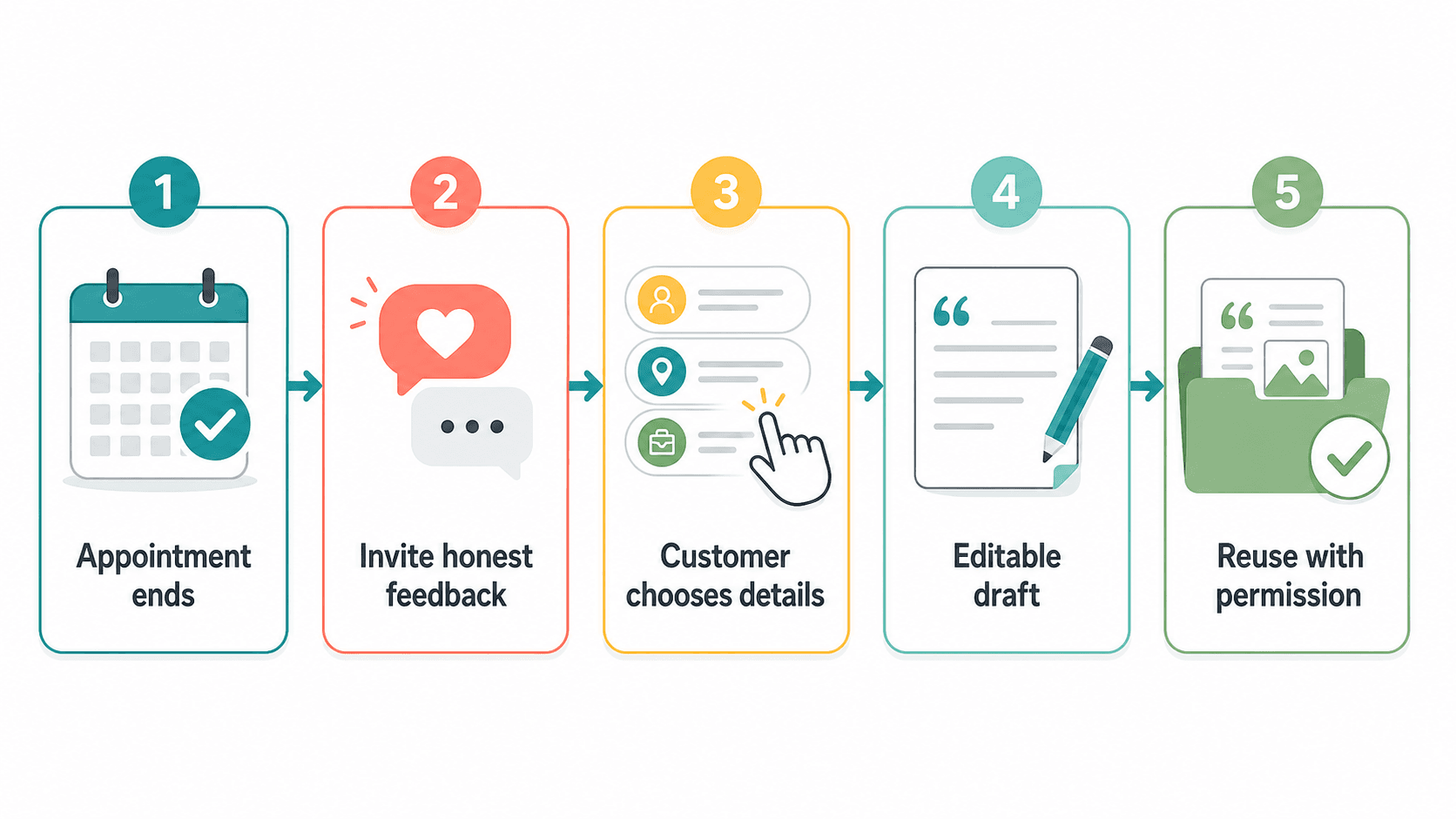
The workflow can be simple:
- The appointment ends.
- Staff invite the customer to share honest feedback.
- The customer chooses or writes experience details.
- The tool creates an editable review, testimonial, social post, or internal note.
- The customer decides what to publish or what the business may reuse.
This matters because many appointment businesses do not lose feedback because customers are unwilling. They lose feedback because the customer has to start from a blank box. A good QR workflow reduces that blank-page problem without writing on behalf of the customer.
Write the QR prompt like an invitation
The words around the QR code shape the entire customer experience. A good prompt should be short, honest, and neutral. It should not ask for five stars, reward only positive reviews, or imply that a customer is expected to praise the business.
Use language like:
Share a few notes about today’s appointment.
Tell us what stood out, what helped, or what we could improve.
Scan to leave feedback while the visit is still fresh.
Your feedback helps our small team improve and helps future customers understand the experience.
Avoid language like:
Scan here for a five-star review.
Loved your visit? Leave us a review. Not happy? Talk to us first.
Leave a positive review and get a discount.
Help us boost our rating.
Google’s Business Profile guidance allows businesses to ask customers for reviews and share a review link, but the request should not become review manipulation. The FTC’s consumer review and testimonial guidance also treats fake, false, or misleading review practices as a serious risk. For appointment businesses, the practical takeaway is to ask for real feedback, not a scripted endorsement.
Give customers detail choices, not a blank box
The biggest improvement over a basic review link is giving customers safe, specific detail prompts. A blank review form asks the customer to invent the whole message. A better feedback flow helps them remember the parts of the appointment that actually happened.
For appointment businesses, useful detail options might include:
- Staff was helpful
- Clear consultation
- Comfortable environment
- On-time appointment
- Good explanation
- Clean space
- Great result
- Easy booking
- Friendly front desk
- Follow-up was helpful
- Something could be improved
- I would rather share private feedback
These should be experience details, not rating instructions. The customer should be able to choose positive, neutral, or improvement-oriented feedback. That protects trust and usually gives the business more useful information than a forced praise request.
If you serve several appointment types, create keyword groups by service. A salon might separate haircut, color, styling, and consultation. A wellness studio might separate first visit, massage, facial, class, and follow-up. A pet service might separate grooming, daycare, boarding, and pickup. The point is not to create a long survey. It is to give customers enough structure to write something specific.
Decide what happens with unhappy feedback
A responsible QR workflow should not hide negative feedback, but it should give unhappy customers a clear way to be heard. The safest pattern is to invite all feedback, then route sensitive service recovery issues to a private conversation without blocking the customer from leaving a public review if they choose.
For example, the flow can include:
- “Share public feedback”
- “Send private feedback to the manager”
- “I need help with an issue from my appointment”
That is different from review gating. Review gating means selectively pushing happy customers toward public reviews while diverting unhappy customers away from public platforms. A healthier workflow lets any customer share honestly and gives the business a fast path to resolve issues when the customer wants help.
For appointment-based businesses, this matters because complaints often involve context: a missed preference, unclear expectations, wait time, discomfort, billing confusion, or a service result that needs a follow-up. A private issue path helps the team respond quickly, but it should not be used to pressure the customer or suppress honest feedback.
Turn customer details into editable drafts
AI can help customers turn their own appointment details into a clearer draft, but the customer should always be able to edit, reject, or publish in their own words. The draft should be a starting point, not a finished review the customer is expected to approve unchanged.
A good appointment feedback draft should include:
- The type of appointment or service
- One or two specific experience details
- A natural tone that sounds like a real person
- No exaggerated claims
- No promises about results
- No details the customer did not provide
- A clear edit step before any public use
This is where Vibpost can fit naturally. Vibpost is an AI marketing assistant for local businesses that uses a smart review QR code workflow, called a Seeding Code inside the product, to help customers turn real experiences into review drafts, social posts, testimonials, and video scripts. For an appointment business, that means the QR code can collect experience keywords first, then help create an editable piece of customer proof instead of sending every customer to a blank review page.
The important boundary is customer control. Vibpost should be used to reduce friction between a real appointment and a useful draft, not to create fake reviews or write feedback without the customer’s input.
Place the QR code where the request feels natural
QR placement should match how the appointment ends. A salon, spa, clinic, gym, education center, and pet service all have different handoff moments, so one placement rule will not fit every business.
Use these placements as starting points:
| Placement | Best for | Staff role | Risk to avoid |
|---|---|---|---|
| Checkout counter card | Salons, spas, wellness studios, service offices | Mention it after payment or rebooking | Do not hover while the customer fills it out |
| Appointment follow-up message | Clinics, studios, education centers, pet services | Send shortly after the visit | Do not send repeated reminders too aggressively |
| Receipt or appointment card | Businesses with printed takeaways | Point to it briefly | Do not make it look like a coupon-for-review offer |
| Waiting area sign | Multi-service offices or gyms | Passive reminder only | Do not rely on it as the only feedback system |
| Staff tablet handoff | Premium services with guided checkout | Offer it as optional | Do not take the device back before the customer can edit freely |
The best wording is often a short staff script:
If you have a minute, this lets you share what stood out from today’s visit. Honest feedback helps us improve, and you can decide what you want to share.
That script works because it gives the customer permission to be honest. It also avoids the awkwardness of asking for a rating.
Ask for permission before reusing testimonials
A customer review, private feedback note, testimonial, and social post are not the same thing. If you want to reuse a customer’s words in marketing, get clear permission and preserve context.
At minimum, your workflow should answer three questions:
- What is the customer submitting?
- Where may the business use it?
- How will the customer be identified, if at all?
For example, a customer might allow:
- Public review draft only
- Private feedback only
- Website testimonial with first name
- Social media quote with initials
- Video script or caption idea for their own use
- No reuse beyond internal service improvement
Appointment businesses should be especially careful with sensitive services. Wellness, health-adjacent, beauty, education, financial, legal, and family-related services may involve personal details. If the feedback includes sensitive information, keep it private unless the customer clearly agrees to a specific public use.
Measure the first week without making fake claims
You do not need to promise more reviews or better rankings to know whether the QR workflow is working. Start with a one-week test and measure behavior, not hype.
Track:
- How many customers were offered the feedback QR code
- How many scanned or opened the flow
- Which appointment types received the most responses
- Which detail prompts customers selected most often
- How many customers chose public review, private feedback, testimonial, social post, or no reuse
- How many drafts were edited before use
- How many unhappy feedback items needed follow-up
- Whether staff found the script easy or awkward
These numbers tell you where the workflow needs work. If scans are low, the QR placement or staff script may be weak. If customers scan but do not submit, the form may be too long. If many customers choose private feedback, you may have useful service recovery signals. If drafts are heavily edited, the prompt options may need to be more specific.
The goal is a better feedback habit, not a vanity metric. For appointment-based businesses, the strongest system is the one staff can repeat every day without making customers uncomfortable.
What appointment businesses should avoid
The easiest way to damage trust is to make the QR code feel like a rating shortcut instead of a feedback invitation. Keep the workflow honest and customer-controlled.
Avoid:
- Asking only happy customers to scan
- Offering discounts, perks, or rewards in exchange for public positive reviews
- Asking customers for a specific rating
- Writing review text without customer input
- Publishing customer words without permission
- Using AI to exaggerate the customer’s experience
- Letting staff pressure customers while they complete feedback
- Hiding private complaints instead of resolving them
- Treating every feedback note as marketing copy
Instead, frame the QR code as a lightweight customer feedback system. Some feedback may become a public review. Some may become a testimonial. Some may help the team fix a problem. All of it should start from what the customer actually experienced.
Where Vibpost fits
Vibpost is useful when a business needs more than a plain QR code that opens a review page. A plain review QR code can reduce access friction, but it does not help customers remember what to say or help the business turn feedback into reusable customer proof.
With a smart review QR code workflow, Vibpost can help appointment businesses:
- Collect experience-based customer details after a real visit
- Generate editable review drafts from customer-selected keywords
- Turn the same customer moment into a testimonial, social post, or video script when appropriate
- Support multiple local business types without requiring a full-time marketer
- Keep the workflow lightweight enough for front-desk or checkout staff
This makes Vibpost most useful for businesses that already create good customer experiences but lose the moment after the appointment ends. The product does not replace honest service, customer consent, or staff judgment. It gives the business a repeatable way to capture feedback while the customer still remembers what happened.
FAQ about appointment feedback QR codes
Should the QR code go before or after the appointment?
After the appointment is usually safer and more useful. The customer has a real experience to describe, and the request feels tied to the service they just received. Before the appointment, a feedback request can feel premature or confusing.
Can appointment businesses ask for Google reviews with a QR code?
Yes, businesses can ask customers for reviews and share a review link or QR code, but the request should invite honest feedback. Do not ask for only positive reviews, do not offer incentives for positive reviews, and do not write the review for the customer.
Should unhappy customers be sent only to a private form?
No. Give unhappy customers a way to get help privately, but do not use that path to block them from leaving honest public feedback. A private issue path is for service recovery, not review suppression.
What should the QR form ask?
Ask for specific appointment details, such as staff help, comfort, result, wait time, explanation, environment, or what could improve. Keep the form short. The more it feels like a survey, the fewer customers will finish it.
Can AI help write the review draft?
AI can help turn customer-selected details into an editable draft, but the customer should control the final words. The draft should reflect what the customer actually experienced and should never invent details, ratings, or results.
How many reminders should a business send?
Start with one polite follow-up after the appointment. If you send a reminder, keep it light and optional. Repeated requests can make the customer feel pressured and may reduce trust.
What is the simplest first version?
Start with one QR code at checkout or in a follow-up message, one neutral staff script, five to eight experience detail prompts, one private issue path, and one weekly review of scans, submissions, and staff feedback. Improve the workflow only after you see where customers drop off.