

How to Turn One Customer Scan Into a Review Draft and Social Post
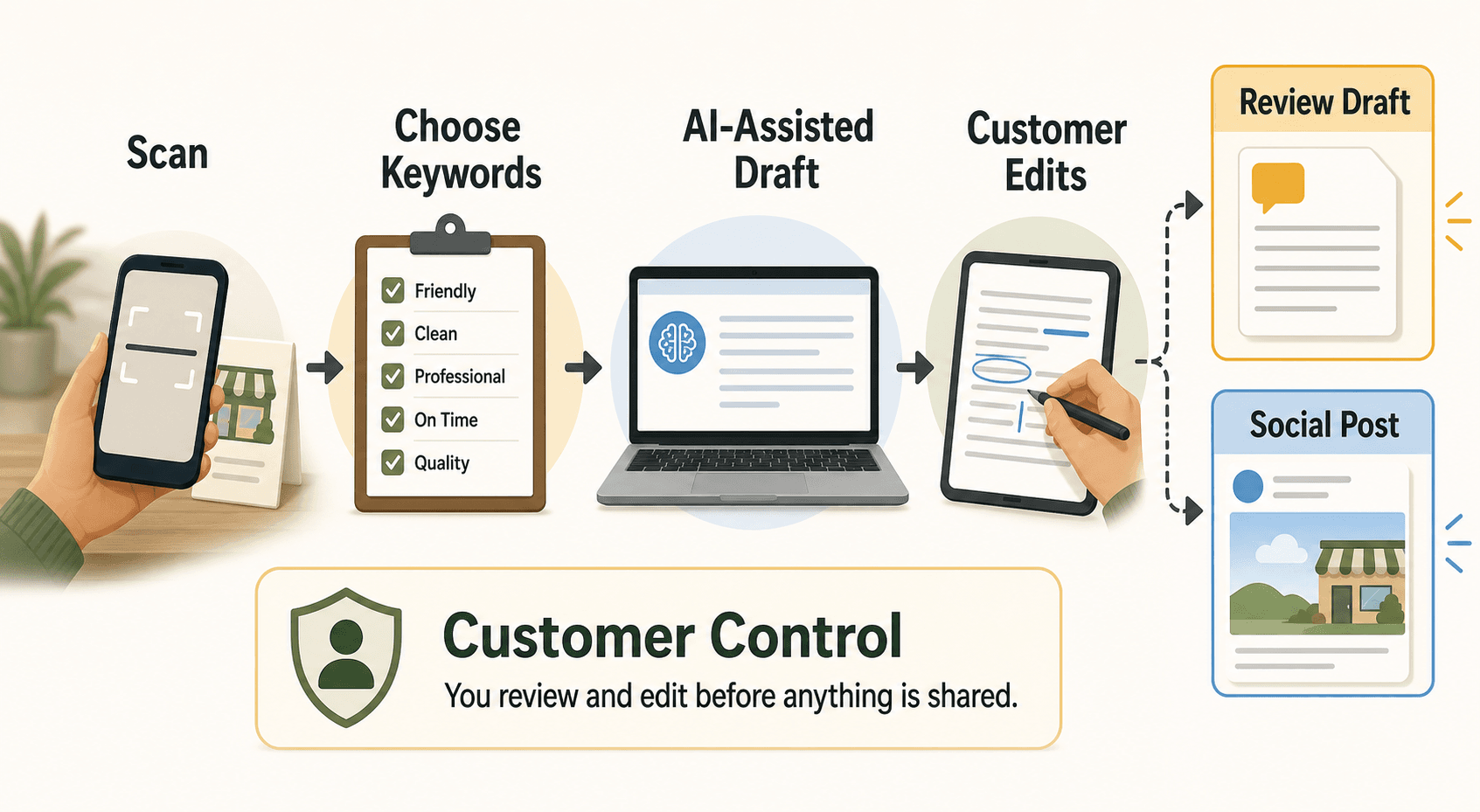
One customer scan can support more than one marketing job if the workflow starts from the customer's real experience. The scan should not simply send someone to a blank review page. A stronger setup lets the customer choose experience-based keywords, uses AI to help draft useful content, and keeps the customer in control before anything is posted, shared, or reused.
For a local business, that means one scan can become a Google review draft, a short social post, a testimonial idea, or a video script. The key is to treat the scan as the beginning of a customer-proof workflow, not as a shortcut for manufacturing praise.
Start with the customer moment, not the QR code
The best scan-to-content workflow begins at the moment when the customer actually has something to say. A QR code is useful only if it appears in the right place, at the right time, with the right expectation.
Think about when customer praise usually happens:
- A diner says the meal was excellent while paying the check.
- A salon client looks in the mirror and says the haircut is exactly what they wanted.
- A gym member finishes a milestone session.
- A shopper thanks the staff for helping them choose a gift.
- A parent tells an education center that the class helped their child feel more confident.
Those moments are specific, fresh, and believable. They are also easy to lose.
If the customer leaves and you ask two days later, the memory becomes softer. If the customer opens a blank review box, they may not know where to start. If the staff member makes the ask sound like a demand, the moment can become uncomfortable.
The scan should capture the moment while it still feels natural. The message can stay simple:
If you would like to share honest feedback, this code makes it easier. You can edit anything before you post.
That line does three important things. It makes the request optional, it keeps the feedback honest, and it tells the customer they remain in control.
What one scan should collect
One scan should collect enough customer input to make the draft useful, but not so much that the customer feels like they are filling out a survey. The goal is to turn a real experience into structured starting material.
A practical customer scan flow can ask for:
- The type of visit or purchase.
- A few experience keywords.
- The customer's preferred output, such as a review draft or social post.
- Optional details in the customer's own words.
- Permission or review steps before reuse.
The keywords matter because they reduce blank-page friction without telling the customer what to say. A restaurant might use keywords like "friendly service," "quick lunch," "cozy atmosphere," "fresh pasta," or "great for families." A salon might use "listened carefully," "clean studio," "natural color," "easy appointment," or "confident result."
These are not fake review lines. They are memory cues.
The customer still decides what is true. The customer still edits the final text. The business should not ask for a certain star rating, require specific wording, or pressure the customer to post while staff are watching.
Google lets businesses share a review request link or QR code, but the review itself still needs to reflect a real customer experience. That distinction is what keeps the workflow useful instead of risky.
Turn the scan into two outputs
A scan becomes more valuable when it can create both a review draft and a social post from the same customer moment. The two outputs should share the same experience, but they should not be identical.
The review draft is usually direct and experience-based. It should sound like something a customer might actually publish after a visit:
- What happened?
- What stood out?
- Who would this place be good for?
- Would the customer recommend it?
The social post can be lighter, more visual, and more reusable:
- A short caption about the experience.
- A post idea for Instagram, TikTok, Facebook, or another channel.
- A testimonial-style snippet for a website or newsletter.
- A short video script based on the same customer proof.
The same scan can support both because the raw material is the customer's actual visit. A cafe customer's "quiet corner, oat latte, friendly staff" input might become a review draft for Google and a short social caption about a work-friendly neighborhood cafe. A gym member's "first pull-up, patient coach, supportive class" input might become a testimonial and a short video prompt.
The business gets more usable customer proof without asking the customer to start from scratch twice.
Keep the review draft customer-controlled
An AI-assisted review draft is safest and most useful when it is editable, optional, and grounded in the customer's own input. It should not become a review written by the business on the customer's behalf.
Use these rules for the review side of the workflow:
| Workflow step | Good practice | What to avoid |
|---|---|---|
| Ask | Invite honest feedback from recent customers | Ask only customers you think will leave positive reviews |
| Input | Let customers choose keywords that match their real experience | Pre-fill exaggerated praise or specific star language |
| Draft | Generate an editable draft from customer-selected details | Publish text without customer review |
| Control | Let the customer edit, delete, or ignore the draft | Pressure the customer to post on the premises |
| Incentives | Keep the request free of rewards or penalties | Offer discounts, gifts, or perks for reviews |
This matters because review platforms care about authenticity. Google's Maps contribution policy says reviews should reflect genuine experiences and warns against incentives, selective solicitation, specific-content requests, and pressure around ratings or reviews. In plain language: help customers express what actually happened, but do not try to control the rating or the words.
That is also good customer experience. A review request that feels respectful is more likely to produce feedback you can trust. A request that feels manipulative may create a short-term number, but it weakens the relationship.
Shape the social post for reuse
The social post should turn the same experience into a piece of content the business can use responsibly. It should not pretend the customer said something they did not say, and it should not turn a private comment into public marketing without permission.
For a social post, the scan can produce several useful formats:
- A customer-friendly caption.
- A short testimonial snippet.
- A before-and-after style story, when the business type supports it.
- A staff training note about what customers appreciate.
- A short-form video idea.
- A website social proof quote, if permission is clear.
The social version should be written for the channel. A review draft might say, "The staff was friendly and the appointment started on time." A social post might say, "A smooth appointment, a clean studio, and a result that felt easy to love. Small details are what make local service feel personal."
The second version is not trying to impersonate a customer review. It is turning a real customer moment into broader proof.
If the business plans to quote a customer's words, use the quote accurately and get the right permission. The FTC's consumer review and testimonial guidance is a useful reminder that reviews and testimonials should not be fake, false, or misleading. For a small local business, the practical rule is simple: do not overstate who said what, do not hide material context, and do not make a private comment look like a public endorsement without consent.
Where Vibpost fits after the scan
Vibpost is an AI marketing assistant for local businesses that helps turn real customer moments into review drafts, social posts, testimonials, and video scripts through a smart review QR code workflow.
Inside the product, that workflow is called a Seeding Code. For a US local business owner, the easier way to think about it is this: a smart review QR code gives customers a structured way to turn a real experience into reusable customer proof.
The difference from a basic QR code is what happens after the scan.
A basic QR code can open a review link. That is useful when the customer already knows exactly what to write.
Vibpost is designed for the missing middle:
- The customer has just had a real experience.
- The business wants to ask without sounding pushy.
- The customer needs help turning memory into words.
- The business wants more than one useful proof asset from the same moment.
- The final content still needs review, editing, and customer control.
That workflow can fit restaurants, cafes, salons, spas, retail stores, gyms, pet shops, education centers, and other local businesses where customer experience is immediate and personal.
A practical setup for local businesses
You do not need to rebuild your whole marketing system to test a scan-to-proof workflow. Start with one location, one customer moment, and one clear output pair.
1. Choose the moment
Pick the moment when the customer is most likely to remember useful details.
For restaurants, that might be after the meal or when a guest compliments a dish. For salons, it might be after the mirror check. For retail stores, it might be after checkout. For gyms, it might be after a milestone session.
Avoid awkward timing. Do not interrupt a customer in the middle of payment, a private conversation, or a rushed exit.
2. Choose the prompt language
Keep the staff script neutral and short.
Good examples:
- "If you would like to share honest feedback, this code makes it easy."
- "No pressure, but this helps us turn real customer feedback into better service."
- "You can edit anything before you post or share."
Avoid:
- "Can you leave us five stars?"
- "Mention my name."
- "Show me after you post."
- "Scan this if you had a good experience."
- "Leave a review and get a discount."
The wording should make the customer feel invited, not cornered.
3. Build the keyword list
Use keywords that match real service details, not exaggerated praise.
For a cafe:
- quiet table
- friendly barista
- fast pickup
- fresh pastry
- good for working
- easy parking
For a salon:
- listened carefully
- clean space
- natural color
- relaxing visit
- on-time appointment
- helpful styling tips
For a retail store:
- helpful recommendation
- gift advice
- local selection
- easy checkout
- friendly staff
- quality product
These keywords help the draft feel specific without forcing the customer into a scripted review.
4. Create separate draft paths
Let the customer or business choose the output.
For example:
- "Help me write a review draft."
- "Turn this into a social post idea."
- "Create a short testimonial draft."
- "Create a short video script."
The more specific the output path, the better the draft will be. A Google review draft should not sound like an Instagram caption. A social caption should not pretend to be a customer's public review.
5. Add a review step
Before anything is used, the person responsible should review it.
For a customer-facing review draft, the customer should edit and decide whether to post. For a business-owned social post, the business should check whether the content is accurate, respectful, and allowed to be reused. For a testimonial, permission should be clear.
This step slows the workflow down slightly, but it protects trust.
Measure the workflow without making fake claims
When you test this for one week, do not start by promising more reviews or better rankings. Measure whether the workflow is easier, more honest, and more repeatable.
Track simple signals:
- How many customers noticed the scan card?
- How many scanned?
- Which keywords were selected most often?
- Did customers edit the draft?
- Did the draft reflect real visit details?
- Did staff feel comfortable making the ask?
- Did negative or mixed feedback still have a clear path?
- Did one scan produce more than one useful asset?
- Did any social post or testimonial require additional consent?
This gives you a practical view of whether the workflow works before you scale it.
The goal is not to squeeze maximum content out of every customer. The goal is to make it easier for real customer satisfaction to become visible proof when the customer wants to share.
Common mistakes to avoid
Most scan-to-content problems come from pushing too hard or collecting too little real input.
Avoid these mistakes:
- Treating the QR code as the whole strategy.
- Asking only visibly happy customers.
- Offering rewards in exchange for reviews.
- Asking for a certain star rating.
- Using AI to invent details the customer did not provide.
- Copying the same draft into every channel.
- Reusing customer words publicly without permission.
- Making the customer post while staff are watching.
- Hiding negative feedback instead of learning from it.
The scan should reduce friction, not remove honesty.
FAQ
Can one scan really create both a review draft and a social post?
Yes, if the scan collects real customer input first. The review draft and social post can use the same experience keywords, but they should be written differently for each destination.
Is it safe to use AI for review drafts?
It can be safe when the draft is based on the customer's real experience, the customer can edit it, and the business does not pressure the customer to publish specific wording or a specific rating.
Should the social post use the customer's exact words?
Only when the words are accurate and the business has the right permission to reuse them. Otherwise, treat the social post as a business-owned content idea inspired by customer feedback, not as a direct quote.
Where should the QR code be placed?
Place it where the customer naturally finishes the experience: table tents, checkout counters, receipts, appointment follow-ups, or front-desk cards. The best placement depends on the business type and the moment when customers are most likely to remember details.
What makes Vibpost different from a basic review QR code?
A basic review QR code opens a link. Vibpost supports the workflow after the scan: customer keywords, AI-assisted drafts, review or social post outputs, and a structure that keeps the content grounded in real customer moments.
The scan is only useful if it protects the moment
One customer scan can become a review draft and a social post, but only if the workflow respects the customer.
Start with the real moment. Ask neutrally. Use keywords to help the customer remember details. Let AI lower the writing friction. Keep the customer in control. Review before reuse.
That is how a local business turns private satisfaction into public proof without turning the review request into pressure.