

How to Write Review Request Prompts Customers Can Edit Before Posting
A good review request prompt should help a real customer remember what happened, not tell them what to say. The safest and most useful prompt gives the customer a few honest starting points, makes the draft easy to edit, and leaves the final decision entirely with them before anything is posted.
For a local business, that means the prompt should never sound like a demand for five stars. It should not offer a reward for a positive review. It should not pressure the customer to mention specific keywords, employees, or outcomes. It should simply help a customer turn a fresh experience into their own words.
That is the difference between helpful review assistance and a review workflow that starts to feel manufactured.
Start with the customer moment, not the rating
The best prompt begins with what the customer actually experienced. A rating is an outcome. The customer moment is the evidence.
If someone just finished a meal, haircut, repair visit, class, spa appointment, gym session, or retail purchase, they may remember one or two concrete details: the staff was patient, the space was clean, the appointment started on time, the explanation was clear, or the product recommendation helped. Those details make a review useful.
A weak prompt asks for a result:
Could you leave us a five-star review?
A stronger prompt asks for honest memory:
If you would like to share feedback, what stood out from your visit today? You can mention the service, the space, the result, or anything we could do better.
That second version does three important things. It invites feedback, gives the customer optional cues, and keeps the door open for mixed or critical comments. The customer is not being pushed toward praise. They are being helped to remember.
Use a prompt formula that protects customer control
Review request prompts are easier to write when you use a repeatable structure. The structure should keep the business helpful without taking over the customer's voice.
Use this five-part formula:
- Permission: make it optional.
- Context: mention the real visit or service.
- Memory cues: offer neutral topics the customer can choose from.
- Editable draft: say they can change anything.
- Customer choice: remind them they decide whether to post.
Here is the full version:
If you would like to share honest feedback about your visit today, this prompt can help you get started. You can mention what stood out, what helped, what could be better, or any detail you think future customers should know. If a draft is created, please edit it freely so it sounds like you, and only post it if you are comfortable sharing it publicly.
That may look longer than a normal front-desk script, so you can shorten it for different surfaces. The point is not to use every word every time. The point is to keep the same safety logic.
The five-step editable review prompt workflow
When a prompt is part of a QR-based review workflow, the sequence matters as much as the wording. The customer should always control the input, the edits, and the final posting decision.
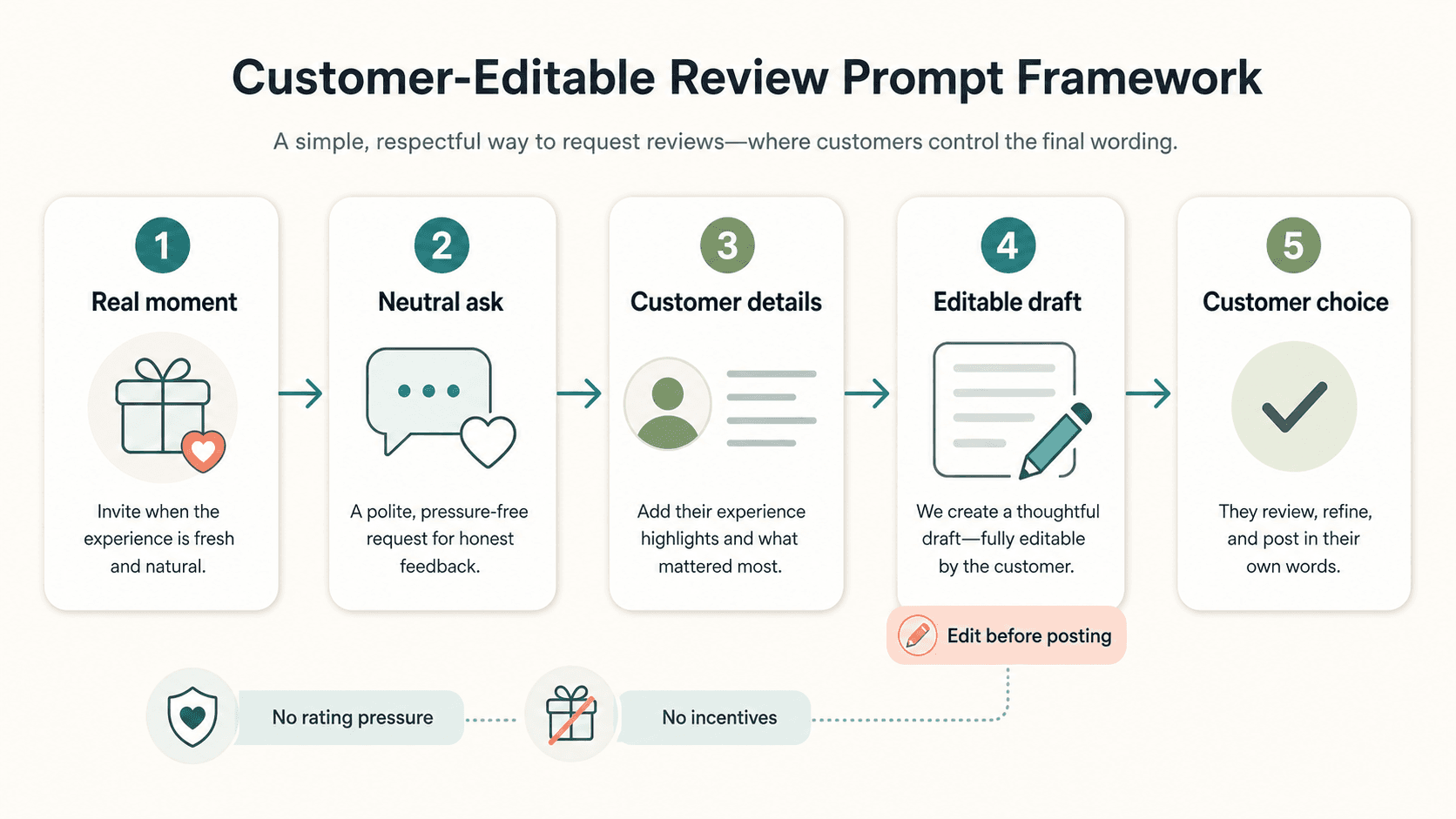
A clean workflow looks like this:
- The customer has a real experience.
- The business makes a neutral ask.
- The customer chooses or writes experience details.
- AI or a template helps turn those details into an editable draft.
- The customer reviews, changes, rejects, or posts in their own words.
That fourth step is where many businesses need to slow down. An editable draft can reduce blank-page friction, but it should not become a script that customers are expected to approve. The draft is a starting point. The customer remains the author.
Write prompts that invite specifics without steering sentiment
Specific reviews are more helpful than vague ones, but specificity should not be confused with steering.
It is reasonable to ask customers what part of the experience stood out. It is risky to ask them to write a certain kind of review.
Use neutral cues such as:
- What did you come in for today?
- What part of the visit was most helpful?
- Was there anything that made the experience easier?
- What would you tell a friend who was considering us?
- Is there anything we could improve next time?
Avoid cues such as:
- Please mention our friendly staff.
- Please say we are the best in town.
- Please include the employee's name.
- Please leave five stars if you enjoyed your visit.
- If anything was wrong, tell us privately instead of posting.
The safer version helps the customer recall details. The unsafe version tries to shape the public record.
Practical prompt examples for local businesses
Good prompts sound different by setting, but the underlying rule stays the same: ask for honest experience details, then let the customer edit.
Restaurant prompt
If you would like to share feedback about your meal, a few details can help you get started: what you ordered, what stood out, how the service felt, or anything we could improve. If a draft is created, please edit it so it sounds like your own experience before posting.
Why it works: it gives concrete cues without asking for praise. It also leaves room for improvement feedback.
Salon prompt
If you want to share your appointment experience, you can mention the service you booked, how the consultation felt, what you liked about the result, or anything you would change next time. Please adjust any draft before posting so it reflects your own words.
Why it works: salon reviews often become more useful when they include the service type and customer comfort level, not just "great place."
Gym prompt
If today's session was useful, you can share what helped: the coaching, equipment, class energy, progress milestone, or anything that would help another member know what to expect. You are welcome to edit or skip any draft.
Why it works: it turns a vague fitness compliment into specific social proof without promising a transformation.
Retail prompt
If you would like to leave feedback, you can mention what you were looking for, whether the staff helped you choose, how the product fit your needs, or what could have made the visit better. Please make any draft your own before sharing.
Why it works: it gives future shoppers useful context while avoiding fake enthusiasm.
Appointment-based service prompt
If you want to share feedback after your appointment, you can mention scheduling, check-in, communication, the service itself, or follow-up. Edit anything that does not sound like you, and only post if you are comfortable.
Why it works: it recognizes that the whole service experience matters, not only the final result.
Keep the front-desk ask short
Staff should not have to recite a long policy statement. The in-person ask can be short, friendly, and neutral.
Use:
If you have a minute, this makes it easy to share honest feedback. You can edit anything before posting.
Or:
We appreciate honest feedback. This gives you a few prompts, but you can write it however you like.
Or:
If you would like to leave a review, this helps you get started. Please make it your own.
The staff member should not hover, check the customer's screen, ask for proof, or imply that a certain rating is expected. The best review request gives the customer space.
What to avoid in AI-assisted review drafts
AI can be useful when it turns customer-selected details into a clearer draft. It becomes risky when it invents the experience, upgrades the sentiment, or makes every customer sound the same.
Avoid these patterns:
- Creating review text before the customer gives any details.
- Turning mild feedback into enthusiastic praise.
- Removing criticism from a mixed review.
- Adding claims the customer did not make.
- Suggesting a star rating.
- Asking customers to approve language they did not recognize.
- Reusing the same polished review structure for everyone.
If AI is used, the prompt should make the boundary explicit:
Use only the customer's selected details. Do not add facts, ratings, guarantees, or claims. Keep the tone natural. Leave room for the customer to edit, disagree, or decline to post.
That kind of instruction matters because the goal is not a perfect marketing sentence. The goal is an honest customer expression with less writing friction.
Where Vibpost fits in this workflow
Vibpost is an AI marketing assistant for local businesses that uses a smart review QR code workflow to help customers turn real moments into review drafts, social posts, testimonials, and video scripts.
Inside the product, the smart review QR code workflow is called a Seeding Code. A local business can use it after a real customer interaction, let the customer choose experience-based keywords, and help turn those details into editable content.
The important part is not that AI writes faster. The important part is that the workflow can preserve customer control:
- The prompt starts from a real visit.
- The customer chooses the experience details.
- The draft is editable.
- The customer decides what to post.
- The business can reuse customer proof only when it has the right permission and context.
For a small business without a full-time marketing team, this can reduce the awkwardness of asking while keeping the customer's voice at the center.
A safer prompt library for your team
If you want to standardize review requests across a team, create a small prompt library instead of letting every employee improvise.
Use three types of prompts.
The general prompt
If you would like to share honest feedback, you can mention what stood out, what helped, what could be better, or anything future customers should know. Please edit any draft before posting so it sounds like you.
Use this when the business type does not require specific context.
The compliment follow-up
Thank you for saying that. If you would like to share it publicly, this can help you turn that thought into your own words. You can change anything before posting.
Use this only after the customer has already offered a genuine compliment. Do not use it to fish for praise from every customer.
The improvement-friendly prompt
We appreciate honest feedback, including anything we could improve. If you choose to share publicly, please make sure the final wording reflects your own experience.
Use this when the business wants to show that it is not only collecting positive reactions.
Check your prompt against three rules
Before using a prompt in your store, salon, cafe, gym, clinic, or service business, test it against three questions.
Does it ask for honest feedback instead of a positive review?
If the wording implies a desired rating, rewrite it.
Does it let the customer edit or decline?
If the customer feels expected to approve a draft, the workflow is too heavy-handed.
Does it avoid incentives and filtering?
Google lets businesses request reviews through links or QR codes, but review practices should still respect platform policies around fake engagement and manipulation. The FTC's consumer review guidance also makes clear that fake, false, or deceptive reviews and testimonials create legal risk. A prompt that pays for praise, suppresses negative feedback, or misrepresents who wrote the review is not worth the short-term lift.
You do not need a legal lecture at the counter. You need prompts that make the right behavior easy.
The simple version to remember
Write review request prompts as if the customer might edit every word in front of you.
That mindset changes the tone. You stop writing prompts that try to harvest praise. You start writing prompts that help customers remember, explain, and choose.
A good local-business review prompt says:
Here is a helpful starting point. Your experience is yours. Please make the final words your own.
That is better for the customer, better for future readers, and better for any business that wants review growth without turning reviews into something customers no longer trust.