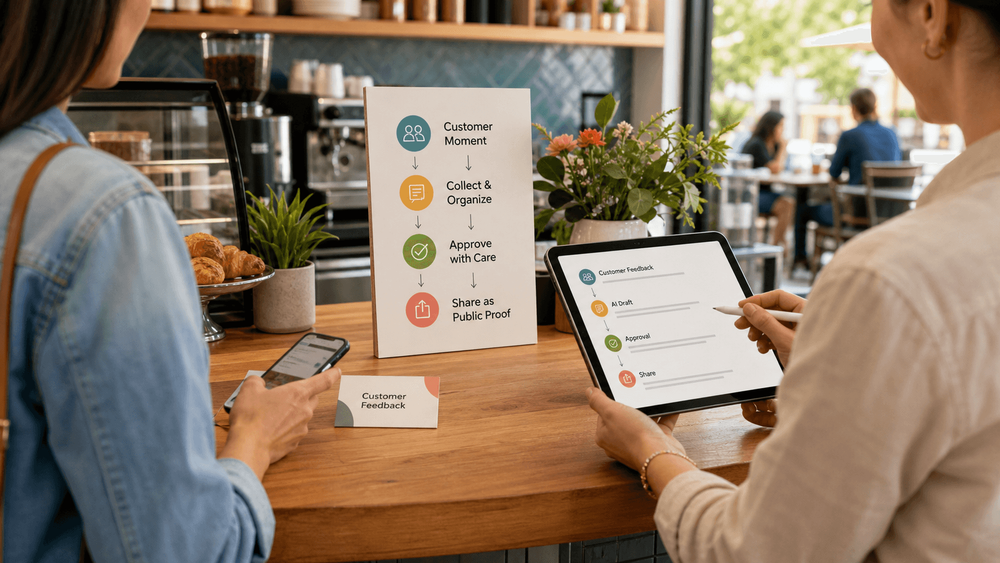
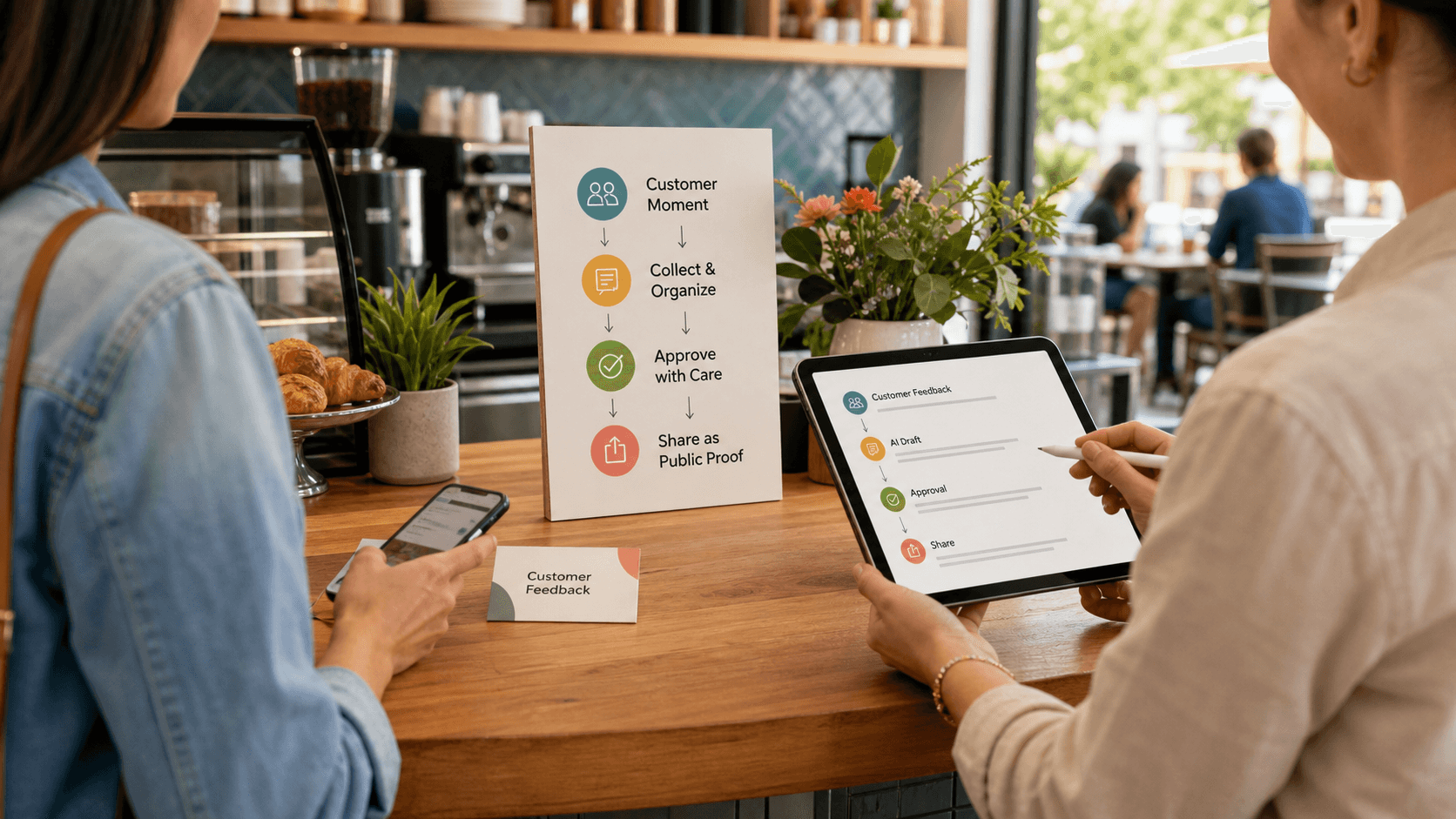
How to Create a Smart Review QR Code Workflow in 2026
A smart review QR code workflow helps a local business turn a real customer moment into useful public proof without asking the customer to start from a blank page. The code is only the entry point. The workflow around it should help the customer remember what happened, choose the details that match their experience, review an AI-assisted draft, and decide what they want to publish or share.
That matters because most happy customers do not leave without caring. They leave because the business asks too late, asks too vaguely, or sends them to an empty review box when they are already busy.
This guide explains how to create a smart review QR code workflow for a restaurant, cafe, salon, spa, gym, retail store, pet shop, or education center. It covers the review link, the scan path, the placement, the compliance boundaries, the tracking, and where Vibpost fits when you want more than a static QR code.
What this guide covers
Use this as a practical setup guide, not a promise that any QR code will automatically create reviews. The goal is to make a real review or social proof moment easier for the customer, while keeping the customer in control.
- What a smart review QR code workflow is
- How to choose the right review destination
- When a basic Google review link is enough
- How to compare QR code options
- How to add the smart layer: keywords, AI drafts, and approval
- Where to place the code
- How to connect the code to follow-up
- What to avoid in 2026
- What to track after launch
- Why specific customer language matters for AI search
- How Vibpost helps local businesses build the workflow
1. What is a smart review QR code workflow?
A smart review QR code workflow is a scan-based customer feedback path that starts from a real experience and ends with customer-approved proof, such as a review draft, social post, testimonial, or video script idea.
A basic QR code usually opens one link. That link might be a Google review form, a Yelp page, a feedback form, a landing page, or a text message flow. This is useful because it removes typing and search friction.
A smart workflow does more than open a destination. It helps the customer answer the question they often get stuck on: "What should I actually write?"
For a local business, that difference is important. A customer may have loved the service, the atmosphere, the haircut, the class, the food, or the staff, but still leave no review because a blank text field feels like work. A smarter workflow gives them simple prompts, such as friendly service, clean space, fast help, great taste, careful staff, kid-friendly, or easy booking. The customer can then turn those details into a review or social proof asset that still sounds like their own experience.
Inside Vibpost, this workflow is called a Seeding Code. In customer-friendly terms, it is a smart review QR code workflow that helps customers turn real experiences into review drafts, social posts, testimonials, and video scripts.
2. Choose the right review destination first
Before you print a QR code, decide where the scan should take the customer. The best destination depends on what you want the customer to do and how much guidance they need.
If your only goal is a Google review, start with the Google review form link for the correct Google Business Profile location. Make sure the business profile is accurate, verified, and current before you send more customers to it. A review workflow should not send people to an outdated location, a duplicate listing, or the wrong branch.
If you want broader customer proof, consider a workflow destination instead of sending everyone directly to one platform. A workflow destination can help customers choose what they want to create: a review draft, a short testimonial, a social post, or a video script. It can also help them select the details that match their visit before any AI-assisted draft appears.
For multi-location businesses, keep destinations separate by location. A restaurant group, salon chain, or gym with several branches should not use one generic review link for every location. The customer should land on the correct store, and the business should be able to see which location, card, receipt, or follow-up message created the scan.
3. When is a basic Google review QR code enough?
A basic Google review QR code is enough when you have one location, a simple review request, and no need to guide the customer beyond the review form.
For example, a neighborhood cafe might place a small card at checkout that says, "Share your experience." The code opens the Google review form. The customer writes in their own words. No extra tool is needed.
This simple version works best when the business has one location, the customer experience is easy to describe, staff can explain the ask naturally, and you do not need scan analytics, AI-assisted draft support, or content reuse across social posts, testimonials, and video scripts.
The limitation is that a basic code still sends the customer to a blank box. Some customers will finish the review. Many will not. If your team often hears compliments in person but rarely sees them turn into written proof, the missing piece is not the code. It is the guided workflow after the scan.
4. Compare QR code options before printing
Not every QR code option solves the same problem. A QR generator can create a scannable square, but that does not mean it gives you the workflow, analytics, or customer guidance you need.
| Option | What it does well | Main limitation | Best fit |
|---|---|---|---|
| Basic review link QR code | Opens the review form quickly | No customer guidance after the scan | Single-location businesses testing a simple request |
| Static QR generator | Easy to create and print | Destination cannot be changed after printing | Permanent links that are unlikely to change |
| Dynamic QR generator | Lets you update the destination later | May require a paid plan and ongoing account access | Printed materials that may need future changes |
| Feedback form QR code | Collects private comments first | Can become review gating if public review access is blocked | Service recovery and internal feedback, with careful boundaries |
| Smart review QR workflow | Guides the customer from moment to draft to approval | Requires a real workflow setup, not just a square code | Businesses that want reviews plus reusable social proof |
If you are printing hundreds of table tents, counter cards, receipt inserts, or appointment cards, avoid treating the QR code as a throwaway design element. Test the link, confirm the destination, and make sure you can maintain it. A broken code on printed material is not just a technical issue. It trains customers and staff to ignore the workflow.
5. Add the smart layer: keywords, drafts, and approval
The smart layer is what turns a QR code from a shortcut into a customer proof workflow. It helps customers move through three steps: choosing what happened, shaping it into draft content, and approving what they want to use.
The first part is guided keywords. Instead of asking "Please leave us a review," the workflow asks the customer to choose details that match the visit. A restaurant might offer cozy atmosphere, fresh pasta, fast service, friendly staff, great dessert, or clean space. A salon might offer careful consultation, relaxing visit, good color, easy booking, or stylist listened.
The second part is AI-assisted drafting. The draft should be based on the customer's selected keywords and actual experience, not on invented praise. The customer should be able to edit, reject, shorten, or rewrite the draft before anything is posted or reused.
The third part is reuse. One real customer moment can support more than one content job. A customer-approved comment can become a Google review draft, a testimonial, a short social post, or a video script idea. That does not mean the business owns the customer's words automatically. It means the workflow can help capture the moment and ask for the right permission before reuse.
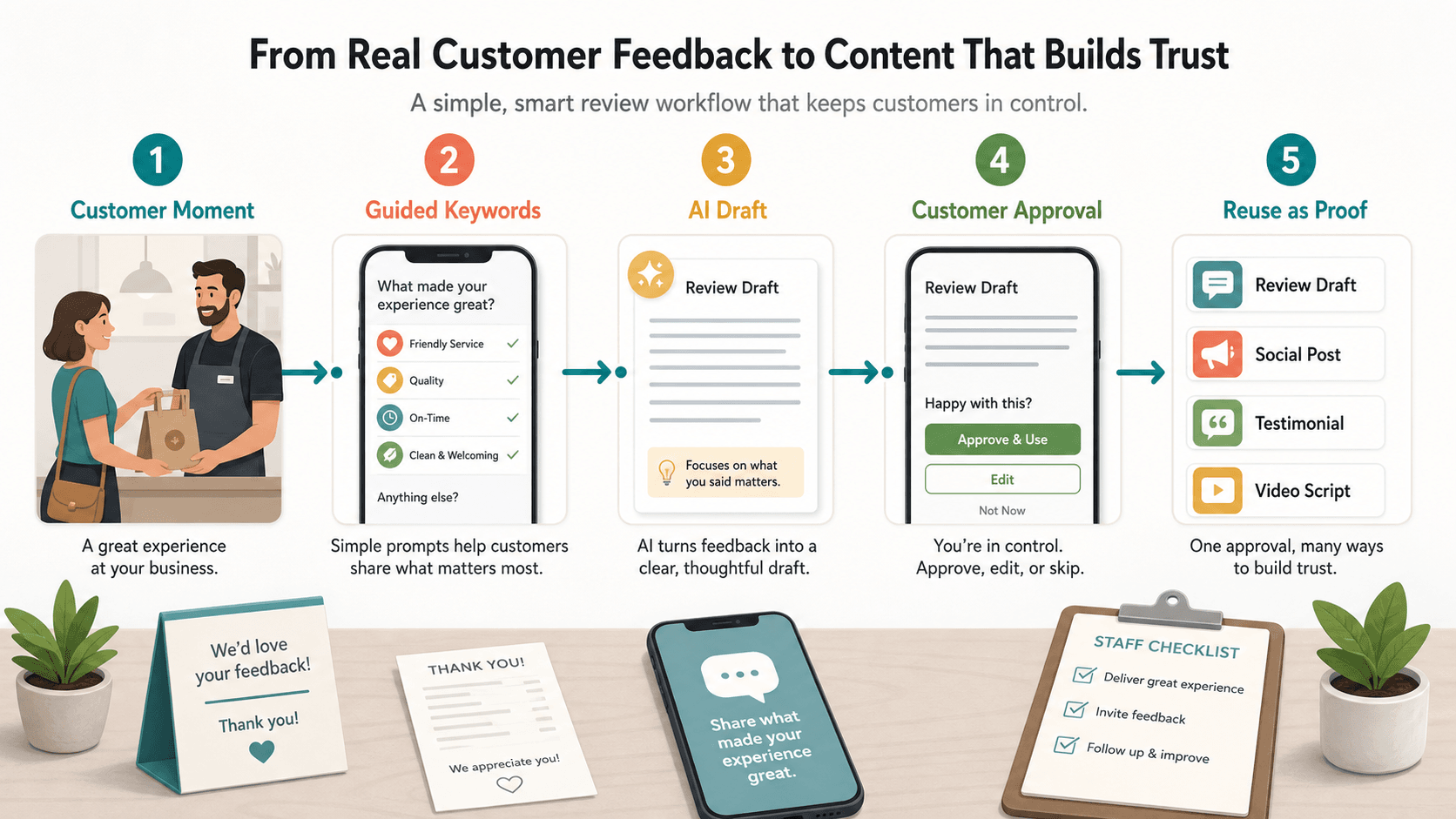
This is where Vibpost is different from a plain QR code generator. Vibpost is an AI marketing assistant for local businesses that uses smart review QR codes to help customers turn real experiences into review drafts, social posts, testimonials, and video scripts. It is designed for small teams that need a repeatable workflow, not another blank content tool.
6. Place the code where the customer moment is strongest
Placement decides whether the QR code becomes a habit or a decoration. Put it where the customer has just experienced the value, not where the business happens to have empty wall space.
For restaurants and cafes, strong placements include table tents, receipt inserts, checkout cards, takeout bag stickers, and follow-up messages after pickup or delivery. For salons and spas, the best moment is often checkout or the post-appointment message, when the customer has just seen the result. For gyms, education centers, and pet services, the right placement may be after a class, session, pickup, or completed service.
Start with one primary moment. If you place codes everywhere at once, you will not know which one worked. Try one counter card, one receipt placement, or one post-visit message for 30 days. Then compare scans, completed drafts, published reviews, and staff friction.
The wording should be simple and low pressure: "Share your experience," "Tell others what stood out," "Loved your visit? Scan to write it in your own words," or "Scan to turn today's visit into a review or social post."
Avoid wording that tells customers what rating to leave or pressures them into positive language. The scan should invite a real experience, not script the result.
7. Connect the QR code to a request system
A QR code by itself is not a review strategy. It becomes useful when staff know when to mention it, customers know why it matters, and follow-up catches people who meant to respond later.
Build the request system around timing:
- Ask at the moment of satisfaction. This may be checkout, the end of a service, the pickup counter, or a post-class thank you.
- Keep the staff line short. A front-desk employee should not need a scripted pitch. "If you want to share what stood out, this code can help you write it quickly" is enough.
- Add a follow-up channel. If the customer does not scan in person, a text or email within the next day can bring the same link back to them.
- Keep the destination consistent. The QR code, email, and SMS should support the same workflow or location-specific review path.
- Review the results weekly. Look for where customers start, where they drop off, and which placements create actual approved content.
If the customer has a negative experience, do not hide the public review option. Give them a way to share private feedback so the team can fix the issue, but do not block or discourage them from leaving an honest public review if they choose to do so.
8. What not to do in 2026
Review workflows must protect trust. The safest rule is simple: ask real customers for honest feedback, make the process easier, and do not manipulate who gets to speak or what they are rewarded for saying.
Google's Maps user-generated content policy says contributions should reflect genuine experiences and should not be used to manipulate ratings or deceive users. The FTC's Consumer Reviews and Testimonials Rule also addresses fake, false, misleading, suppressed, or improperly incentivized reviews and testimonials.
For a local business using QR codes, avoid fake reviews, reviews written on behalf of customers without their input, rewards for positive reviews, selective solicitation, review suppression, forced rating language, shared devices as the main collection method, and AI-generated text presented as real customer experience without customer review and approval.
A smart workflow should make honest feedback easier. It should not manufacture praise.
9. Track scans, drafts, and approved proof
The first month is not about declaring success. It is about learning where the workflow fits naturally into the customer journey.
Track scans by placement, keyword selections, drafts generated, edits, abandoned drafts, published reviews, approved testimonials, reusable social post ideas, and staff friction. These numbers show whether the workflow is helping customers express real experiences or simply adding another step.
Do not judge the workflow only by total reviews. A cafe that gets fewer reviews but more specific customer language may be learning something useful. A salon that sees many scans but few completed drafts may need better keywords. A gym that gets strong scan volume after classes but weak follow-through the next day may need a shorter follow-up message.
The most useful review workflow is measurable without becoming manipulative. You are trying to understand friction, not force a result.
10. Why specific customer language matters for AI search
Specific reviews are easier for people, search engines, and answer systems to understand. A generic review that says "Great place" is positive, but it does not explain what the business is known for. A review that mentions the service, location, staff interaction, product, class, dish, or result gives future customers more useful context.
That does not mean you should tell customers what to say. It means your prompt can help them remember real details: what they enjoyed, which service or product they used, whether a staff moment stood out, and what someone like them should know before visiting.
For AI search and local discovery, this kind of language is easier to summarize accurately because it connects the business to real attributes. Vibpost's keyword-first flow is useful here because it starts from the customer's own memory. The customer chooses what actually happened, and the draft grows from that input.
11. How Vibpost helps
Vibpost helps local businesses build the missing middle between a happy customer and usable public proof. It is not just a QR code generator and not just an AI writing tool.
With Vibpost, a business can create a smart review QR code workflow for the customer journey. Customers scan, choose experience-based keywords, and get AI help turning those inputs into review drafts, social posts, testimonials, or video scripts. The customer remains in control of what they approve, edit, publish, or share.
This fits local businesses that already create good experiences but do not have a full-time marketing team. Restaurants, cafes, salons, spas, gyms, pet shops, retail stores, wellness businesses, and education centers can use the workflow at the point where customer trust is freshest.
Vibpost's public product context includes AI-assisted review generation, video scripts, multi-language support, customization, data analytics, unlimited generation, 2,000+ merchants, 150k+ reviews generated, and 4.8/5 merchant satisfaction. Use those as product facts, not as a guarantee that every business will get the same result.
The practical reason to use Vibpost is this: a blank review request asks the customer to do all the work. A smart workflow helps them turn a real moment into clear, customer-approved proof.
Smart review QR code checklist
- Confirm the correct business location and review destination.
- Use one primary link or workflow per location.
- Test the scan on multiple phones before printing.
- Keep the customer prompt short and low pressure.
- Place the code at the moment the customer experience is still fresh.
- Add guided keywords that reflect real experiences, not desired ratings.
- Let customers edit, approve, or skip AI-assisted drafts.
- Keep public review access available for all customers.
- Do not reward positive reviews or suppress negative ones.
- Track scans, draft completion, published reviews, and approved reuse.
- Review results after 30 days and adjust placement, wording, or keywords.
FAQ
How do I create a smart review QR code workflow?
Start with the correct review destination or feedback workflow, then create a QR code that sends customers there. Add guided keywords, AI-assisted drafting, and a customer approval step if you want the workflow to do more than open a blank review form.
Is a smart review QR code the same as a Google review QR code?
No. A Google review QR code usually opens a Google review form. A smart review QR code workflow can include the review link, but it also guides the customer through experience keywords, AI-assisted draft creation, approval, and reuse as social proof.
Can AI write Google reviews for customers?
AI can help a customer turn their own experience into a draft, but the customer should control, edit, and approve the final text. Do not use AI to invent reviews, impersonate customers, or publish content without customer input.
Where should a local business place the QR code?
Place it where the customer has just had the strongest experience: at checkout, on a table tent, on a receipt, in a post-visit text, after a service appointment, after a class, or near pickup. Start with one placement so you can measure it clearly.
Is review gating allowed?
Do not block unhappy customers from public review options or ask only happy customers to leave public reviews. You can collect private feedback to improve service, but the workflow should not suppress honest public feedback.
When does Vibpost make sense?
Vibpost makes sense when a business wants more than a static review link. It is useful when customers need help turning a real experience into a review draft, social post, testimonial, or video script, and when the team wants a repeatable customer proof workflow.