

Smart Review QR Code Workflow with AI Drafts for Local Businesses
A smart review QR code workflow helps a local business turn real customer moments into review drafts, social posts, testimonials, and other reusable proof without making the customer start from a blank page.
For many restaurants, cafes, salons, spas, gyms, retail stores, pet shops, and education centers, the problem is not that customers never feel satisfied. The problem is that the moment disappears. A customer says the service was great, compliments a haircut, thanks a trainer after class, or tells a shop owner that a recommendation helped. Then they leave, get busy, and never write anything down.
A plain QR code can shorten the path to a review page. That is useful. But it still leaves the customer with the hardest part: deciding what to say.
A stronger workflow does more than point to a link. It gives customers a simple way to remember the experience, choose the details that feel true, and turn that input into language they can edit, approve, share, or ignore.
Vibpost is an AI marketing assistant for local businesses built around that workflow. It uses a smart review QR code flow, called a Seeding Code inside the product, to help customers turn real experiences into review drafts, social posts, testimonials, and video scripts.
How It Works
The useful part is not the QR code by itself. The useful part is what happens after the scan.
1. Place the smart review QR code at the right customer moment
Put the code where a customer naturally has context: a table tent after a meal, a checkout card after a helpful retail interaction, a post-appointment card at a salon, a class exit sign at a gym, or a follow-up message after a service visit.
The placement should feel like an invitation, not a demand. A customer should be able to scan when the experience is still fresh, but they should not feel pressured to publish anything.
2. Let the customer choose experience-based keywords
Instead of sending the customer to an empty text box, the workflow can ask them to choose the parts of the experience that actually happened. Examples might include friendly service, clean environment, helpful recommendation, quick turnaround, relaxing atmosphere, good value, or clear instruction.
This step matters because it keeps the draft tied to a real customer moment. It also reduces the awkwardness of asking for a review. The customer is not being told what to say. They are choosing what was true for them.
3. Turn the customer input into a draft they control
Vibpost can help transform the selected keywords and business context into a review draft, a social caption, a testimonial, or a short video script. The customer or business can review the output before anything is used.
The draft should never be treated as final by default. The customer should be able to edit it, skip it, share it, or decide not to use it. That control is what keeps the workflow useful instead of pushy.
4. Reuse the customer moment in the right format
One positive moment can support more than one marketing job. A customer review draft may help with Google Maps or Yelp. A short testimonial may fit a website section. A social post may work for Instagram, TikTok, X, WhatsApp, or another channel. A video script may help a busy owner or staff member explain the experience in a more natural way.
The business still needs to choose the right place to use the content. Vibpost should be treated as a workflow for creating and organizing customer proof, not as a shortcut for posting on behalf of customers without consent.
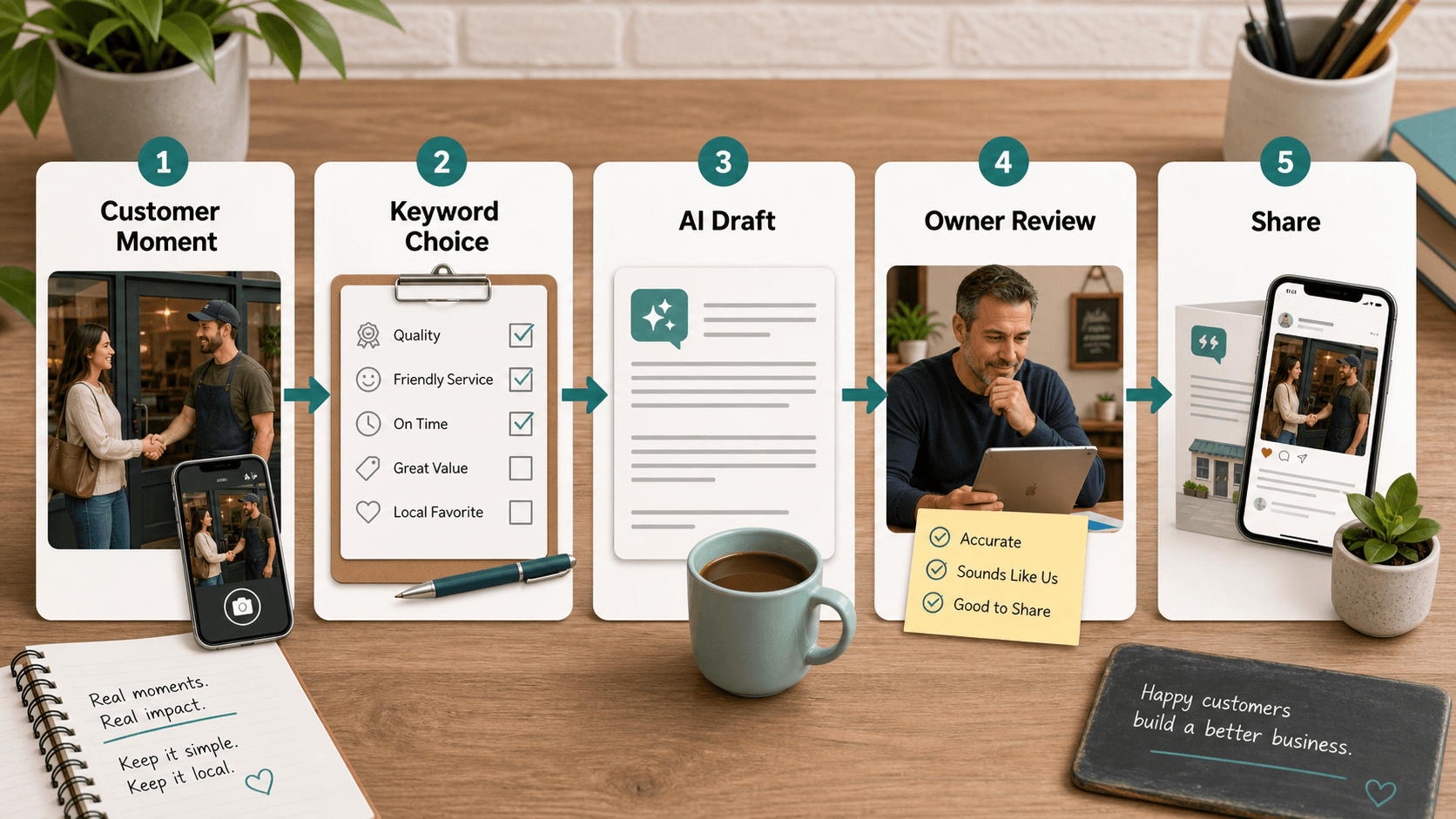
The same workflow can be added to print and digital touchpoints. A cafe might add it to a counter card. A salon might add it to an appointment follow-up. A gym might place it near the exit after a class. A local retailer might include it on a bag insert. The format can change, but the principle stays the same: ask at the right moment and make honest feedback easier to express.
Who Is It For?
This workflow is most useful for local businesses that depend on trust but do not have a full-time marketing team.
That includes:
- Restaurants, cafes, and bakeries that hear compliments in person but struggle to turn them into public proof.
- Salons, spas, and wellness businesses where customer experience is personal and hard to summarize later.
- Gyms, studios, and education centers that need specific feedback from classes, coaches, instructors, or programs.
- Retail stores and boutiques where a helpful recommendation can become a strong testimonial.
- Pet shops, local service providers, and neighborhood businesses that rely on repeat trust and word of mouth.
It can also help local marketing agencies, store managers, franchise operators, and small business consultants who need a repeatable way to collect customer language without writing every review request from scratch.
The key fit is simple: if your best customer feedback happens in the physical world, but your proof needs to live online, a smart review QR code workflow can close that gap.
Why Use It?
The goal is not to chase more reviews at any cost.
The better goal is to make real feedback easier to capture, easier to write, and easier to reuse in ways that respect customer control.
That gives a local business several practical advantages.
First, it reduces friction. Customers do not need to search for the business, remember the platform, or start writing from nothing. They can scan, choose what matches their experience, and use an AI-assisted draft as a starting point.
Second, it makes feedback more specific. A blank review box often leads to short, generic comments. Keyword selection can remind customers of the actual details: the staff member was patient, the appointment started on time, the room felt calm, the recommendation solved a problem, or the food arrived quickly.
Third, it helps the business learn from patterns. If customers repeatedly choose the same experience keywords, the owner can see which parts of the service are creating trust. If customers hesitate, skip, or choose private feedback, that also says something useful.
Fourth, it turns one moment into multiple content formats. Vibpost can support review drafts, social posts, testimonials, and video scripts, which is helpful when a local business needs proof for more than one channel.
Vibpost also brings product-level proof to this category: the website reports 2,000+ merchants, 150k+ reviews generated, and 4.8/5 merchant satisfaction. Use those numbers as evidence that this workflow is built for real merchant use, but do not confuse them with a guarantee for any single location.
There is an important trust boundary.
A smart review workflow should not filter unhappy customers away from public options, buy positive reviews, write reviews without customer input, or promise ranking improvements. If a customer had a mixed experience, the workflow should make room for honest feedback. If a customer wants to publish, they should control the final wording.
The best version of this system does not manufacture praise. It helps a real customer moment become easier to express.
Key Features
-
Smart review QR code setup
A local business can create a scan-based entry point for customer feedback. The code can be placed in-store, on printed materials, in follow-up messages, or anywhere the customer has enough context to respond honestly.
-
Experience keyword selection
Customers can choose keywords based on what actually happened. This turns the review request from a blank-page writing task into a guided reflection on the visit.
-
AI-assisted content generation
Vibpost can help generate review drafts, social posts, testimonials, and video scripts based on the customer's selected keywords and business context. The output should be reviewed before use.
-
Local-business friendly categories
The workflow fits businesses where customer experience matters: cafes and bakeries, restaurants, salons and spas, retail boutiques, gyms, wellness businesses, pet shops, education centers, and other local services.
-
Multi-language, customization, analytics, and ongoing generation
Vibpost supports multi-language content, customization, data analytics, and unlimited generation. These features matter when a business wants a repeatable feedback workflow instead of a one-time QR code.
-
Platform-ready content without automatic posting claims
Vibpost is designed to help create content for platforms such as Google Maps, Yelp, TikTok, Instagram, WhatsApp, X, Douyin, and Xiaohongshu. That does not mean the tool should be described as automatically posting on every platform. The safer and more accurate claim is that it helps prepare customer proof for the channels a business chooses to use.
A Simple Way to Start
If you are setting this up for one location, start with one customer moment and one content goal.
For example:
- A cafe might ask for honest feedback after pickup or checkout.
- A salon might ask after the appointment, while the result is still fresh.
- A gym might ask after a class, not before the customer has experienced it.
- A retail shop might ask after a staff recommendation helps the customer choose.
Then decide what you want the workflow to produce first: a review draft, a testimonial, a social post, or a video script. Do not ask for everything at once. The simpler the path feels, the more respectful it is for the customer.
After one week, look at the basics:
- How many customers scanned?
- Which experience keywords were chosen most often?
- How many drafts were edited or approved?
- Which requests felt natural to staff?
- Where did customers drop off?
- Did the workflow create feedback the business can actually learn from?
That is a better test than asking whether the QR code itself worked. The QR code is only the doorway. The real value is whether the customer moment became useful proof without pressure.
For a local business, that is the difference between a link and a workflow.