

Smart Review QR Code Workflow: Convert Customer Moments into Reviews and Social Proof
A smart review QR code workflow lets a local business turn a real customer moment into useful feedback, review drafts, testimonials, social captions, and short video script ideas.
A plain QR code can send someone to a review page. That is helpful, but it only solves the access problem. It does not help a busy customer remember what stood out, choose the right details, or write something that sounds like their real experience.
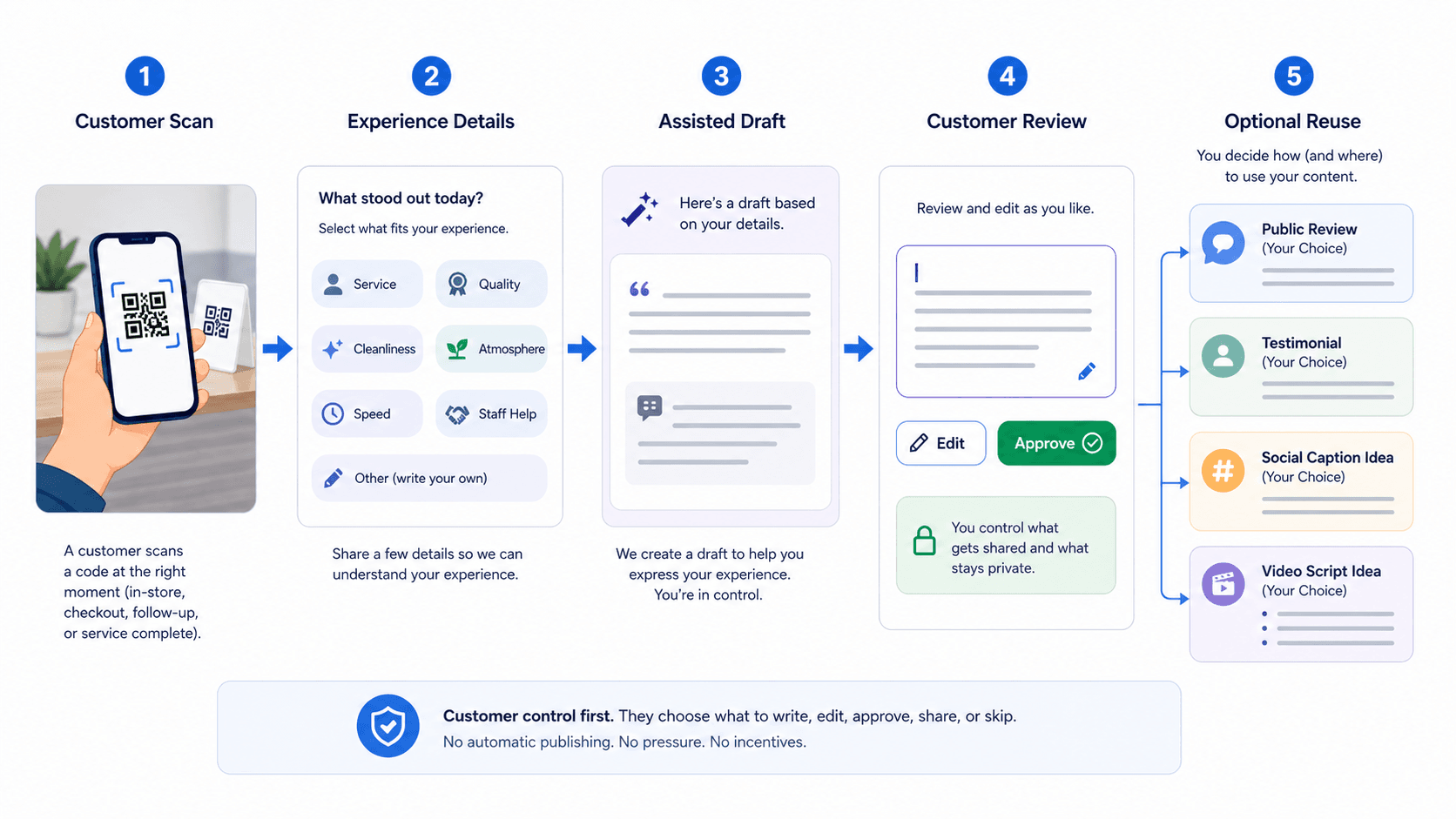
With a workflow like Vibpost, the QR code becomes more than a link. It becomes a guided customer proof flow: scan, choose experience details, review an AI-assisted draft, edit it, approve it, and decide how the content should be used.
Before choosing where to print the code or which destination to use, it helps to understand the customer moments a smart review QR code can support.
Smart Review QR Code Workflow: The Use Cases for Local Businesses
Here are common local business situations where a smart review QR code workflow can do more than a static review link.
Restaurant and Cafe Feedback
Restaurants and cafes hear valuable comments every day.
A guest may compliment a dish, mention fast pickup, thank a server, notice the atmosphere, or say the meal was perfect for a family visit. If that moment disappears after the customer leaves, the business loses useful proof.
A smart review QR code can sit near the counter, on a table tent, on a receipt insert, or in a follow-up message. The customer scans, selects details such as service, flavor, speed, atmosphere, cleanliness, or value, and gets help turning those details into a draft they can edit.
The goal is not to pressure every guest into a public review. The goal is to make it easier for real customers to express what actually happened.
Salon, Spa, and Wellness Visits
Salons, spas, and wellness businesses often create highly personal customer moments.
A client may like the consultation, the cleanliness, the final look, the comfort of the service, or the way the staff explained the process. Those details are often more useful than a short rating because future customers want to know what the experience felt like.
A smart QR workflow works best at the moment of completion. The client has just seen the result, the memory is fresh, and the staff can ask in a low-pressure way:
If you want to share what stood out today, this code helps you choose a few details and turn them into a draft you can edit.
That sentence keeps the request optional and makes customer control clear.
Gym, Studio, and Class-Based Businesses
Gyms, fitness studios, dance schools, tutoring centers, and education programs often rely on progress stories.
Customers may not know how to write a useful review from scratch, but they can usually answer simple prompts:
- What class or session did you attend?
- What felt different after the visit?
- What did the coach, teacher, or staff help with?
- What would you tell someone who is considering the same service?
A smart review QR code can guide those answers into a review draft, private feedback, a testimonial, or a short social caption idea. The business gets more structured input without asking staff to become copywriters.
Retail, Pet Care, and Service Pickup
Retail stores, pet groomers, repair shops, and other service-based local businesses often have a natural pickup or checkout moment.
That is when the customer notices whether the staff recommendation helped, whether the pet looked cared for, whether the product fit the need, or whether the service was handled with care.
A QR-based workflow can capture that detail before it becomes vague. Instead of asking for "a review," the business can ask the customer to choose what stood out: recommendation, quality, speed, staff help, cleanliness, care, or result.
Those details can later support review requests, testimonials, social captions, and service improvement notes.
Google Business Profile Review Requests
Many local businesses want more useful reviews on their Google Business Profile because customers already look there when comparing nearby options.
A QR code can make the review path easier to reach. The business can place the prompt where the customer already is: checkout, pickup, appointment closeout, event exit, table cards, printed receipts, or follow-up messages.
The important boundary is that the review must represent a real customer experience. Google's Maps user-generated content policy allows merchants to ask for genuine experience-based contributions without incentives, but it does not allow fake engagement, incentives for reviews, discouraging negative reviews, or selectively asking only happy customers for positive reviews.
That means the workflow should help customers express their own experience. It should not filter, buy, script, or force public praise.
Private Feedback and Service Recovery
Not every scan needs to become public content.
Sometimes the best outcome is private feedback that helps the business fix a problem. A customer may have waited too long, received the wrong item, felt confused, or wanted a follow-up. A smart workflow can route that feedback into an internal note while still keeping public review options fair and voluntary.
This is where the difference between service recovery and review gating matters. A private feedback path is useful when it helps the business respond. It becomes risky when it is used to hide unhappy customers from public review choices.
Testimonials, Social Captions, and Video Script Ideas
Some customer moments are valuable beyond a review.
A restaurant may want a short caption about a seasonal dish. A salon may want a customer-approved testimonial about a service result. A gym may want a short video script idea about a class experience. A pet shop may want a reusable quote about care and trust.
Vibpost supports review drafts and video script generation, along with customization, multi-language support, data analytics, and unlimited generation. Inside the product, the smart review QR code workflow is called a Seeding Code. In plain local-business terms, it is a way to turn real customer moments into reusable proof while keeping the customer involved in the final wording and use.
Why Use a Smart Workflow Instead of a Static Review QR Code?
You can turn a review link into a QR code with many basic tools. For some businesses, that may be enough.
But a static QR code stores one destination and sends everyone to the same place. The customer still faces a blank page. The business still learns very little about which moments, prompts, or placements work.
A smart workflow adds more useful layers.
1. Editable Prompts
A local business should not have to reprint every sign whenever it changes a prompt.
The message that works for a cafe counter may not work for a spa checkout desk. A summer promotion may need different wording than a holiday season. A service recovery prompt may need a different tone from a testimonial prompt.
Editable prompts let the business adjust the post-scan experience without treating every printed code as permanent.
2. Trackable Customer Moments
Scan data by itself is not the same as trust.
Still, measurement helps a local business learn. If a table tent gets attention but a receipt insert does not, the team can adjust. If customers scan but stop before approving a draft, the prompt may be too long, too vague, or poorly placed.
Vibpost includes data analytics, so the workflow can be reviewed as a practical operating habit instead of a one-time print job.
3. Multi-Language Support
Many US local businesses serve customers who are more comfortable in different languages.
Multi-language support helps customers describe their experience in the language that feels natural to them. That can make the workflow more inclusive and reduce friction for customers who have something useful to say but do not want to compose it from scratch in English.
The business should still keep the same trust standard: the content should reflect the customer's real experience and final approval.
4. Multiple Content Outputs
A review link has one job. A smart customer proof workflow can support several outputs.
The same customer moment might become:
- a public review draft
- a private feedback note
- a testimonial
- a social caption idea
- a short video script idea
- a reusable phrase for a landing page or email, with permission
This matters for small teams because they often do not have enough fresh customer language. A good workflow helps them collect real words and real details without inventing stories.
5. Customer Review Before Use
AI should assist expression, not replace the customer.
The customer should be able to edit, approve, share, save, or skip. The business should not publish private feedback as marketing content without consent. If a testimonial or social post is reused, the customer should understand how it may be used.
For US advertising and testimonial use, the FTC's review and endorsement guidance is a useful reminder: customer endorsements should be honest, not misleading, and not distorted by hidden incentives or manipulation.
6. Better Staff Simplicity
The best workflow is the one staff can explain in one sentence.
If employees need a long script, the QR code will sit unused. If the request sounds pushy, customers may feel uncomfortable. If the prompt is clear and optional, staff can bring it up naturally at the right moment.
The workflow should feel like a helpful way to share feedback, not a demand for a five-star review.
How to Use Vibpost's Smart Review QR Code Workflow
Since a basic QR code only opens a destination, a local business needs a fuller workflow when the goal is customer proof. Here is a practical way to set it up.
- Choose the customer moment you want to capture.
Start with one moment, not every possible moment. For a restaurant, that might be after payment or pickup. For a salon, it might be after the service result. For a gym, it might be after class. For a pet groomer, it might be pickup.
- Decide what the scan should ask first.
The first screen should be easy. Ask the customer what stood out, then offer simple choices such as service, speed, atmosphere, quality, cleanliness, staff help, value, comfort, or result.
- Let the customer add their own detail.
Multiple-choice prompts are useful, but they should not trap the customer in generic language. Leave room for a short note in the customer's own words.
- Generate an assisted draft.
Use AI to help turn selected details into a clear draft. Keep the draft grounded in what the customer selected or wrote. Do not add claims the customer did not make.
- Ask the customer to review and edit.
This is the control point. The customer should be able to change the draft, remove anything that does not sound right, approve it, or stop.
- Offer the right next step.
Depending on the customer's choice and your workflow, the content may become a review draft, private feedback, a testimonial, a social caption idea, or a video script idea.
- Review performance weekly.
Look at scans, completed drafts, approved content, private feedback themes, and placement performance. Do not judge the workflow only by scan count. A lower number of high-quality, customer-approved responses can be more useful than many empty scans.
Best Practices for Smart Review QR Codes
QR codes are easy to create, but they only work well when the physical placement, wording, and customer experience fit together.
1. Match the Prompt to the Moment
A checkout counter prompt should be short. A follow-up text can be slightly more specific. A table tent can focus on the dining experience. A service completion card can mention the finished result.
Do not use one generic prompt everywhere if your customer moments are different.
2. Keep the Call to Action Clear and Optional
The call to action should tell customers what the code helps them do.
Good examples:
- "Share what stood out today."
- "Tell us about your visit."
- "Turn your experience into a draft you can edit."
- "Leave feedback in your own words."
Avoid wording that asks for a specific rating, promises a reward for a review, or implies that only positive feedback is welcome.
3. Avoid Incentives and Review Gating
Do not offer discounts, free goods, or other rewards in exchange for reviews. Do not ask only happy customers to leave public reviews. Do not discourage negative reviews. Do not write reviews for customers.
The safer workflow is simple: ask for honest feedback from real customers, make the process easier, and let the customer control the final wording.
4. Make the Code Easy to Scan
A QR code should be large enough for the setting.
Counter cards, table tents, receipts, pickup bags, posters, appointment cards, and follow-up messages all behave differently. Test the code from the distance where customers will actually see it. If the code is too small, too low contrast, or hidden behind clutter, the workflow will fail before the customer reaches the first prompt.
5. Put the Code Where Staff Can Explain It
Placement is not only a design decision. It is an operations decision.
If staff can point to the code naturally, customers are more likely to understand why it is there. If the code appears with no context, many people will ignore it.
The best placement is usually close to the moment when the customer has just completed the experience and still remembers the details.
Create a Customer Proof Workflow with Vibpost
A smart review QR code workflow can be a practical starting point for local businesses that want more useful customer proof without creating fake reviews, pressuring customers, or adding a large marketing process.
Vibpost is built for that kind of workflow. It helps local businesses use AI-powered review generation, video script generation, customization, multi-language support, data analytics, and unlimited generation to turn real customer moments into review drafts, social posts, testimonials, and reusable proof.
More than 2,000 merchants have used Vibpost, with 150k+ reviews generated and 4.8/5 merchant satisfaction. Those numbers are helpful, but the real test for your business is simple:
Can a customer scan at the right moment, choose honest details, review the draft, stay in control, and leave you with proof that reflects a real experience?
If yes, the QR code is no longer just a shortcut. It becomes a repeatable customer proof workflow.