

How to Create a Smart Review QR Code Workflow for a Local Business in 2026
Getting more reviews does not have to become a complicated marketing campaign. In many local businesses, the real problem is simpler: happy customers leave before the business gives them an easy next step.
A smart review QR code workflow removes that gap. Instead of asking a customer to search for your business later, you give them a simple scan path while the experience is still fresh. With the right setup, that scan can lead to a review link, a short feedback flow, a customer-approved draft, a social post idea, or a reusable testimonial.
This guide explains what a smart review QR code is, how to create one with Vibpost, how to build a manual version if you are not ready for a dedicated workflow, where to place it, and how to use it without turning real feedback into fake or pressured reviews.
What is a smart review QR code?
A smart review QR code is a scan-based feedback workflow that helps a customer move from a real-world experience to a useful piece of online proof.
A basic QR code usually does one job: it opens a link. Google Business Profile lets businesses create and share a review link or QR code from the profile's review request flow, so a customer can reach the review form more quickly.
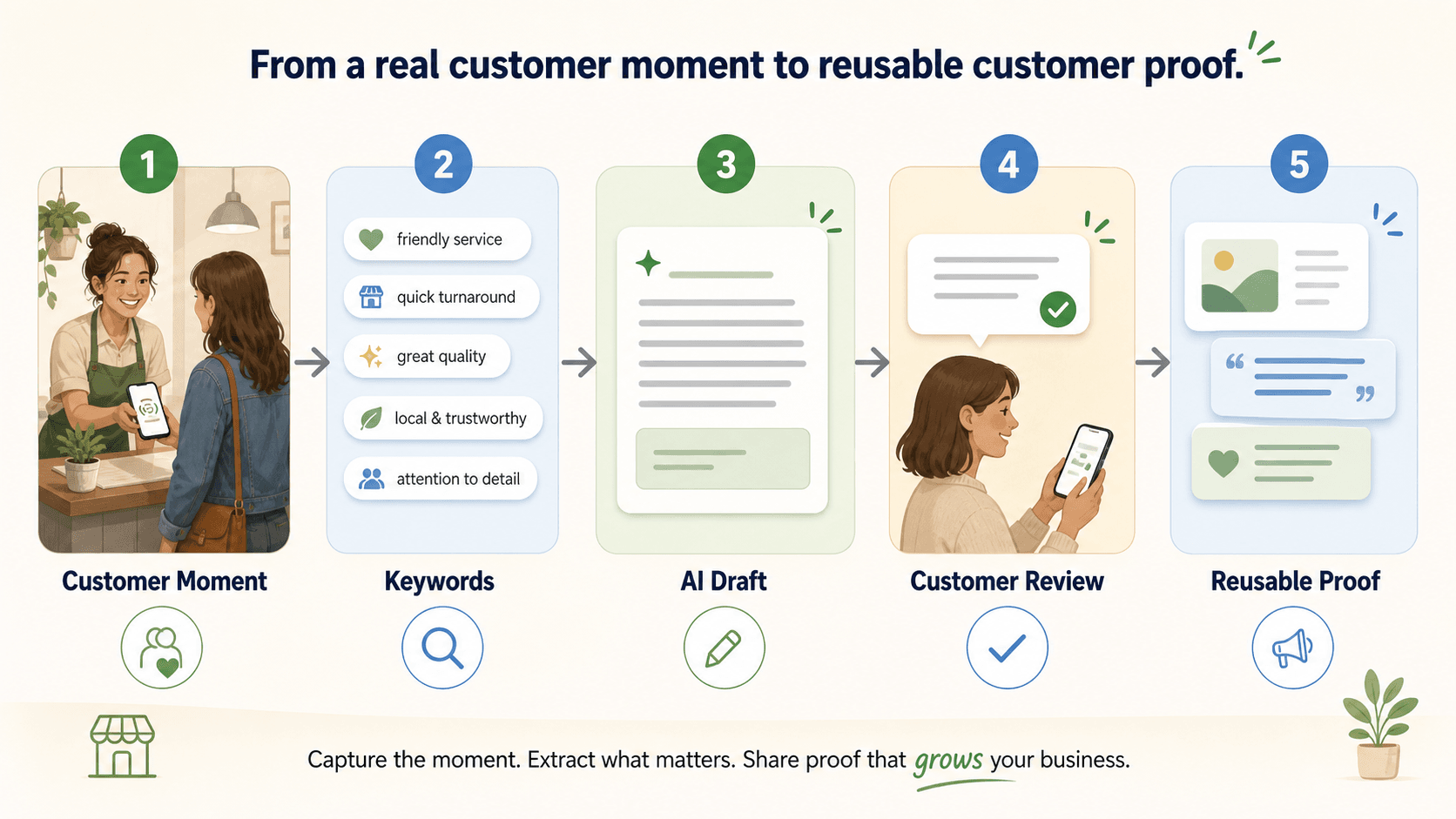
A smart workflow goes one step earlier in the customer journey. It does not only point the customer to a blank review box. It helps them remember what they liked, choose experience-based keywords, and turn that moment into a review draft, social post, testimonial, or video script they can review and control.
That difference matters for local businesses because most customers are not professional writers. A guest may have loved the food, the haircut, the front-desk service, the class, or the atmosphere, but still leave without writing anything because the blank page feels like work.
Vibpost is built for that missing middle. It uses a smart review QR code workflow, called a Seeding Code inside the product, to help local businesses turn real customer moments into reusable proof. Customers scan, choose keywords that match their experience, and get AI help shaping that input into draft content.
The goal is not to manufacture praise. The goal is to lower the friction between a genuine customer experience and a piece of content the customer can approve, edit, publish, or share.
How do you create a smart review QR code workflow?
If you use Vibpost, the workflow is straightforward: set up the business context, choose the customer experience keywords you want to make easy to remember, generate the smart review QR code, and place it where customers are most likely to scan after a real visit.
For a restaurant, that might mean a table tent, receipt insert, counter sign, or follow-up card. For a salon or spa, it might mean the checkout desk or a post-appointment message. For a gym, pet service, retail store, bakery, or education center, it might be the point where the customer has just completed the experience and still remembers the details.
Inside the workflow, the customer should stay in control. They choose the keywords that match what happened, review the AI-assisted draft, edit anything that does not sound like them, and decide what to publish or share.
That customer-control step is important. Review and testimonial content should reflect real experiences, not business-written scripts. The FTC's Consumer Reviews and Testimonials Rule, effective October 21, 2024, addresses deceptive conduct involving fake, false, or misleading reviews and testimonials. Google's Maps user-generated content policy also says reviews should reflect genuine experiences and warns businesses not to incentivize, pressure, or selectively solicit reviews in ways that manipulate ratings or review content.
So the best workflow is simple:
- Ask real customers, not only obviously happy ones.
- Make the path easy with a scan or direct link.
- Help customers express their own experience.
- Let customers review, edit, and decide.
- Do not reward a specific rating or pressure people into positive language.
How to build a manual version in six steps
If you are not ready for a dedicated smart workflow, you can still create a simpler review QR code. This version will not give customers the same keyword-to-draft support, but it can reduce friction.
Step 1: Open your Google Business Profile
Start with the profile customers already use to find you. Make sure the location is verified, current, and accurate. Check the business name, address, hours, service area, phone number, and category before sending more customers to the profile.
If the profile is messy, fix that first. A review request should lead customers to a business page that looks trustworthy.
Step 2: Get the review link or QR code
In Google Business Profile, use the reviews area to get the review sharing option. Google's current help result describes a "Get more reviews" flow where businesses can copy a review link or share a QR code.
Save the link somewhere your team can access it. If you manage more than one location, keep each location's link separate. Sending a customer from one branch to another branch's review form creates confusion and can pollute your own feedback data.
Step 3: Turn the link into a scannable customer path
If you already downloaded Google's QR code, you can test and use it. If you are turning a review link into your own QR code, use a reliable generator and keep the destination simple.
For local businesses, dynamic QR codes are useful when you may need to change the destination later. Static QR codes are simpler, but if the link changes or a location moves, the printed card may become outdated.
Do not make the customer scan through several marketing pages before reaching the review action. Every extra step reduces the chance that they finish.
Step 4: Design the card around one action
The QR code should be easy to scan and easy to understand. Use enough contrast, leave white space around the code, and print it large enough for a phone camera to recognize quickly.
The wording should be short. A line like "Share your experience" or "Leave us a review" is usually clearer than a long paragraph. Avoid wording that tells people what rating to leave or what opinion to express.
If you use Vibpost, this is where the smart workflow can carry more of the work. Instead of asking the customer to start from a blank review box, the scan can guide them through keywords such as friendly service, quick help, great quality, clean space, local favorite, or felt cared for.
Step 5: Test the scan before printing
Test the QR code with more than one phone. Try it in normal lighting, low lighting, from a slight angle, and at the distance a real customer will use.
Confirm three things:
- The code opens the right location.
- The page loads quickly on mobile.
- The customer understands what to do next.
If your staff has to explain every scan, the workflow is not clear enough yet.
Step 6: Put it where the experience is still fresh
Placement matters more than decoration. The best spot is usually the moment after value has been delivered but before the customer mentally moves on.
For restaurants and cafes, that may be the table, receipt, counter, or takeout bag. For salons and spas, it may be the mirror station, checkout desk, or post-appointment follow-up. For gyms, classes, pet services, and retail stores, it may be the exit area, packaging, or a friendly follow-up message.
Do not hide the code in a place customers pass without noticing. A review QR code is not only a graphic asset. It is part of the service flow.
Where should a local business place the code?
Put the code where the customer naturally pauses.
In a cafe, a table card can work because the customer has time to look at it. In a bakery or retail boutique, a receipt card or checkout sign may work better because the interaction is faster. In a salon, spa, gym, or education center, the best moment may be right after the service, when the customer is already talking to staff.
Think of placement by business type:
- Restaurants and cafes: table tents, receipts, counter signs, takeout inserts.
- Salons and spas: mirror stations, front desk cards, appointment follow-up messages.
- Retail stores: checkout displays, packaging inserts, loyalty-card holders.
- Gyms and wellness studios: class exit areas, locker-room-safe signage, follow-up texts.
- Pet services and education centers: pickup areas, report cards, appointment summaries.
The code should feel like a helpful invitation, not a demand. Staff can mention it naturally: "If today's visit was helpful, the card makes it easy to share your experience on your own phone."
That wording keeps the customer in control and avoids pressuring them to perform in front of the business.
Design and placement details that improve scan rates
A review QR code card has to work in real life, not just in a design file.
Use high contrast. Keep enough quiet space around the code. Avoid glossy print finishes that create glare. Put the card at eye level or within easy reach. If the code is on a table or counter, make sure it is not blocked by menus, payment terminals, utensils, products, or staff equipment.
The call to action should explain the action without steering the opinion. These examples are safer:
- "Share your experience"
- "Tell us how your visit went"
- "Leave a review on your own phone"
- "Scan to give feedback"
These are riskier because they can sound like rating manipulation:
- "Leave us a five-star review"
- "Scan if you loved us"
- "Show your review for a discount"
- "Mention your server by name"
The physical card should also match the customer moment. A playful table card may fit a cafe. A calm card may fit a spa. A short receipt message may fit a retail store. The best design is the one customers can understand in two seconds.
What makes the workflow "smart" instead of just scannable?
The smart part is not the square code. The smart part is what happens after the scan.
A static QR code sends customers straight to a destination. That is useful, but it often drops them into a blank text box. A smart review QR code workflow adds structure around that moment.
With Vibpost, a local business can set up a customer proof flow that starts from the real visit:
- The business creates the smart review QR code.
- The business configures store context and experience keywords.
- The customer scans after a real experience.
- The customer selects words that match what happened.
- AI helps turn those inputs into a review draft, social post, testimonial, or video script.
- The customer or business reviews the output before anything is published or reused.
That is why Vibpost is not just a QR code generator and not just a generic AI writing tool. A generic AI tool starts from a prompt. Vibpost starts from a customer moment.
For small local teams, that matters. The owner, front desk, cashier, stylist, trainer, or manager does not have to invent a new marketing campaign every week. They can build one repeatable workflow into the moments that already happen.
Extra tips for getting more real reviews
The scan is only the beginning. You still need timing, staff habits, and follow-up.
Ask when the experience is fresh. If a customer compliments the meal, the haircut, the repair, the class, or the service, that is a natural moment to invite feedback. Do not wait three weeks and send a cold request that feels disconnected from the visit.
Keep the ask human. A staff member can say, "We appreciate honest feedback. If you want to share what stood out, this makes it easy." That is better than turning the request into a script customers hear at every checkout.
Use follow-up messages carefully. A short email or text can help customers who meant to scan but forgot. The message should contain one direct link, one clear request, and no pressure to leave a positive rating.
Respond to reviews. Thank customers for positive feedback, and respond calmly to critical reviews. A review workflow is not only about collecting praise. It is also a way to show that the business listens.
Track the whole path. Instead of only counting total reviews, track scans, keyword selections, draft starts, completed drafts, published reviews, reusable social posts, and staff friction. If customers scan but do not finish, the issue may be wording, page speed, placement, or the next step after the scan.
Vibpost can support that broader customer proof workflow by helping local businesses generate review drafts, social posts, testimonials, and video scripts from customer-selected keywords. Its public product context includes AI-assisted review generation, video scripts, multi-language support, data analytics, customization, unlimited generation, and use across local business categories such as restaurants, cafes, salons, spas, retail stores, gyms, pet shops, and education centers.
A smart review QR code is a service moment, not a shortcut
A review QR code works best when it respects the customer.
The best version does not beg for praise, filter unhappy people away, or ask customers to write something specific. It makes the next step obvious for someone who already had a real experience and is willing to share it.
For a local business, that is the practical opportunity: turn a brief in-person moment into a review, testimonial, social post, or video idea before the memory disappears.
If all you need is a link to a review page, a basic QR code may be enough. If you want a repeatable workflow that helps customers move from a real experience to customer-approved proof, Vibpost gives that scan a more useful job.