Smart Review QR Code Workflows Local Businesses Should Try in 2026
If you run a local business, you have probably noticed that QR codes have become part of everyday customer behavior. Restaurants use them for menus, salons use them for booking pages, retail shops use them for promotions, and event teams use them for check-ins.
The next question is more specific:
Can a QR code help a happy customer turn a real visit into a useful review, testimonial, social post, or piece of proof?
The answer is yes, but the QR code is only the entry point. Some workflows simply send customers to a review page. Others help customers remember what happened, write in their own words, and decide what they want to share.
Here is a practical look at the smart review QR code workflows a local business can use right now, and where a tool like Vibpost fits when a plain link is no longer enough.
| Workflow | Best for | Customer effort | Can reuse feedback | Watch out for |
|---|---|---|---|---|
| Simple review link QR | Fast access to a public review page | Low | No | Can feel abrupt without context |
| Printed table tent or receipt card | Restaurants, cafes, salons, gyms, retail counters | Low | No | Static cards can become stale |
| Feedback-first form | Learning what customers really experienced | Medium | Sometimes | Do not hide negative feedback |
| Dynamic QR workflow | Campaigns that may need changing later | Low | Sometimes | Analytics do not create better stories by themselves |
| Vibpost smart review QR workflow | Turning real customer moments into review drafts and reusable proof | Low to medium | Yes | Keep customer consent and control clear |
Simple review link QR
If you only need one basic workflow, start with a direct review link QR code.
This is the fastest version. You create the link for the platform where reviews matter, place the QR code near the right customer moment, and let customers scan when they choose.
For a cafe, that might be a small card near the pickup counter. For a salon, it might be a post-appointment card. For a gym, it might appear after a class, not before. For a pet shop, it might be on a checkout card after a helpful staff interaction.
The strength of this workflow is simplicity. Customers do not need to search for your business page, remember your name later, or type a URL.
The weakness is that it only solves access.
It does not help the customer decide what to say. It does not capture private feedback before a public review. It does not turn the customer's language into a reusable testimonial, social caption, or video script.
If you just need a clean path to a review page, this is a good place to start. If customers often say nice things in person but rarely write them down, you will probably need a richer workflow.
Printed table tent or receipt card
Printed QR cards are useful because they show up where the customer experience actually happens.
A restaurant can place a small card on the table. A local class business can add one near the exit. A salon can include one with aftercare instructions. A retail shop can print one on a bag insert or receipt sleeve.
This workflow works best when the ask feels like part of the service, not a demand.
Try wording like:
If your visit was helpful, you are welcome to share honest feedback when you have a minute.
That kind of line gives the customer space. It does not ask for a rating. It does not tell them what to write. It simply opens the door.
The trade-off is that printed materials are static. If the link changes, the campaign changes, or you want to route customers to a different page later, you may need to reprint.
For one location and one stable review page, printed cards are fine. For multi-location teams, seasonal campaigns, or businesses that want to learn from feedback before sending people to public platforms, a static card can become too limited.
Feedback-first form
A feedback-first QR workflow asks one important question before anything else:
What did the customer actually experience?
That matters because local businesses should not treat every customer moment as a review request. A customer may be happy. A customer may be mixed. A customer may have useful private feedback that should go to the team before it becomes public.
A simple feedback-first flow can ask:
- What went well?
- What could be improved?
- What detail would you want another customer to know?
- Would you like to share this publicly, send it privately, or skip?
This approach is healthier than pushing everyone straight to a public review page. It gives the customer control and gives the business a better understanding of what is really happening.
The downside is that many forms stop at collection. They gather feedback, but they do not help the customer turn a real experience into a useful public review or a piece of reusable proof.
If you choose this path, keep the form short. Customers are more likely to finish when the flow feels easy, respectful, and optional.
Dynamic QR workflow
Dynamic QR codes are helpful when your destination may change.
Maybe a restaurant wants the same printed code to point to a summer menu in June, a review request in July, and a private event page in August. Maybe a salon wants one code for first-time clients and another for repeat appointments. Maybe a gym wants to test whether a front-desk QR card performs better than a class-exit QR card.
The advantage is flexibility. You can change the destination behind the code without changing the printed material.
The limitation is that flexibility is not the same as customer proof.
Analytics can tell you that people scanned. They cannot tell you whether the customer remembered the right part of the experience, whether the review sounded natural, or whether the feedback can become a testimonial, social post, or video script.
Use dynamic QR when you need control over destinations and testing. Add prompts or an AI-assisted flow when you need the customer's actual story.
Vibpost smart review QR workflow
Vibpost is useful when the problem is no longer "How do we make a QR code?"
The bigger problem is:
How do we help customers turn real experiences into useful words without making the request feel awkward?
Vibpost is an AI marketing assistant for local businesses. It uses a smart review QR code workflow, called a Seeding Code inside the product, to help customers turn real customer moments into review drafts, social posts, testimonials, and video scripts.
That makes it different from a plain QR code generator.
A plain QR code points somewhere.
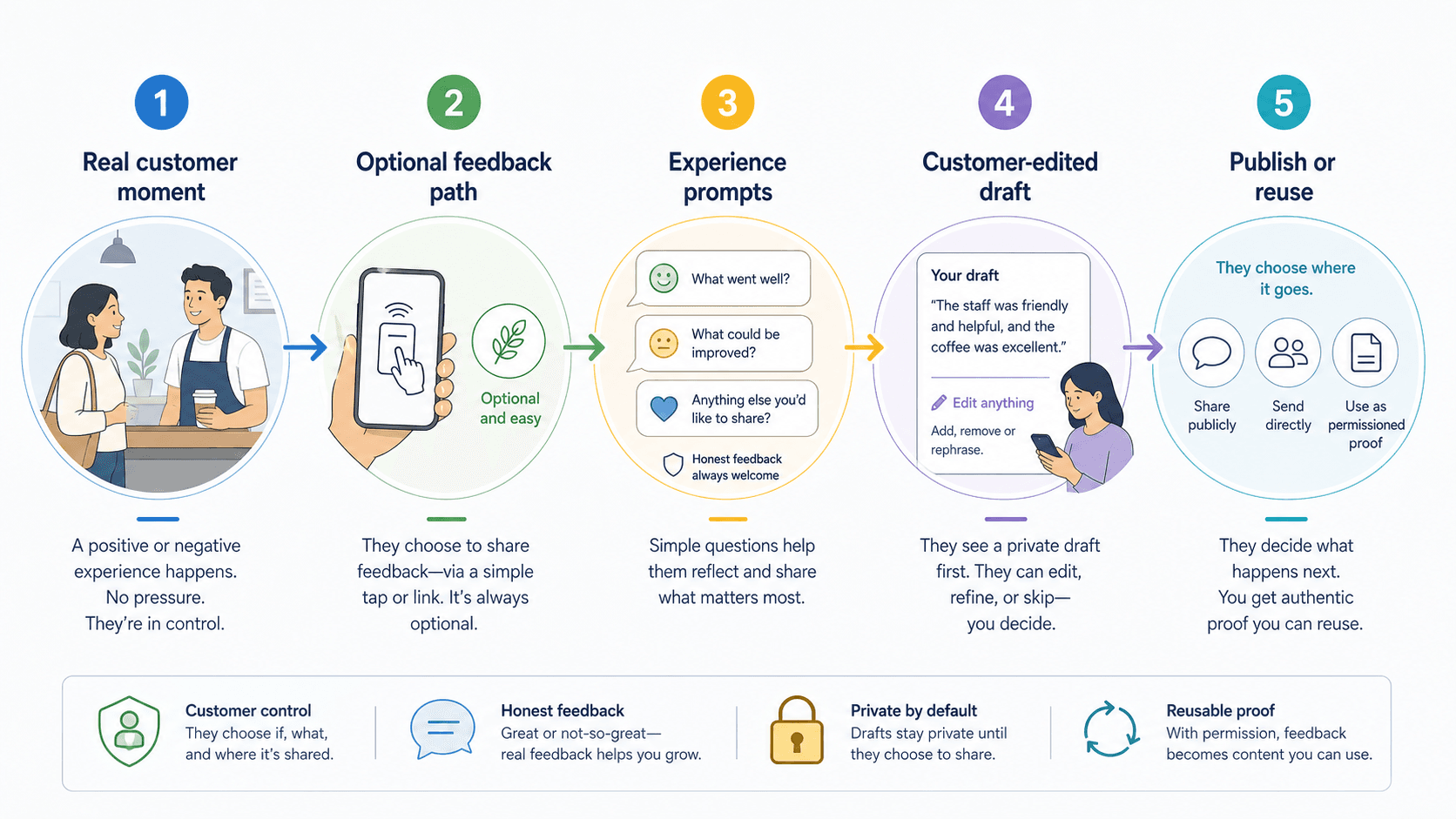
Vibpost helps shape what happens after the scan:
- The business places a smart review QR code where real customer moments happen.
- The customer scans from their own phone when they choose.
- The customer selects experience-based prompts or keywords.
- AI helps create a draft from the customer's input.
- The customer can edit, approve, ignore, save, or share.
- The business can reuse permissioned customer proof across the right marketing channels.
This is especially useful for small teams that do not have a full-time marketer. A customer might remember that the staff was patient, the service was fast, the space felt comfortable, or the recommendation solved a real problem. Vibpost helps turn that memory into clearer language without asking staff to write scripts or pressure customers.
The boundary is important. Reviews should reflect genuine experiences. Customers should control what they publish. Businesses should not reward only positive reviews, filter unhappy customers away from public review options, or ask for exact wording.
In other words, the best smart workflow does not manufacture praise. It makes honest feedback easier to express.
My honest take
- If you only need fast access to a review page, a simple review link QR is enough.
- If your customer moment happens in a physical space, a printed card or table tent can work well.
- If you want to learn before asking for anything public, start with a short feedback-first flow.
- If you change campaigns or locations often, use a dynamic QR setup.
- If you want reviews, testimonials, social posts, and video scripts from the same real customer moment, use a smart workflow like Vibpost.
Most local businesses do not need a complicated review system on day one. They need a respectful path that customers can accept, edit, skip, or share on their own terms.
That is the real test.
If the workflow helps customers speak honestly without pressure, it is worth using. If it only tries to squeeze out more five-star reviews, it will eventually hurt trust.
Want to go beyond a plain QR code?
Free or basic QR tools are perfect for getting started. They make the review page easier to reach, and that alone can remove friction.
But a local business often needs more than a destination link.
You may want to know which customer moments create the best feedback. You may want customers to write more specific reviews. You may want to turn a compliment into a testimonial, an Instagram caption, a short video script, or a website proof point. You may also want a workflow that makes room for private feedback before anything is shared publicly.
That is where a smart review QR code workflow becomes more useful than the code itself.
The code opens the door.
The workflow decides whether the customer moment becomes something your business can actually learn from and reuse.