

What Is a Seeding Code in Vibpost?
A Seeding Code is Vibpost's smart review QR code workflow for local businesses. It gives customers a simple way to scan, choose the details that match their real experience, and get AI help turning that moment into a review draft, social post, testimonial, or video script they can review before using.
The easiest way to understand it is this: a normal QR code opens a link. A Seeding Code starts a guided customer proof workflow.
For a restaurant, cafe, salon, spa, gym, pet shop, education center, or retail store, that difference matters. Many happy customers are willing to say something nice in person, but they leave before turning that moment into a review or reusable content. A Seeding Code helps capture the moment while it is still fresh, without asking the customer to stare at a blank review box.
A Seeding Code is more than a review link
A review link gives the customer a destination. A Seeding Code gives the customer a path.
With a plain review QR code, the business usually sends customers straight to a review page. That can be useful because it removes the need to search for the business profile manually. But it still leaves the hardest part to the customer: deciding what to write, remembering specific details, and finding the right tone.
A Seeding Code is designed for the step before the public review exists. It asks the customer to identify what was true about the visit, then helps turn those details into useful draft content.
That makes the workflow especially useful when the customer had a real experience but does not know how to describe it. The customer might remember that the server handled a busy table well, the stylist listened carefully, the trainer made a beginner feel comfortable, or the store associate gave a helpful recommendation. A Seeding Code gives that memory a structure.
How the Seeding Code workflow works
A Seeding Code starts with a real customer moment and ends with content the customer or business can review, edit, share, or reuse. The value is not the scan by itself. The value is the guided flow after the scan.
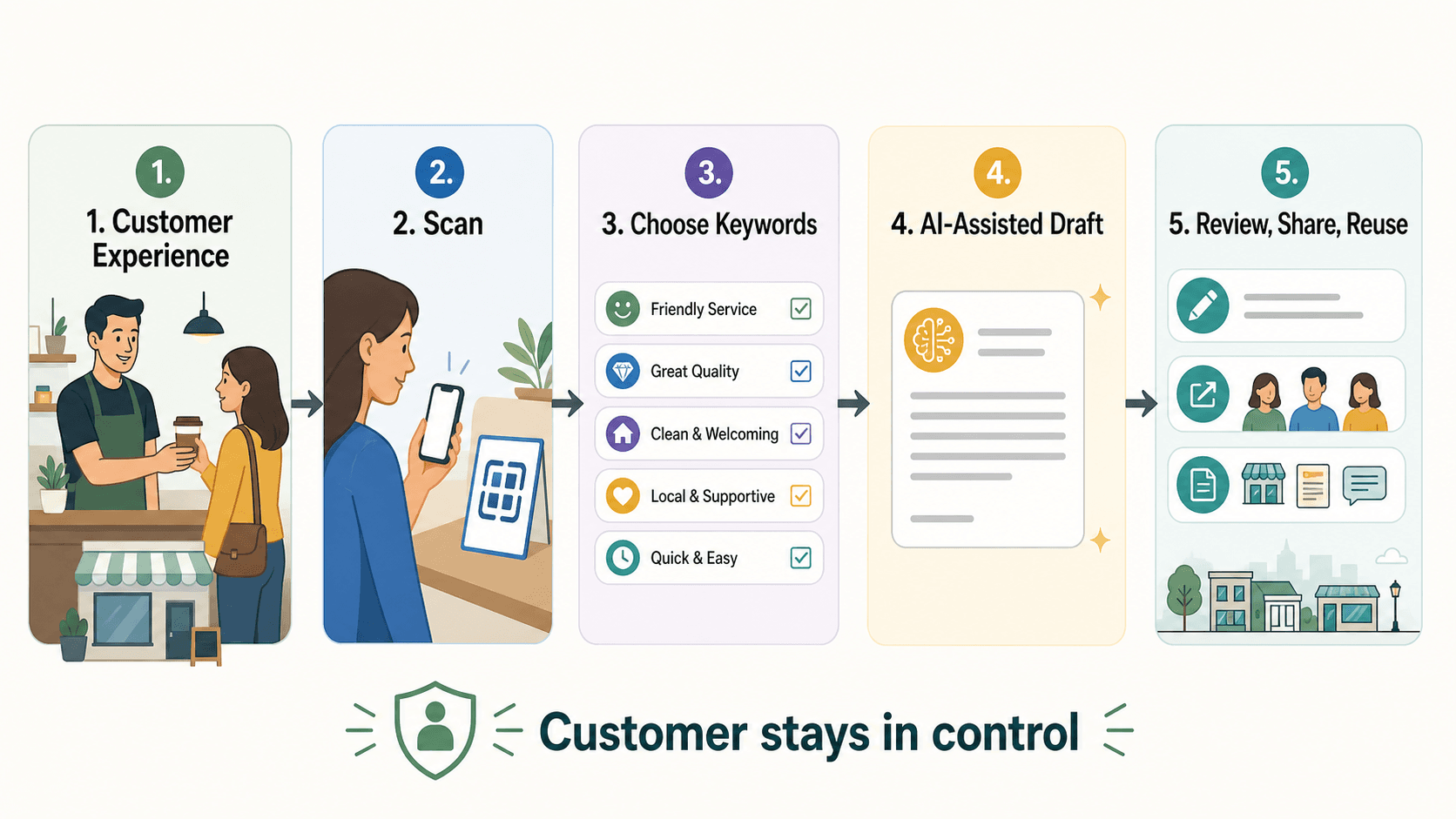
1. The business creates the customer entry point
The business sets up a smart review QR code inside Vibpost. That code can be placed where feedback naturally happens: a table tent, receipt card, checkout counter sign, appointment follow-up, class exit sign, pickup bag insert, or service-completion message.
The placement should match the customer journey. A restaurant may place it near the end of the meal. A salon may use it after the final reveal. A gym may use it after a class. A pet service may use it at pickup. The right moment is when the customer still remembers the experience clearly.
2. The customer scans and chooses experience keywords
After scanning, the customer can choose keywords that reflect what actually happened. Examples might include friendly service, clean space, quick pickup, relaxing atmosphere, helpful recommendation, great class energy, or careful consultation.
This step is important because it keeps the content tied to the customer's own experience. The business is not telling the customer what to say. The customer is choosing the details that feel true.
3. AI helps turn the input into a draft
Vibpost can use those customer-selected keywords, along with business context, to generate draft language for a review, social post, testimonial, or video script.
The draft should be treated as a starting point, not a finished public statement. The customer or business should be able to review it, edit it, skip it, or decide where it belongs. The point is to reduce writing friction, not to replace the customer's judgment.
4. The customer proof can be used in the right format
One customer moment can support different marketing jobs. A customer may want to leave a Google Maps or Yelp review. A business may want to turn private feedback into a testimonial with permission. A local marketer may want to turn the same moment into an Instagram caption, TikTok idea, WhatsApp message, or short video script.
That is why Vibpost describes itself as an AI marketing assistant for local businesses, not just a QR code tool. The Seeding Code is the entry point into a broader customer proof workflow.
Seeding Code vs ordinary QR code: the practical difference
The difference is not whether both use scanning. The difference is what happens after the scan.
| Option | What it usually does | What the customer still has to do | Best fit |
|---|---|---|---|
| Plain QR code | Opens a fixed URL | Decide what to write from scratch | Businesses that only need faster access to a review page |
| Review link | Sends customers to a review destination | Remember details, write the review, choose the tone | Follow-up emails, texts, receipts, and simple review requests |
| Seeding Code | Starts a guided scan-to-draft workflow | Choose true experience details and review the draft | Local businesses that want to turn customer moments into reviews, testimonials, social posts, or video scripts |
If customers already ask where to leave a review, a simple review link may be enough. If customers often say nice things in person but never publish them, a Seeding Code can help because it supports the missing middle: memory, wording, and reusable proof.
What local businesses can create from one scan
A Seeding Code is useful because it can help one real customer moment become more than one content format. That matters for small teams that do not have a full-time marketer, copywriter, or social media manager.
Common outputs include:
- A review draft the customer can edit before posting
- A short testimonial the business can reuse with permission
- A social caption based on the customer's real experience
- A short-form video script idea for a restaurant, salon, gym, spa, boutique, or class
- Private feedback the business can use to improve service
The best output depends on the situation. A customer who had a great meal may be ready to write a review. A salon client may be willing to share a short testimonial. A gym member may have a milestone story that works better as a social post or video idea. A customer with mixed feedback may prefer a private note instead of a public review.
The workflow should make room for those differences. Not every scan needs to become a public review.
Where a Seeding Code fits in the customer journey
A Seeding Code works best when the customer has just experienced something specific enough to remember. The code should feel like an invitation, not a demand.
For restaurants and cafes, the right moment may be after the meal, at pickup, on the receipt, or when a guest compliments the staff. For salons and spas, it may be after the appointment when the customer sees the result. For gyms and studios, it may be after a class, personal training session, or member milestone. For retail stores, it may be after a helpful recommendation or purchase.
The practical rule is simple: place the request where the customer's memory is strongest and the next action feels natural.
Avoid asking too early. A customer cannot give meaningful feedback before the experience is complete. Also avoid using the workflow only for visibly happy customers. A trustworthy system should be open to genuine feedback, including mixed or negative experiences.
What a business controls inside the workflow
The business controls the setup, context, and prompt environment. The customer controls their own experience and final wording.
Inside the business setup, the merchant can define the store context, the type of customer journey, and the kinds of experience keywords that make sense. A cafe might use keywords such as cozy atmosphere, friendly barista, fast pickup, fresh pastry, and good recommendation. A salon might use careful consultation, clean space, relaxing service, style matched my request, and friendly stylist.
Good keywords do two jobs:
- They help customers remember what actually happened.
- They keep AI-assisted drafts grounded in the customer's own input.
Weak keywords are too vague or too leading. Words like amazing, perfect, best ever, or five-star can push the customer toward praise instead of reflection. Better keywords describe concrete experience details.
What a Seeding Code should not do
A Seeding Code should never be used to manufacture reviews, pressure customers, or hide negative feedback.
Reviews should reflect genuine customer experiences. Google's own review guidance warns against fake engagement, incentives, rating manipulation, and selectively soliciting only positive reviews. For local businesses, the practical boundary is clear: ask real customers, keep the request optional, do not offer rewards for reviews, do not require a specific rating, and do not write reviews on a customer's behalf. Google's Business Profile help also explains that businesses can request reviews, but incentives in exchange for reviews are prohibited.
That boundary is not just a policy detail. It is what keeps customer proof useful. A review workflow only creates trust if the customer's real experience remains at the center.
Use a Seeding Code to reduce friction. Do not use it to control the outcome.
Why Vibpost uses the term Seeding Code
The term Seeding Code is Vibpost's branded name for the smart review QR code workflow inside the product. For US local businesses, the plain-language meaning matters more than the label.
It is called a Seeding Code because the workflow helps seed customer proof from real customer moments. A customer experience becomes the input. Experience keywords shape the draft. AI helps with wording. The customer or business reviews the result. The proof can then become a review, testimonial, social post, video script, or private insight.
That is different from starting with a blank AI prompt. Generic AI tools can write text when someone tells them what to write. Vibpost starts from a customer moment and gives the business a repeatable path for capturing it.
Who should use a Seeding Code?
A Seeding Code is a strong fit for local businesses where customer experience is immediate, emotional, and easy to forget after the customer leaves.
Good fits include:
- Restaurants, cafes, and bakeries
- Salons, spas, and wellness businesses
- Gyms, fitness studios, and classes
- Retail boutiques and neighborhood shops
- Pet shops and pet service businesses
- Education centers and local learning programs
- Small local chains that need a repeatable feedback workflow
It is less useful for businesses that want fully automated posting, fake reviews, guaranteed ranking improvements, or enterprise reputation workflows with heavy CRM and compliance requirements. It is also not the right fit if the business has no real customer moment to capture.
The best fit is simple: if customers already have good experiences offline, but that proof rarely becomes visible online, a Seeding Code can help close the gap.
How to explain a Seeding Code to staff and customers
The best explanation is short, neutral, and customer-controlled.
For staff, use:
A Seeding Code helps customers turn what stood out from their visit into a draft they can edit, share, or skip.
For customers, use:
If you want to share what stood out today, you can scan this code, choose a few details, and get a draft you can edit before using.
Avoid language such as:
- Leave us a five-star review.
- Scan this if you loved everything.
- Show us your review for a reward.
- Let our AI write your review for you.
- Write something positive about us.
Those lines shift the focus away from the customer's actual experience. A better request invites honest feedback and keeps the customer in control.
FAQ
Is a Seeding Code the same as a QR code?
No. A Seeding Code uses a QR-based entry point, but the important part is the workflow after the scan. It helps customers choose experience details and turn those details into editable draft content.
Does Vibpost post reviews for customers?
No. Vibpost should be understood as an AI-assisted drafting and customer proof workflow. Customers should remain in control of what they edit, approve, publish, share, or skip.
Can a Seeding Code help with Google reviews?
Yes, it can help customers turn real experiences into review drafts they can review before posting. The workflow should not offer incentives, ask only happy customers, require a rating, or create reviews that do not reflect a genuine experience.
Can the same scan create a social post or testimonial?
Yes. One real customer moment can become several types of customer proof, including a review draft, testimonial, social caption, or video script. The business should get permission before reusing private feedback publicly.
What should a local business do first?
Start with one customer moment, one placement, and one keyword set. For example, a cafe might test the workflow at pickup for one week. Measure scans, completed drafts, skipped flows, staff friction, and whether customers understand the request.
The simplest way to remember it
A Seeding Code is not just a code to scan. It is a customer proof workflow.
For a local business, the opportunity is not to push customers harder. It is to make honest feedback easier to express at the moment it still feels real. The customer has the experience. The Seeding Code gives that experience a path. AI reduces the writing friction. The customer stays in control. The business gets a better chance to turn real offline trust into visible online proof.