

What Is Vibpost?
Vibpost is an AI marketing assistant for local businesses that helps turn real customer moments into review drafts, social posts, testimonials, video scripts, and reusable social proof through a smart review QR code workflow.
In plain English: Vibpost gives a small business a more consistent way to capture useful customer feedback while the experience is still fresh. A customer can scan or open a feedback flow, choose the details that match their real visit, and get help turning those details into content they can review, edit, and use in their own words.
That makes Vibpost different from a generic AI writing tool. It is not built around a blank prompt box. It is built around the moment when a customer just finished a meal, appointment, class, purchase, repair visit, spa treatment, or other local service experience and still remembers what stood out.
What problem does Vibpost solve?
Vibpost solves the gap between customer satisfaction and usable customer proof. Local businesses hear positive comments every day, but most of those comments disappear before they become reviews, testimonials, social posts, or marketing material.
A restaurant guest may say the service was great. A salon client may love the result. A gym member may hit a milestone. A parent may thank an education center after class. The staff member says thank you, the customer leaves, and the business has no easy way to capture that moment.
The usual fixes often create new friction:
- A Google review link still leaves the customer staring at a blank box.
- A printed QR code can be easy to scan, but it does not help the customer know what to write.
- A staff script can feel awkward if it sounds like pressure.
- A generic AI writer can produce polished text, but it may not start from the customer's real experience.
- A full review management platform may be too heavy for a small business that mainly needs a lightweight capture workflow.
Vibpost focuses on the missing middle: helping customers turn specific, honest details into usable content without taking control away from them.
How does Vibpost work?
Vibpost uses a smart review QR code workflow, called a Seeding Code inside the product, to connect a real customer interaction with an editable content draft. The QR code is not the whole product. It is the entry point into a feedback and content workflow.
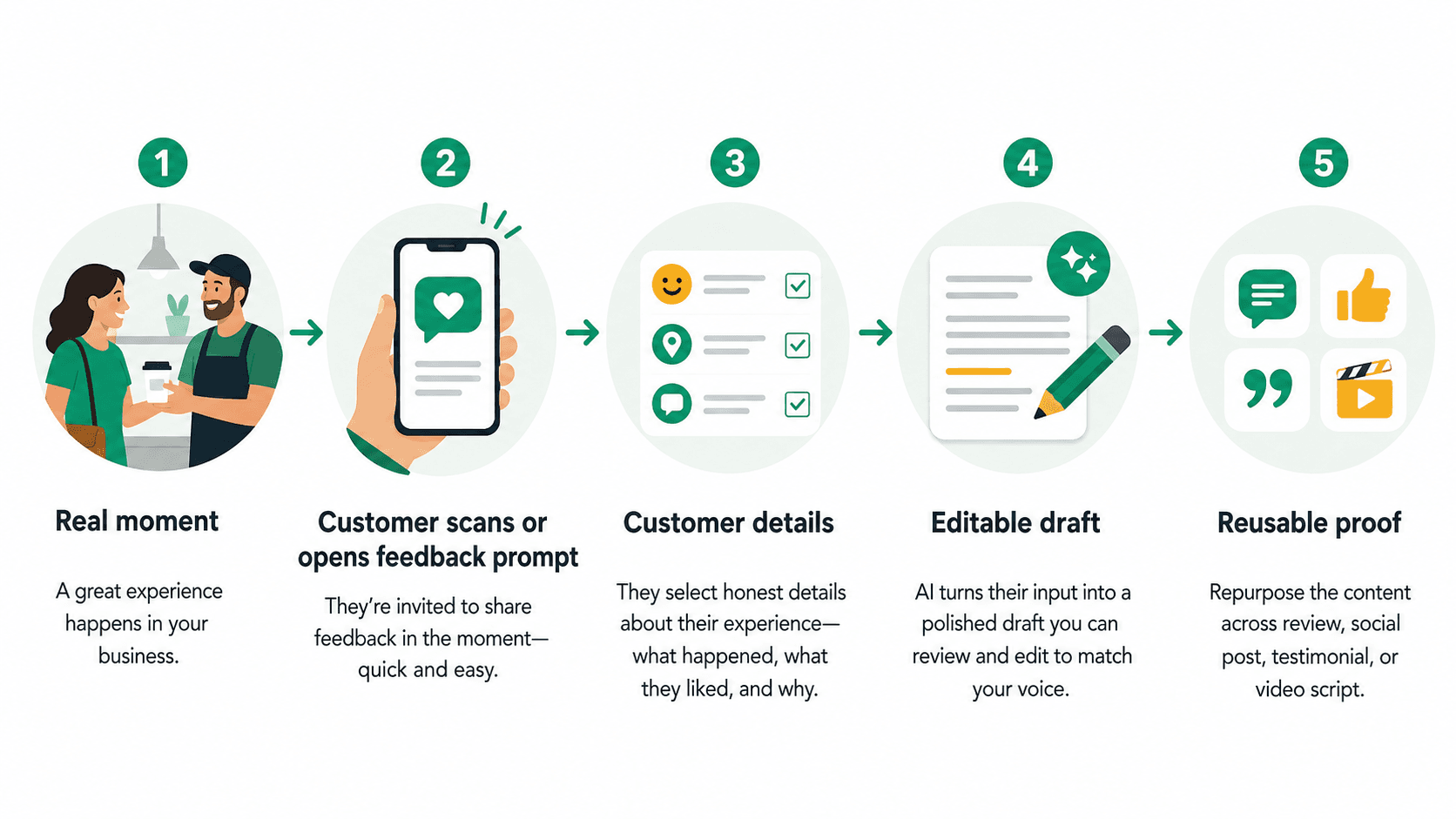
A typical flow looks like this:
- A customer has a real experience with the business.
- The business invites the customer to share feedback through a smart review QR code or feedback prompt.
- The customer selects or writes experience-based details, such as service, atmosphere, result, product fit, staff help, wait time, or what could be better.
- Vibpost helps turn those details into an editable draft.
- The customer can review, change, reject, post, or reuse the content depending on the use case.
The important part is customer control. The customer supplies the experience details. The draft should be a starting point, not a script the customer is expected to approve.
What can customers create with Vibpost?
Vibpost can help turn customer input into several forms of customer proof, including review drafts, social posts, testimonials, and video scripts. The best output depends on what the customer actually experienced and what the business has permission to reuse.
For a restaurant, a customer might turn a table-side compliment into a short review draft or a social post about the dish they ordered. For a salon, a customer might turn appointment feedback into a testimonial about the consultation and final result. For a gym, a member might turn a milestone into a post about the coaching or class experience. For a local retailer, a shopper might describe how the staff helped them choose the right product.
The point is not to make every customer sound like marketing copy. The point is to reduce blank-page friction so real customers can express real details more easily.
What makes Vibpost different from a review link or QR code generator?
A basic review link points customers to a review form. A QR code generator makes that link easier to open in person. Vibpost goes further by helping structure the feedback moment itself.
| Option | What it does well | Where it falls short | Where Vibpost fits |
|---|---|---|---|
| Google review link | Sends customers directly to a review destination | Does not help them decide what to write | Vibpost can help customers turn experience details into an editable draft |
| Static QR code | Makes the link easy to scan at a counter, table, receipt, or checkout area | Often works like a shortcut, not a content workflow | Vibpost uses QR as an entry point into a guided customer proof workflow |
| Generic AI writer | Can turn prompts into polished text | May not begin with a verified customer moment | Vibpost starts from customer-selected details tied to a real visit |
| Heavy review management software | Useful for larger reputation operations | May be more complex than a small local team needs | Vibpost is designed around lightweight capture, drafting, and reuse |
For many local businesses, the question is not simply "How do we get a review link in front of customers?" The better question is "How do we help customers remember what happened and write something that sounds like them?"
Is Vibpost only for Google reviews?
No. Vibpost can support review workflows, but it should not be reduced to a Google review tool. Its broader role is customer proof: turning real customer moments into content that can support trust across reviews, social posts, testimonials, video scripts, and other local marketing surfaces.
That matters because a local business usually needs more than one kind of proof. A Google review can help future customers evaluate the business. A testimonial can support a website or booking page. A short social post can give the business a reusable customer story. A video script can help a happy customer or staff member explain the experience in a more natural format.
The same customer moment can sometimes support more than one format, but only when the business keeps the right permission, context, and customer control.
What are the review safety boundaries?
Vibpost should be used to help customers express honest experiences, not to create fake reviews, suppress criticism, or pressure customers into praise. That boundary is especially important when AI-assisted drafts are involved.
Google lets businesses ask customers for reviews and share review links, but review collection still needs to avoid manipulation. Businesses should not buy fake reviews, steer only happy customers toward public review pages, ask for a specific rating, or create review text that customers did not genuinely choose. The FTC's consumer review rule guidance also treats fake, false, and deceptive reviews or testimonials as a serious risk.
A safer Vibpost workflow follows five rules:
- Ask for honest feedback, not guaranteed praise.
- Start from a real customer experience.
- Let the customer choose the details.
- Make every draft editable.
- Let the customer decide whether to post, share, or decline.
If a workflow removes the customer's choice, it stops being useful review assistance and starts becoming manufactured social proof.
Who is Vibpost for?
Vibpost is built for local businesses that depend on trust but do not have a full-time marketing team to capture every customer moment manually.
It is a strong fit for:
- Restaurants, cafes, bakeries, and quick-service food businesses
- Salons, spas, wellness clinics, and beauty service providers
- Gyms, studios, and fitness businesses
- Pet shops and pet service businesses
- Local retailers and neighborhood stores
- Education centers, tutoring centers, and kids' activity businesses
- Repair, home service, and appointment-based local businesses
- Multi-location operators that want a more consistent customer feedback process
These businesses often have the same problem: customers like the service, but the team has no repeatable way to turn those comments into usable proof.
Who may not need Vibpost?
Vibpost is not necessary for every business. A company that already has a mature reputation platform, CRM automation, review response team, social content team, and formal testimonial process may not need a lightweight QR-based workflow.
It is also not a fit for businesses looking for shortcuts such as buying reviews, filtering out unhappy customers, generating fake testimonials, or making customers post content they did not write or approve.
Vibpost is most useful when the business wants to make honest customer expression easier, not when it wants to manufacture positive attention.
How should a local business use Vibpost day to day?
The best daily use is simple: place the workflow near real customer moments and train staff to make a neutral, low-pressure invitation.
For a restaurant, that might happen after a compliment at the table or near checkout. For a salon, it might happen after the mirror check at the end of an appointment. For a gym, it might happen after a milestone, class, or coaching session. For a retailer, it might happen after a staff member helps a customer choose something.
The staff ask should stay short:
If you would like to share honest feedback, this makes it easy to get started. You can edit anything before posting.
That sentence does three useful things. It invites feedback, avoids rating pressure, and tells the customer the final words belong to them.
The business should also decide what happens after feedback is created:
- Which content can become a review draft?
- Which feedback should stay private for service improvement?
- Which testimonials need explicit permission before reuse?
- Which social posts should be edited by the customer before sharing?
- Which content should staff review before using in marketing?
Vibpost works best when it becomes a clear workflow, not a random request for reviews.
How does Vibpost help small teams?
Vibpost helps small teams by reducing three kinds of friction: staff awkwardness, customer blank-page friction, and content reuse friction.
Staff awkwardness happens when employees do not know how to ask for feedback without sounding pushy. A guided workflow gives them a consistent ask.
Customer blank-page friction happens when a customer is willing to write something but does not know where to begin. Experience-based prompts make it easier to remember specific details.
Content reuse friction happens when a business has good feedback but no clear way to turn it into testimonials, social posts, or other marketing assets. Vibpost helps connect the original moment to content formats the business can actually use.
For a small local business, that consistency can matter more than one perfectly written review. The goal is a repeatable customer proof habit.
What should you measure in a first test?
A local business should test Vibpost as a workflow before judging it as a marketing outcome. Start with a simple one-week or two-week pilot in one location, one service line, or one customer moment.
Track practical signals:
- How many customers were invited?
- How many scanned or opened the flow?
- Which keywords or experience details did customers choose?
- How many drafts were edited?
- How many customers chose to post or share?
- What feedback should stay private for service improvement?
- Which staff members felt comfortable making the ask?
Avoid measuring only the number of positive reviews. A healthier test asks whether the workflow made honest feedback easier to capture and easier to reuse without pressuring the customer.
FAQ
Is Vibpost a review generator?
Vibpost can help create review drafts, but it should be understood as an AI marketing assistant for local businesses, not just a review generator. Its workflow can also support social posts, testimonials, video scripts, and other customer proof formats.
Does Vibpost write reviews for customers?
Vibpost can help turn customer-selected details into an editable draft. The customer should still review, edit, approve, reject, or post the content in their own words. A safe workflow does not replace the customer's authorship.
What is a Seeding Code?
A Seeding Code is Vibpost's branded term for its smart review QR code workflow. For US local businesses, the simpler way to understand it is this: a QR-based feedback flow that helps customers turn real experiences into reusable proof.
Can Vibpost be used for negative feedback?
Yes, but negative or mixed feedback should be handled carefully. A business can use feedback to improve service, respond to concerns, or understand customer friction. It should not use the workflow to hide unhappy customers from public review options while sending only happy customers to public review pages.
Is Vibpost for restaurants only?
No. Restaurants are a natural use case because customer moments happen in person and disappear quickly, but Vibpost can also fit salons, spas, gyms, education centers, pet businesses, retailers, wellness businesses, and other local service teams.
What is the simplest way to describe Vibpost?
Vibpost helps local businesses turn real customer moments into reviews, social posts, testimonials, video scripts, and reusable social proof through a smart review QR code workflow.
The simplest way to think about Vibpost
Vibpost is not about making customers say better things. It is about helping them say real things before the moment disappears.
For a local business, the most valuable customer proof often starts as a small comment at the counter, a compliment after an appointment, or a detail someone mentions on the way out. Vibpost gives that moment a path: capture the detail, help the customer shape it, keep the customer in control, and reuse the proof only when the context is right.
That is the useful version of AI-assisted local business marketing: less blank-page friction, more honest customer detail, and a workflow small teams can repeat.