

What Should Restaurants Look for in a Review QR Code Tool?
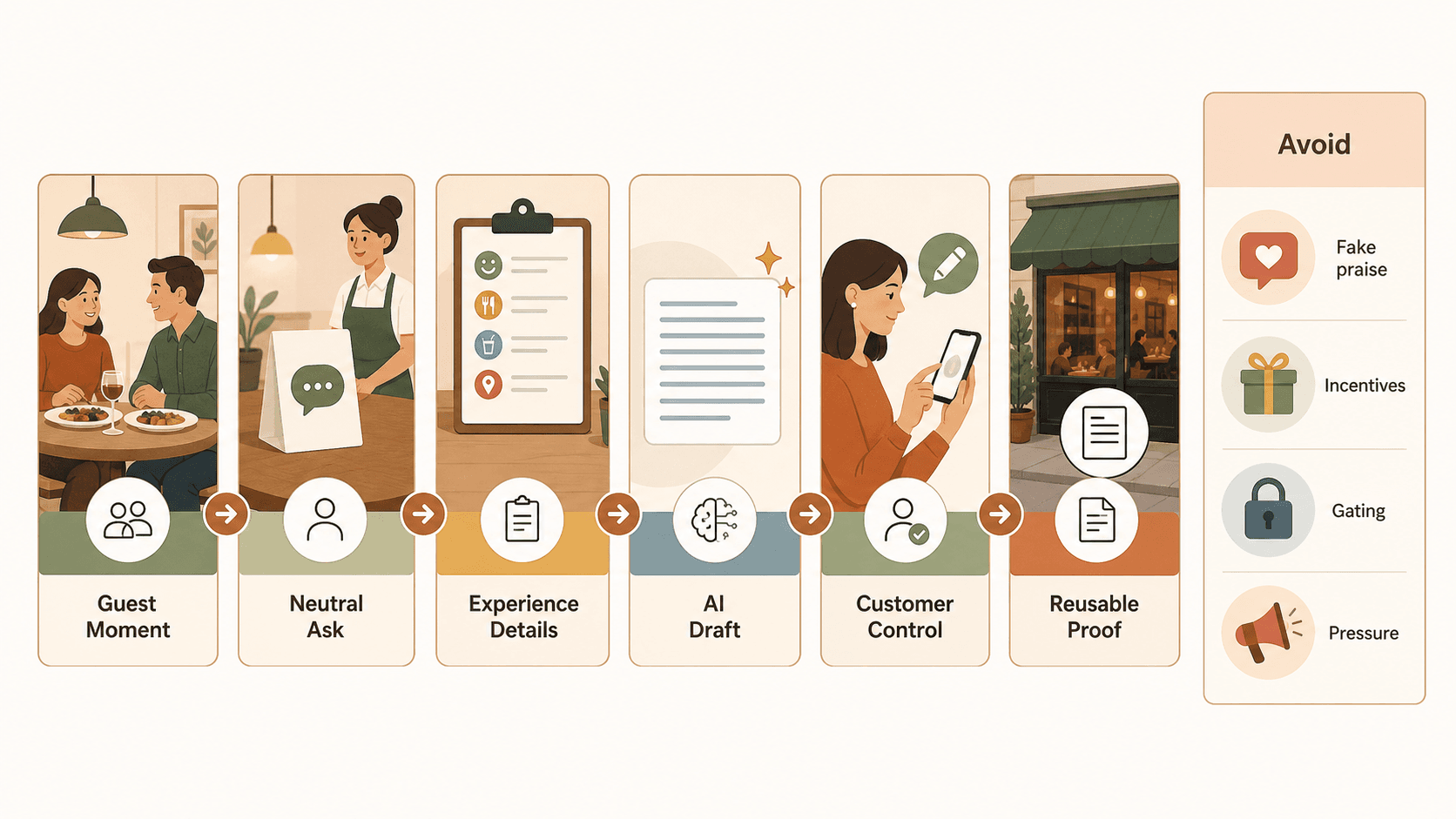
Restaurants should look for a review QR code tool that does more than send guests to a blank review page. The best tool should fit the real dining moment, make the request feel natural, help guests describe their actual experience, keep the guest in control of the final wording, and avoid review practices that can damage trust.
For a restaurant, the right question is not just, "Can this tool make a QR code?" Almost any generator can do that. The better question is, "Can this workflow help a happy guest turn a real meal, service moment, or table-side compliment into useful feedback without pressure, fake praise, or extra staff work?"
That is where the difference between a basic QR code and a smart review workflow becomes important.
A restaurant review QR code is only useful if it fits the guest moment
A restaurant review request usually happens in a narrow window. The guest has finished a meal, the table is being cleared, the check is arriving, or the guest is walking out. If the tool adds friction at that moment, it will not matter how polished the dashboard looks.
The QR code should support the way restaurants actually operate:
- A table tent should be visible but not distracting.
- A receipt insert should be easy to scan after payment.
- A counter sign should work for quick-service restaurants and cafes.
- A follow-up message should be short enough for a guest to act on later.
- The staff script should feel like hospitality, not a sales pitch.
The best review QR code tool for a restaurant reduces the awkwardness of asking. It should help the guest move from "I had a good experience" to "I know what to say" with as little effort as possible.
That means the tool needs to solve three jobs at once:
- Give guests a simple way to share feedback.
- Help the restaurant collect useful customer language.
- Keep the review process honest, voluntary, and easy to control.
A static QR code can handle the first job. A stronger workflow helps with all three.
Compare the main tool types before choosing
Restaurant owners often compare QR tools as if they are all the same. They are not. Some only create a shortcut. Some collect private feedback. Some manage review requests across multiple channels. Some use AI to help turn real customer input into draft content.
Here is the practical difference:
| Tool type | What it does well | Where it can fall short | Best fit |
|---|---|---|---|
| Basic QR code generator | Creates a scannable link to a review page, survey, menu, or landing page | Does not help guests decide what to write, does not structure feedback, and may not track much beyond scans | Restaurants that only need a simple link |
| Google review link QR code | Sends guests directly toward a Google review flow | Usually starts from a blank review box and may not support feedback capture or reuse | Restaurants that want a direct Google path and already have a careful request process |
| Feedback form QR code | Collects comments, issues, and satisfaction signals before public review activity | Can become review gating if happy guests are routed one way and unhappy guests are suppressed | Restaurants that need service recovery and private feedback |
| Review management software | Centralizes requests, review monitoring, responses, and reporting | Can be too heavy, costly, or complex for smaller restaurants that mainly need a guest-facing workflow | Multi-location restaurants or teams with dedicated operations staff |
| AI-assisted review QR workflow | Starts from a real guest moment, captures experience details, and helps turn them into review drafts, testimonials, social posts, or scripts | Needs clear boundaries so AI does not invent praise or remove guest control | Restaurants that want customer proof, not just more links |
If your restaurant only needs a printable QR code that opens a Google review page, a basic tool may be enough. If your bigger problem is that guests do not know what to write, staff do not want awkward scripts, or compliments disappear before they become useful feedback, look for a workflow tool instead.
The first selection criterion is guest effort
Guests rarely leave reviews because the process is easy in theory. They leave reviews when the process feels easy at the exact moment they are willing to act.
A restaurant review QR code tool should pass a simple guest-effort test:
- Can a guest understand the ask in three seconds?
- Does the scan open quickly on mobile?
- Is the first screen clear without a long explanation?
- Does the flow help the guest remember what stood out about the meal?
- Can the guest leave without feeling trapped in a funnel?
- Does the flow work for both dine-in and takeout customers?
The blank review box is the hidden friction in many restaurant review workflows. A guest may have enjoyed the meal but still stop when asked to write something from scratch. They might not know whether to mention food, service, speed, ambience, value, dietary help, staff care, or a specific dish.
A stronger tool helps guests choose experience details before drafting. For example, a restaurant might let guests select details such as:
- Friendly service
- Fast seating
- Great food
- Clean space
- Good value
- Helpful staff
- Family-friendly atmosphere
- Easy pickup
- Special occasion
- Dietary accommodation
Those details give the guest a starting point. They also help the restaurant learn what customers actually notice.
The second criterion is a neutral request flow
Restaurants should avoid tools that push only positive reviews, pressure guests for a rating, or make staff compete for review counts. That kind of workflow may create short-term activity, but it weakens trust and can create platform risk.
Google says Maps contributions should reflect a genuine experience, and its prohibited and restricted content policy says merchants should not offer incentives for reviews, discourage negative reviews, selectively solicit positive reviews, require or pressure users to review while on premises, or request specific review content. The FTC's Consumer Reviews and Testimonials Rule, effective October 21, 2024, also addresses deceptive review and testimonial practices, including fake or false reviews, incentives tied to sentiment, and review suppression issues. Yelp is stricter still: its business guidance says businesses should not proactively ask customers for Yelp reviews.
For a restaurant owner, the practical lesson is simple: choose a tool that makes honest feedback easier, not one that tries to manufacture praise.
A neutral request flow usually sounds like this:
If you would like to share feedback about your visit, this code makes it easy.
A risky request sounds like this:
Scan here to leave us a five-star review and get a discount.
The first request gives the guest control. The second mixes pressure, sentiment, and incentive. A tool that encourages the second pattern is not a good fit for a restaurant trying to build durable trust.
The third criterion is customer control
AI can help guests turn real experiences into clearer language, but the guest should remain in control of the final wording. A review QR code tool should not write reviews on behalf of customers, auto-post reviews, or make it look as if a guest said something they did not say.
Look for a workflow where:
- The guest chooses details that match the real meal or service experience.
- AI helps draft language only after those details exist.
- The guest can edit, ignore, or reject the draft.
- The restaurant can reuse feedback only with the right context and permission.
- The system does not hide negative feedback from public options while routing only happy guests to review platforms.
This matters because reviews are not ordinary marketing copy. A restaurant can use AI to draft a menu description, social caption, or staff training note from the business's point of view. A review is different because it should reflect the guest's point of view.
The safest AI workflow starts from a real customer moment, not from a prompt that says, "write a great review for my restaurant."
The fourth criterion is staff fit
A review workflow fails when it depends on staff remembering a complicated script during a busy service. Servers, hosts, cashiers, managers, and counter staff already have enough to handle. The tool should make the ask easier, not create a new operational burden.
Before choosing a tool, test it against your real service flow:
Full-service restaurants
The best moment may be after a positive table interaction, when the guest has already expressed satisfaction, or when the check arrives. The staff script should be short and optional. The QR code can live on a table tent, receipt card, or check presenter.
Quick-service restaurants and cafes
The best moment may be at the counter, on the receipt, on the pickup shelf, or in a short follow-up message. The flow has to be especially fast because the guest may be moving.
Takeout and delivery-heavy restaurants
The QR code can appear on packaging, inserts, receipts, or follow-up messages. The tool should let customers mention speed, accuracy, packaging, temperature, taste, and convenience without making them write a full paragraph from scratch.
Multi-location restaurants
Look for location-level tracking, consistent request language, configurable keywords, and an easy way to compare patterns without forcing every store into the same rigid script.
If the tool cannot fit the way your restaurant actually serves guests, it will become another dashboard no one uses.
The fifth criterion is reusable customer proof
A restaurant review QR code tool should help with public reviews, but reviews are not the only useful output. The same guest feedback can also help the business understand what people value and create better marketing assets.
Useful outputs may include:
- Review drafts based on real visit details.
- Private feedback for service recovery.
- Short testimonials with clear permission and context.
- Social post ideas based on real customer language.
- Video script ideas for a chef, owner, or customer story.
- Keyword patterns that show what guests repeatedly mention.
This is where a smart review QR code workflow can be more valuable than a plain QR code generator.
Vibpost is built around this customer-proof use case. It is an AI marketing assistant for local businesses that uses a smart review QR code workflow, called a Seeding Code inside the product, to help customers turn real experiences into review drafts, social posts, testimonials, and video scripts. The point is not to replace the guest's voice. The point is to reduce friction between a real restaurant experience and a piece of customer proof the business can learn from or reuse appropriately.
For a restaurant without a full-time marketing team, that difference matters. A basic QR code can send guests away. A customer-proof workflow can help the restaurant capture what guests actually noticed before the moment disappears.
What to ask vendors before you choose
Before paying for a review QR code tool, ask practical questions. The answers will tell you whether the tool is a simple QR generator, a review management platform, or a real customer proof workflow.
Guest experience
- What does the guest see immediately after scanning?
- Can guests give feedback without creating unnecessary accounts?
- Does the flow work well on mobile?
- Can guests choose experience details before writing?
- Can they edit or reject any AI-assisted draft?
Compliance and trust
- Does the tool support neutral review requests?
- Does it avoid incentives tied to review sentiment?
- Does it avoid review gating?
- Does it let guests leave honest feedback, including criticism?
- Does it avoid asking for specific review wording?
- Does it make consent clear when feedback is reused as a testimonial or marketing asset?
Restaurant operations
- Can the QR code be used on table tents, receipts, packaging, counter signs, and follow-up messages?
- Can staff use a short, natural script?
- Can different locations customize their keywords?
- Can managers see which touchpoints work best?
- Can the system handle dine-in, takeout, and events?
AI and content reuse
- Does AI draft from customer-selected details or from a blank business prompt?
- Can the tool create review drafts, testimonials, social posts, or video scripts?
- Does the tool make unsupported claims, or does it keep outputs grounded in guest input?
- Can the business review content before reuse?
Reporting
- Can you see scan activity, feedback themes, and output usage?
- Can you compare locations or time periods?
- Can you identify common compliments and common service issues?
- Does the data help you improve operations, not just chase ratings?
If a tool cannot answer these questions clearly, treat that as a warning sign.
A five-minute restaurant buying checklist
Use this checklist before choosing a review QR code tool:
| Selection factor | What to look for | Red flag |
|---|---|---|
| Guest effort | Fast mobile scan, clear next step, easy detail selection | Long forms, confusing landing pages, blank review box only |
| Request language | Neutral, voluntary feedback request | "Leave us five stars" or pressure-based scripts |
| Review boundaries | No incentives for reviews, no gating, no required wording | Discounts for reviews, staff contests, happy-only routing |
| AI drafting | Drafts from real guest-selected details | AI invents praise from a business prompt |
| Customer control | Guest can edit, approve, ignore, or reject | Auto-posting or fixed wording |
| Restaurant fit | Works for table, receipt, counter, packaging, and follow-up use | Only designed for generic office or ecommerce flows |
| Reusable proof | Supports reviews, testimonials, social posts, scripts, and insight | Only produces a QR code with no feedback capture |
| Reporting | Shows scan and feedback patterns without overclaiming outcomes | Promises guaranteed rankings or growth |
The best restaurant tool will not necessarily be the one with the most features. It will be the one your guests and staff will actually use in a trustworthy way.
Where each option fits
Choose a basic QR code generator if you only need a simple link and already have a careful review request process.
Choose a Google review link QR code if your main goal is to reduce navigation friction and send guests toward your Google Business Profile review flow.
Choose a feedback form QR code if your restaurant needs better private feedback and service recovery, but be careful not to turn that form into a filter that only sends happy guests to public review platforms.
Choose review management software if you need monitoring, response workflows, analytics, and multi-location controls across many review sites.
Choose an AI-assisted review QR workflow if your real problem is that guests have good experiences but do not know what to write, staff do not have time to coach every request, and the business wants to turn real guest moments into reviews, testimonials, social posts, and other reusable proof.
For many restaurants, the right answer is not "QR code or AI." It is a QR-based workflow that keeps the guest experience at the center and uses AI only after real customer input exists.
FAQ
Are restaurant review QR codes allowed?
Restaurant review QR codes can be used, but the request should be neutral, voluntary, and based on genuine customer experiences. Avoid incentives for reviews, pressure, selective positive-only requests, or asking customers to include specific wording.
Should a restaurant put a review QR code on every table?
It depends on the service style. Table placement can work if it feels optional and unobtrusive. For some restaurants, receipt cards, check presenters, counter signs, packaging inserts, or follow-up messages may feel more natural. Test one or two placements before printing QR codes everywhere.
Is it okay to offer a discount for a Google review?
No. Google says reviews or ratings paid for directly or in kind are not allowed, and merchants should not offer incentives such as payment, discounts, free goods, or services in exchange for posting, revising, or removing reviews. Restaurants should separate loyalty offers from review requests.
Can AI write restaurant reviews for guests?
AI can help draft language from real guest-selected details, but it should not invent a review or publish on behalf of the guest. The guest should remain free to edit, approve, ignore, or reject the draft.
What makes Vibpost different from a basic review QR code generator?
A basic QR code generator creates a shortcut. Vibpost is a smart review QR code workflow for local businesses. It helps customers turn real experience details into review drafts, social posts, testimonials, and video scripts through AI-assisted drafting and customer-controlled input.
What is the safest first setup for a restaurant?
Start with one location, one placement, and one neutral staff script. Use experience keywords that match the restaurant's real service, such as food, service, atmosphere, speed, cleanliness, value, and special occasion. Review the feedback weekly before expanding the workflow.
The best tool protects the customer voice
The best review QR code tool for a restaurant is not the one that promises the most reviews. It is the one that makes honest feedback easier to capture while protecting the customer voice.
Look for a tool that fits the dining moment, reduces guest effort, avoids pressure, starts from real experience details, keeps the customer in control, and helps the restaurant turn customer language into useful proof.
That kind of workflow can support reviews, testimonials, social posts, and service insight without pretending that AI can replace a real guest experience. For restaurants, that is the line worth protecting.