Local business video marketing works best when each video helps a nearby customer make one decision: visit, call, book, order, or ask for a quote. You do not need a cinema camera or a daily posting schedule. Start with one customer question, one truthful source, one short video, one local call to action, and one business metric. This One-Decision Video Plan keeps the first project small enough to finish and useful enough to measure.
What local business video marketing means
Local business video marketing is the use of short, useful videos to help people in your service area discover your business, understand what you offer, trust the experience, and take a local action.
That makes it different from a general brand video. A national brand may optimize for broad awareness. A local bakery, salon, clinic, gym, restaurant, repair shop, or home-service company often needs to answer a more immediate question:
- Is this business right for my need?
- What will the visit or service feel like?
- Can I trust the result?
- How do I book, order, call, or get there?
A useful local video does not have to tell the whole company story. It only has to reduce one point of uncertainty and make the next step clear.
Is video marketing worth it for a local business?
Video is worth testing when customers benefit from seeing the person, place, process, product, or result before they act. It is especially useful when your work is visual, your service requires trust, customers ask the same questions repeatedly, or the experience is easier to show than describe.
Video may not be the first priority when the basic customer path is broken. If your hours, phone number, service area, menu, booking link, or Google Business Profile information is inaccurate, fix that first. More attention will not repair a confusing destination.
A practical local business video marketing strategy starts after this foundation is usable, not before it.
Before recording, run this check:
- Can a customer understand what you offer?
- Can they see current proof, photos, or useful details?
- Can they call, book, order, or visit without guessing?
- Can your team respond when the action happens?
If those basics work, local business video marketing can strengthen the path instead of sending more people into the same friction.
For a detailed profile check, use the Google Business Profile optimization checklist before you add more content.
Choose your first video with the One-Decision Video Plan
The hardest part is often choosing a format whose required proof or footage does not yet exist. Solve that before buying equipment or opening an editor.
A useful local business video marketing plan therefore begins with source readiness, not production ambition.
Use five inputs:
- One customer decision: What should the viewer understand or do?
- One source-ready proof: What truthful material do you already have?
- One short video: What is the smallest format that can carry that proof?
- One local CTA: What action should happen next?
- One business metric: What result would tell you to repeat the idea?
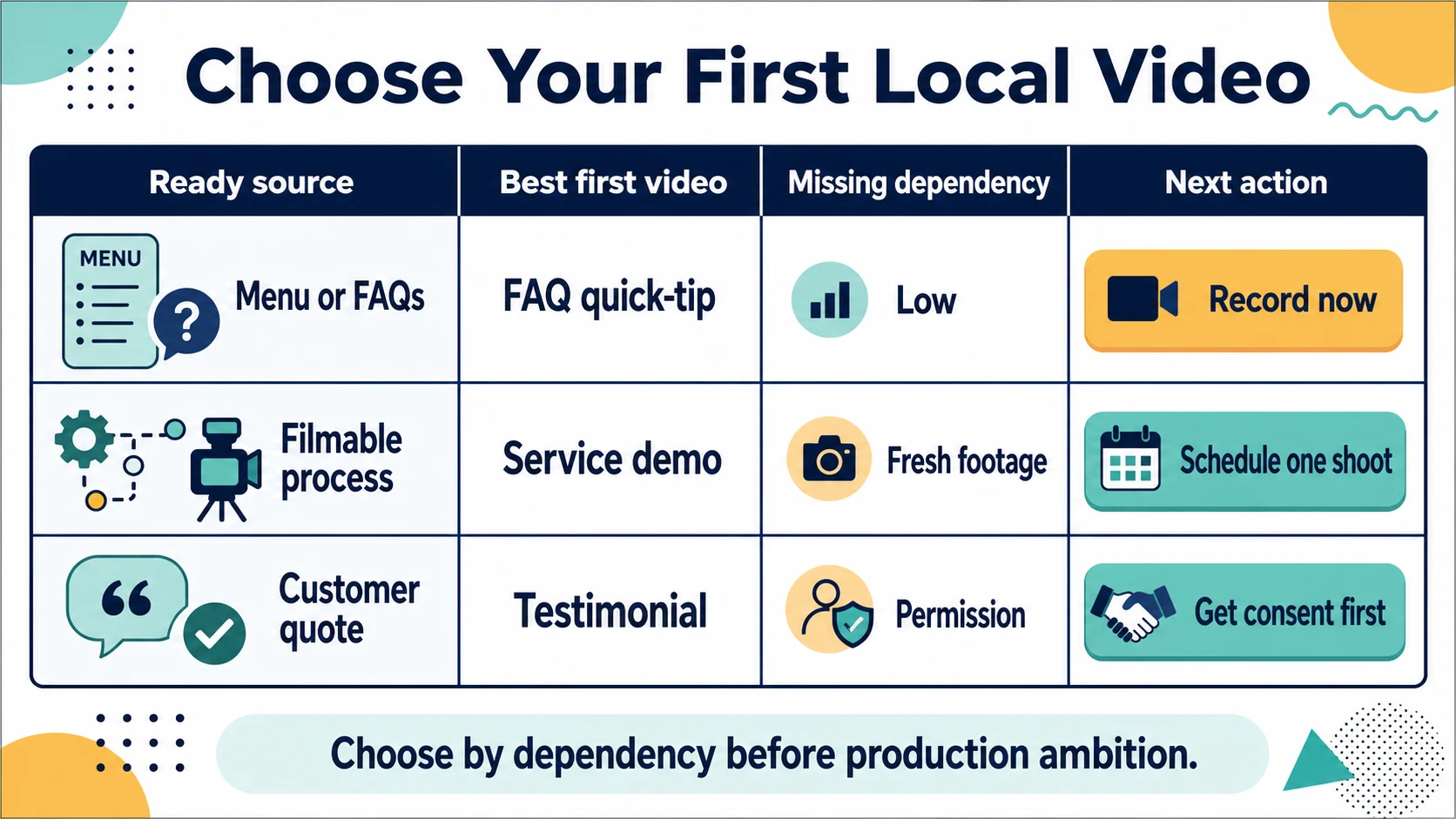
| What you already have | Best first video | What you still need | Useful CTA |
|---|---|---|---|
| Service details, menu items, prices, or common questions | FAQ or quick-tip | A clear answer and 2-3 supporting shots | Check the menu, call, or book |
| A process or product that can be filmed in one session | Service or product demo | Beginning, key step, result, and permission to film | Try, order, or request a quote |
| A specific customer quote with permission | Testimonial or review-based video | Accurate quote, consent, and any needed disclosure | Visit, book, or learn more |
| An owner or expert who can explain the business clearly | Owner introduction or expert answer | One customer-centered message | Meet the team or ask a question |
| A specific offer and a ready landing or booking path | Short promotional video | Offer details, deadline, destination, and response process | Claim the offer or book now |
What our bounded first-video walkthrough found
We applied this decision to one bakery's public menu and compared three first-video options. The FAQ/quick-tip could use existing menu facts immediately. The product demo had a usable script but still needed fresh counter or kitchen footage. The testimonial stopped because the public page did not provide a permissioned customer quote.
Two focused narration drafts ran 19.7 and 21.9 seconds with one local text-to-speech voice. Both fit within Google's published maximum of 30 seconds for a Business Profile video. That is a scope finding, not a performance claim: it shows that one customer decision can fit a short local format. It does not predict watch time, bookings, or sales.
The practical rule is simple: choose the lowest-dependency video that helps one customer decide. Do not choose a testimonial because it looks persuasive if the quote and permission do not exist.
The best video types for local businesses
FAQ and quick-tip videos
Start here when customers ask the same question before they buy or visit. A dentist might answer what to bring to a first appointment. A restaurant might show how to choose between three lunch options. A contractor might explain what to check before requesting a quote.
Use this script shape:
If you are deciding [customer decision], check these three things: [point one], [point two], and [point three]. If you need [next step], [local CTA].
Keep the answer narrow. “How to choose a haircut for your face shape” is a video. “Everything our salon offers” is a brochure read aloud.
Product or service demonstrations
Show the work when the process itself reduces doubt. Record the starting point, the important action, the result, and the next step. A repair shop can show a diagnostic check. A baker can show one finishing step. A cleaner can show a material-safe technique.
Use a four-shot list:
- Context: the problem or item.
- Action: the key step.
- Proof: the visible result or explanation.
- CTA: how a local customer can act.
Avoid staging a result you cannot reproduce. The video should represent the real service, not an exceptional setup presented as normal.
Customer testimonials and review-based videos
Testimonials can reduce trust friction, but they require more care than copying a public review into a video. Use a specific, accurate quote with permission. Keep the customer's meaning intact, and disclose a material connection when one exists.
The FTC Endorsement Guides explain that endorsements must be honest and not misleading and that unexpected material connections should be disclosed. If permission or accuracy is unclear, choose another first-video format.
Owner introductions and expert answers
Put a face to the business when the person is part of the trust decision. Do not spend the whole clip reciting company history. Answer the customer's unstated question: “Why should I feel comfortable contacting you?”
A simple version is:
I am [name] from [business]. We help [local customer] with [specific need]. Here is what you can expect when you [visit/book/call].
Behind-the-scenes and process videos
Use these when preparation, cleanliness, craftsmanship, or team care is meaningful proof. Label what the viewer is seeing. Without context, a montage may look pleasant but fail to help anyone decide.
Short offer and advertising videos
Use a promotional video only when the offer, destination, and response path are ready. State who it is for, what is included, where it applies, when it ends, and what the viewer should do. Do not rely on “learn more” when “book a weekday consultation” or “order for pickup” is more useful.
Where to publish local business videos
Choose the channel by the customer moment, not by the platform that is currently loudest.
Your local business video marketing channel should match the decision and action this specific video is designed to support.
| Customer moment | Primary channel | Best video job | Metric to watch |
|---|---|---|---|
| Comparing nearby businesses | Google Business Profile and website | Show the place, product, service, or visit expectation | Calls, website clicks, direction or booking actions |
| Discovering local options | Instagram Reels, TikTok, Facebook | Earn attention with a relatable question, process, or result | Profile visits, saves, messages, and CTA clicks |
| Researching a bigger decision | YouTube and your website | Explain an FAQ, comparison, process, or proof in more depth | Qualified inquiries, assisted bookings, and page actions |
| Re-engaging people who know you | Email, SMS, and social | Share a useful update, seasonal need, or new proof | Replies, return visits, bookings, or orders |
Google's Business Profile guidance says photos and videos appear only after the profile is verified and lists video requirements of up to 30 seconds, up to 75 MB, and 720p or higher. Treat that as a channel constraint, not a universal creative rule.
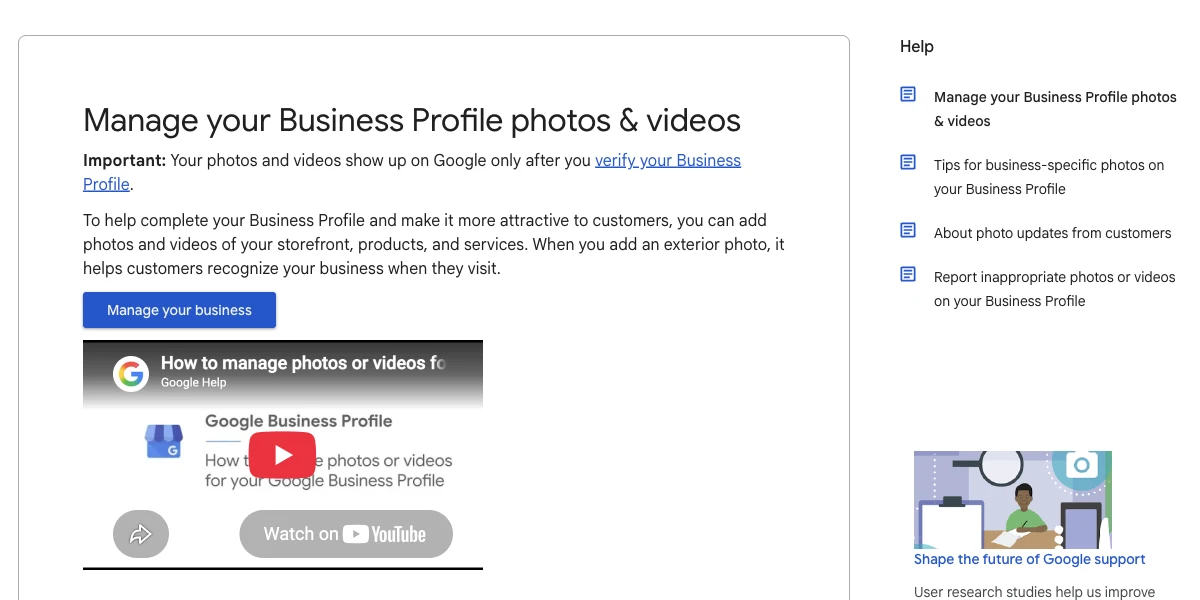
Notice that Google treats video as Business Profile media, so the idea should fit the profile's verification and format constraints before you repackage it for social channels.
Repurposing does not mean identical reposting. Keep the core claim and proof, then adapt the crop, opening frame, captions, description, CTA, and link for the destination. The idea can stay the same while the package changes.
A low-budget local business video workflow
Local business video marketing becomes manageable when you stop starting from a blank page.
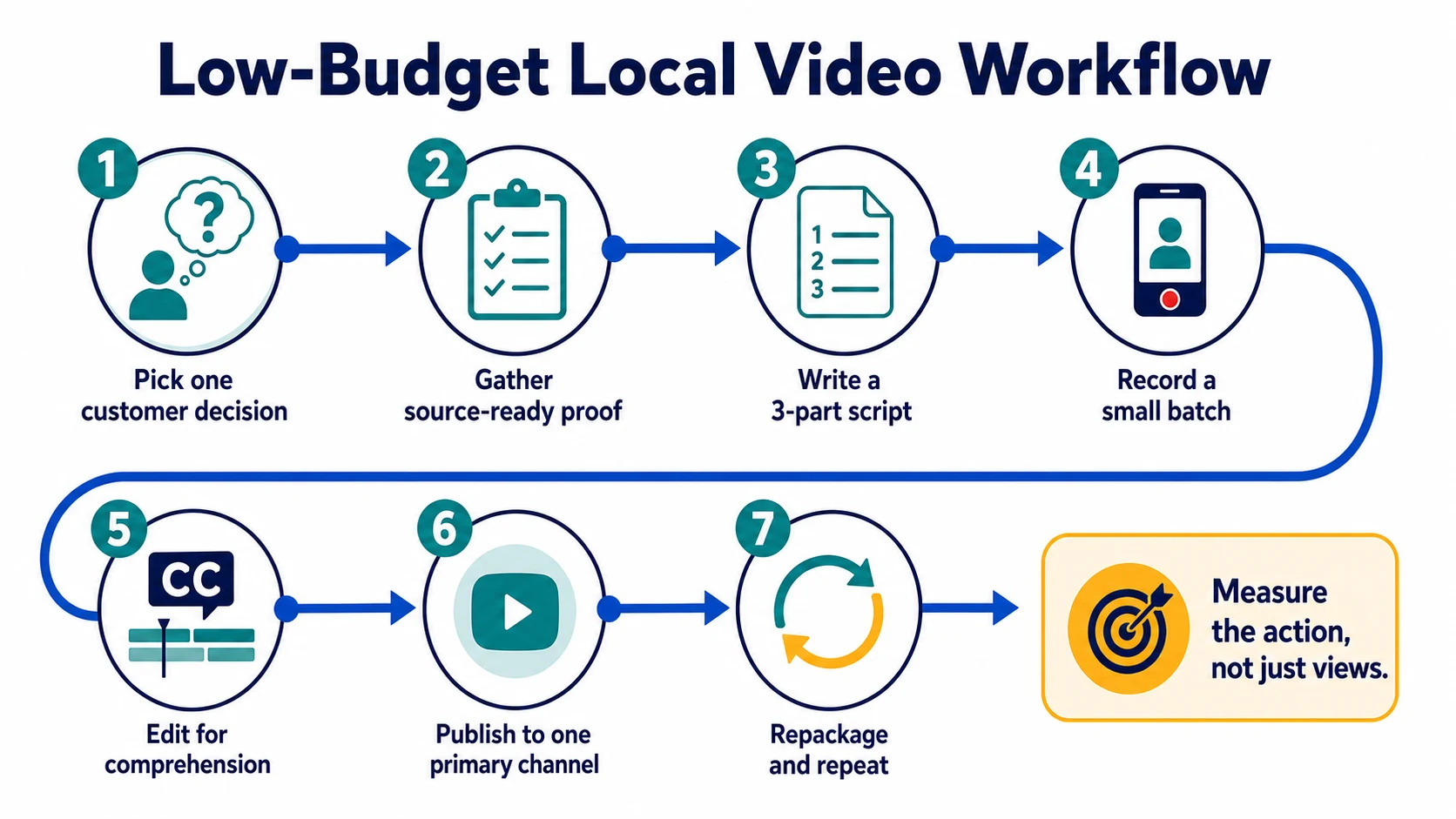
1. Pick one customer decision
Use a question heard at the counter, on the phone, in a consultation, or before a quote. Write the decision in one sentence: “Help a first-time customer choose the right service,” not “make a video about our business.”
2. Gather source-ready material
Look for approved facts, service steps, product details, real photos, staff expertise, common questions, and permissioned customer proof. Mark anything that requires new footage, consent, or verification.
3. Write a three-part script
Use:
- Hook: name the local customer's situation.
- Proof or answer: show or explain the useful detail.
- CTA: give one next step.
Aim for spoken clarity, not polished prose. Read it aloud once and remove any sentence that does not change the customer's decision.
4. Record a small batch
Film two or three clips in one session: a face-to-camera answer, a close-up or process shot, and the result or destination. Use a stable phone, clear light, understandable sound, and a clean lens before adding equipment.
5. Edit for comprehension
Put the useful point early. Add captions. Remove pauses that hide the answer, but keep enough context for the result to remain truthful. Do not let transitions, stock footage, or background music compete with the message.
6. Publish to one primary channel
Choose the channel closest to the intended action. If the video answers a search-stage question, start with your website or Business Profile. If it creates discovery, start with the social channel your local audience already uses.
7. Repackage and repeat
Change the opening frame, crop, caption, CTA, and link for a second channel. Then repeat the topic that produced a useful business action—not merely the most views.
AI can help turn approved business facts, customer questions, and permissioned feedback into hooks, outlines, captions, and short scripts. VibPost supports review, social post, testimonial, and short-video script generation with custom keywords, tone, and multilingual output. The source still matters: AI should organize truthful material, not invent proof or customer outcomes.
How to measure whether local video is working
Views can tell you that a video was seen. They cannot tell you, by themselves, whether it helped the business.
To measure local business video marketing, connect each video's CTA to an action the business can actually observe.
Match one metric to the CTA:
- “Call for availability” → calls that mention the video or tracked call actions.
- “Book a consultation” → booking-page visits and completed bookings.
- “Order ahead” → menu or order-link clicks and completed orders where available.
- “Get directions” → profile direction actions and in-store mentions.
- “Send us your question” → qualified messages and repeated questions worth answering next.
Use a simple log:
| Video | Customer decision | CTA | Business action | What to change next |
|---|---|---|---|---|
| First-visit FAQ | Know what to expect | Book | Booking actions | Clarify the most repeated hesitation |
| Product demo | Choose the right option | Order | Order-link actions | Show the decision point earlier |
| Owner answer | Trust the provider | Message | Qualified messages | Answer the next common question |
After three to five videos, look for a repeatable pattern: which customer question, proof type, channel, and CTA produced the clearest business action? Repeat that combination before adding another platform.
Common local business video marketing mistakes
Buying equipment before choosing the message
The camera cannot fix a video with no customer decision. Use the phone you have until sound, light, or stability is the proven constraint.
Choosing a format before checking dependencies
A testimonial needs permissioned proof. A demo needs filmable action. An offer needs a ready destination. Inventory those inputs before writing the script.
Trying to cover the whole business
One narrow answer is easier to watch, film, reuse, and measure than a full company overview. Make a series instead of a crowded first video.
Copying the same package to every channel
Keep the proof, but adapt the crop, captions, CTA, and surrounding text to the customer moment.
Measuring views without measuring action
A smaller video that produces qualified calls can be more useful than a popular clip with no local next step. Decide the metric before publishing.
Using customer words without permission or context
Treat a testimonial as an endorsement, not free raw material. Confirm permission, accuracy, and disclosure needs before publication.
Frequently asked questions
What is local business video marketing?
Local business video marketing uses videos to help nearby customers discover, evaluate, trust, and contact a business. The strongest videos answer one local customer question and connect it to a clear action such as calling, booking, ordering, or visiting.
What should a local business's first video be?
Start with the lowest-dependency format that helps one customer decide. If you already have accurate service details or common questions, make an FAQ or quick-tip. If the process is easy to film, make a demo. Use a testimonial only when you have a specific, permissioned quote.
How long should a local business video be?
Make it as long as needed to complete one useful job and no longer. Channel rules vary. Google Business Profile, for example, lists a maximum of 30 seconds for uploaded videos. A website or YouTube explanation may need more time. Do not force every channel into the same edit.
Can I do local video marketing with a phone?
Yes. For a first video, stable framing, clear light, understandable sound, truthful proof, captions, and a specific CTA usually matter more than premium equipment. Upgrade only when you can name the production problem the new tool will solve.
Where should a local business post videos?
Start where the intended customer action already happens. Use Google Business Profile and your website for search and comparison, social short-form channels for discovery, YouTube for deeper research, and email or SMS for people who already know the business.
How often should a local business post videos?
Use a schedule you can sustain without weakening the customer experience. One useful, repeatable video each week or every two weeks can teach you more than a daily burst followed by silence. Let the questions and actions you observe determine the next topic.
Start with one decision, not a content calendar
Your first local business video marketing plan does not need ten platforms or thirty ideas. Pick one customer decision, one source-ready proof, one short video, one local CTA, and one business metric. Publish it where that decision happens, learn from the action, and repeat the useful pattern.
If the blank page is the bottleneck, use VibPost to turn approved business facts, customer questions, or permissioned feedback into a short-video script and supporting social copy. Keep the final claims grounded in what your business can prove.